





The cheapest model isn’t always the cheapest way to run an AI application.
A lower-cost model can fail often enough that retries wipe out the saving. Longer context can increase spend even when request volume stays flat. And one user action can trigger several model calls once agents and tools enter the workflow.
Thus, token price alone is a poor measure of AI efficiency.
Instead, pay close attention to how much it costs to produce a successful result. If a change lowers the model bill while increasing failures or manual intervention, you haven’t really made the workflow cheaper.
AI cost management starts from that broader view of spend.
AI cost management starts with the cost of a successful outcome
AI cost management is the discipline of understanding what an AI workload costs, finding the behavior behind that spend, and reducing waste without pushing performance below an acceptable level.
Provider invoices only give you the first part. They tell you that you spent $10,000 on model APIs, not whether the money went into a valuable reasoning workflow or an agent repeatedly retrying work that a cheaper architecture could handle.
That’s why a model call is often the wrong unit of analysis.
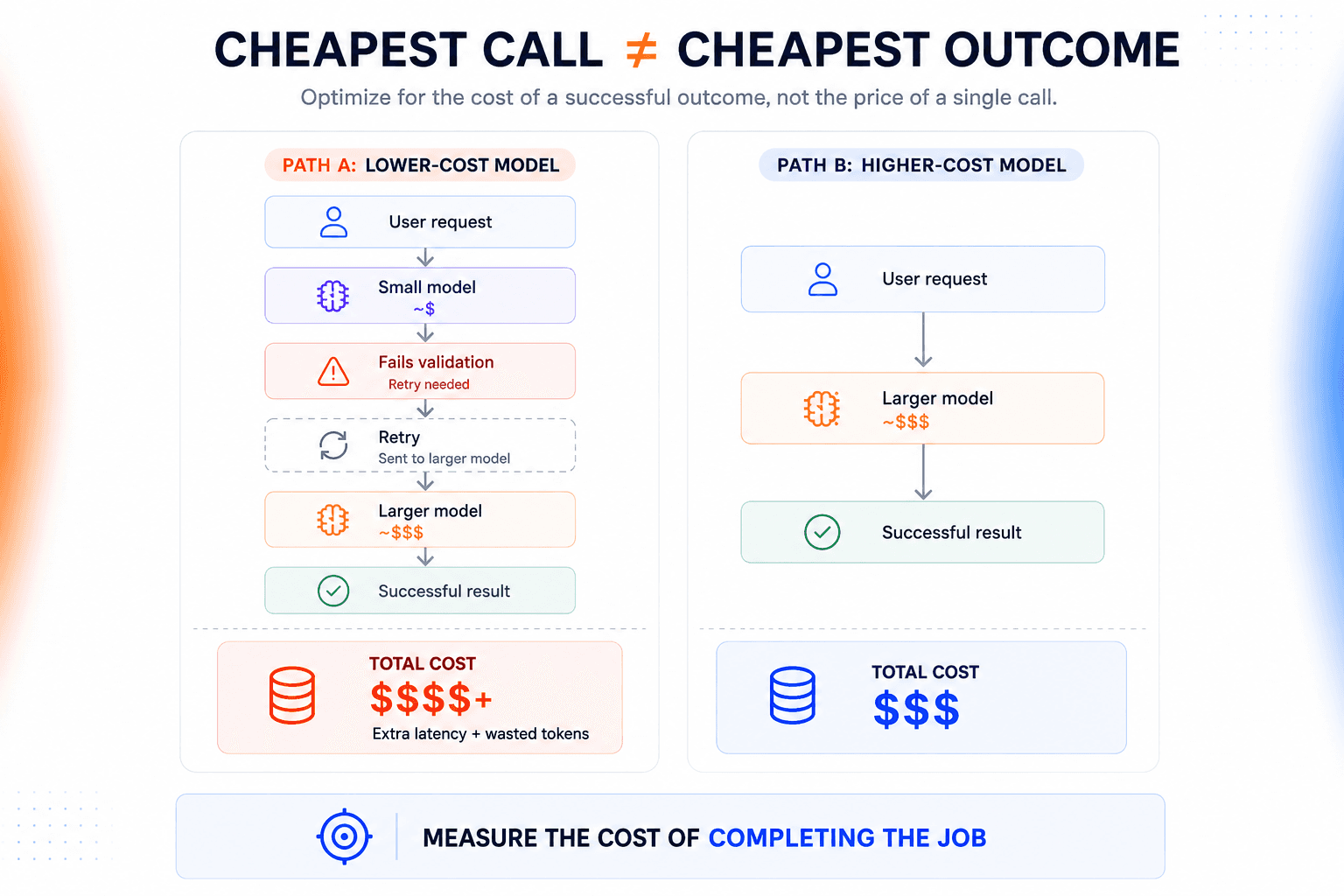
Take an invoice-extraction pipeline. A smaller model looks cheaper per request, so you route extraction traffic to it. Most documents work. Complex layouts don’t, and those failures are retried with a larger model.
Now you’re paying for both calls.
The larger model might’ve been cheaper at the workflow level if it completed the job correctly the first time. The same logic applies to context and fallback chains.
What looks inexpensive in isolation can become expensive once you account for everything required to reach an acceptable result.
The useful number is cost per successful outcome.
Our view is that this is where AI unit economics become meaningful. A cheap request that has to be repaired, retried, or escalated isn’t really cheap.
AI costs change with runtime behavior, not just infrastructure usage
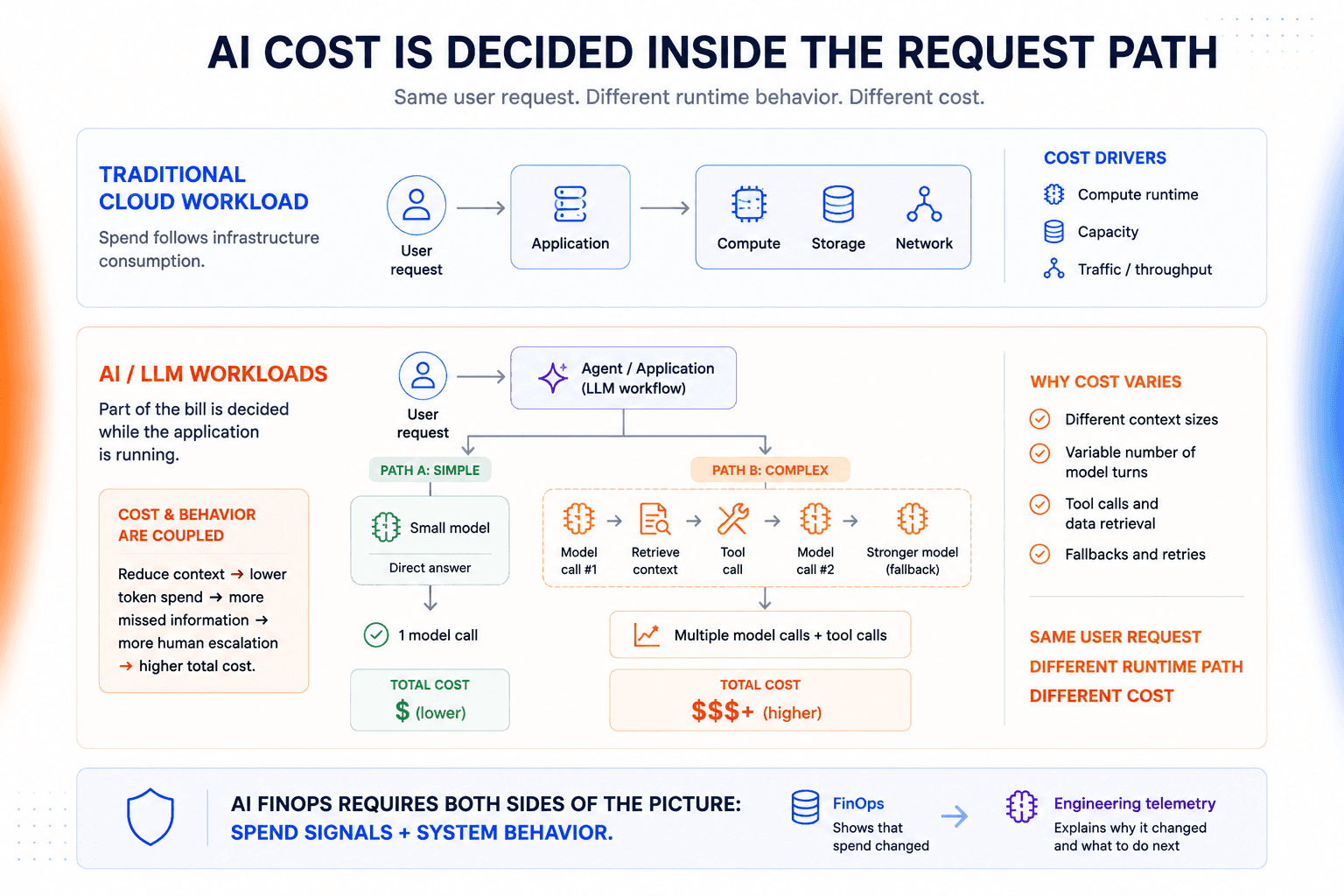
Traditional FinOps is largely built around infrastructure consumption. How much compute you run and how much traffic moves through the system.
LLM workloads behave differently. Part of the bill is decided while the application is running.
Take a customer-support agent. One request might be answered directly by a smaller model. Another might retrieve several documents, call an external tool, and escalate to a stronger model before it can respond. From the user’s perspective, both were one request. Their cost can be very different.
Not to mention there’s another complication: cost and system behavior are coupled.
Removing half the retrieved context might reduce token usage. But if the agent starts missing important details and sends more cases to human review, the saving doesn’t mean much.
This is why AI cost management can’t live entirely inside a FinOps dashboard.
FinOps can show that spend changed. Engineering telemetry has to explain what the application did to cause it, and whether the cheaper version still performs well.
We don’t see cost observability as a finance-only problem. The engineers who can explain the request path are usually the same people who can explain why the bill moved.
Where AI spend actually comes from
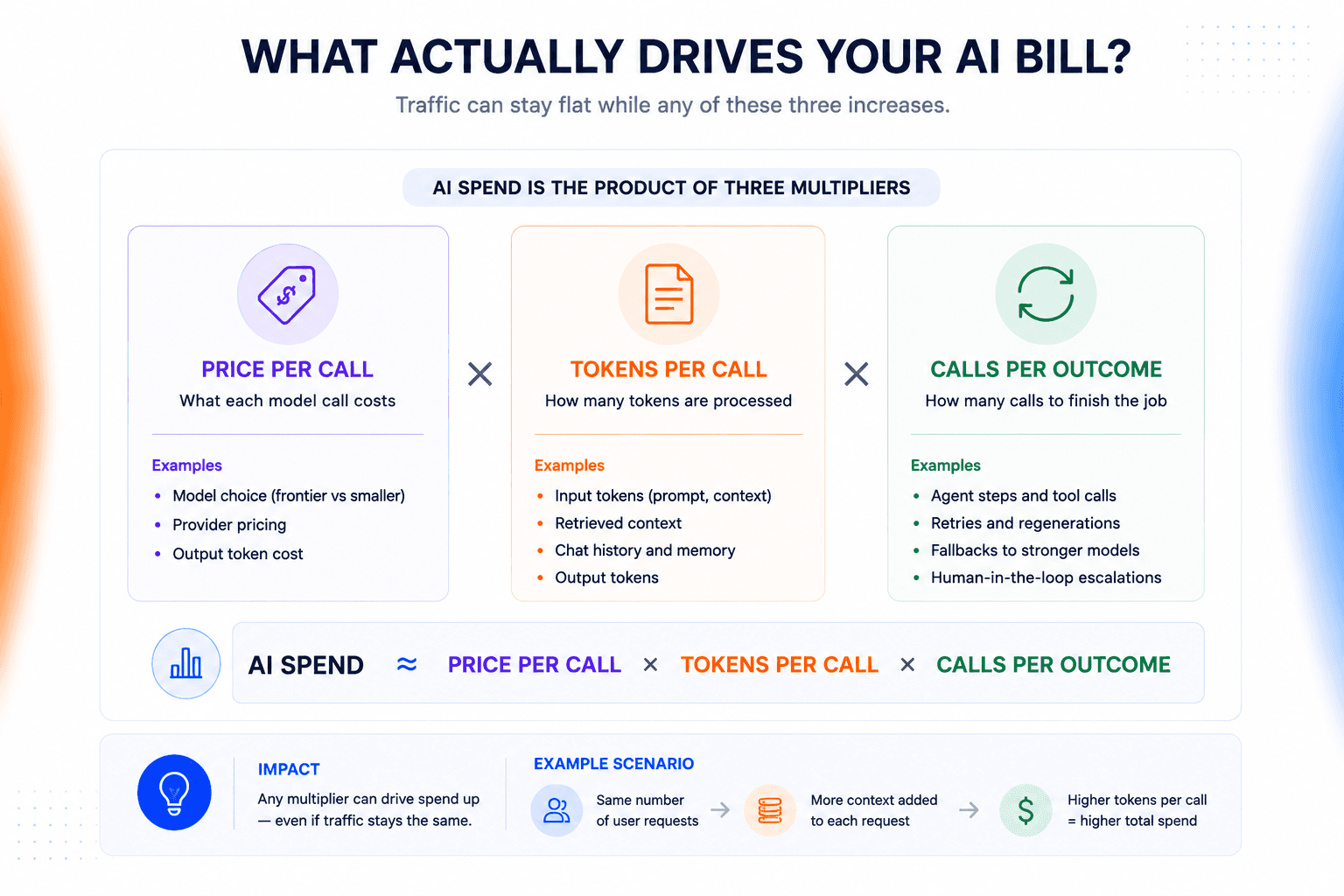
AI spend is mostly a function of three things:
What each model call costs
How many tokens it processes
How many calls it takes to finish the job
That last part is easy to underestimate.
Traffic can stay flat while the bill climbs because the application is doing more work for every request.
Model selection sets the price of each call
The easiest way to overspend is to send every task to your most capable model.
We see teams often standardize on one strong model because it keeps the application architecture simple.
In our experience, that simplicity is useful early on. But it becomes expensive once high-volume routine traffic starts paying the same inference price as the handful of tasks that actually need frontier-model capability.
The trade-off is that mundane work gets priced like hard reasoning. A binary classifier shouldn’t automatically run on the same model you use for a difficult research agent.
Use the lowest-cost model that consistently clears the quality bar for the task.
That bar has to come from your own workload. Public benchmarks won’t tell you whether a model follows your output schema reliably or handles the failure cases that matter in your application.
Context can multiply token usage across a workflow
Input-token growth is easy to miss because it rarely comes from one dramatic change.
A system prompt gains a few instructions. Chat history gets carried forward. Retrieval starts returning six chunks instead of three.
Now consider an agent that resends 12,000 tokens of context across five model turns. That’s 60,000 input tokens before you count a single generated token.
The expensive part is actually repeatedly paying for context as it moves through the workflow.
Retries create a hidden tax on failed work
Retries are easy to miss because the user still sees one request.
An application might regenerate after malformed JSON fails schema validation.
Another workflow could repeat a generation because the first result couldn’t be used downstream.
Either way, you paid for work that never reached the user.
If your cost reporting only looks at completed requests, that retry tax can disappear from the metric you’re using to judge model or routing efficiency.
We think failed work should stay visible in the economics of the successful request. Otherwise you end up rewarding routes that look cheap only because their failures are hidden elsewhere
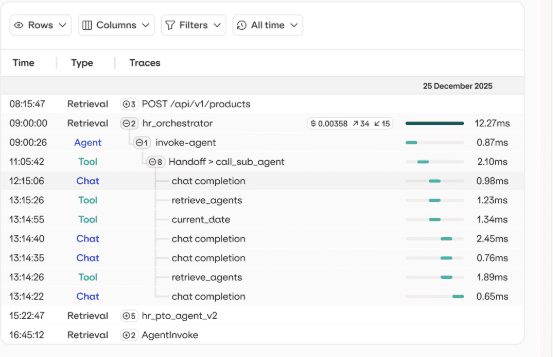
Agents multiply the number of paid steps
Agentic workflows break the one-request, one-call assumption entirely.
A research agent might use one model call to decide what it needs, invoke a tool, then return to the model with the result. If the evidence is incomplete, the loop runs again. What looked like one task from the user’s perspective can become several inference steps behind the scenes.
That changes the unit economics quickly.
A support agent averaging eight model calls per resolved ticket has a very different cost profile from a chatbot that answers in one, even if both use the same underlying model.
Build cost visibility before you optimize
You can’t optimize AI spend reliably until you can trace it.
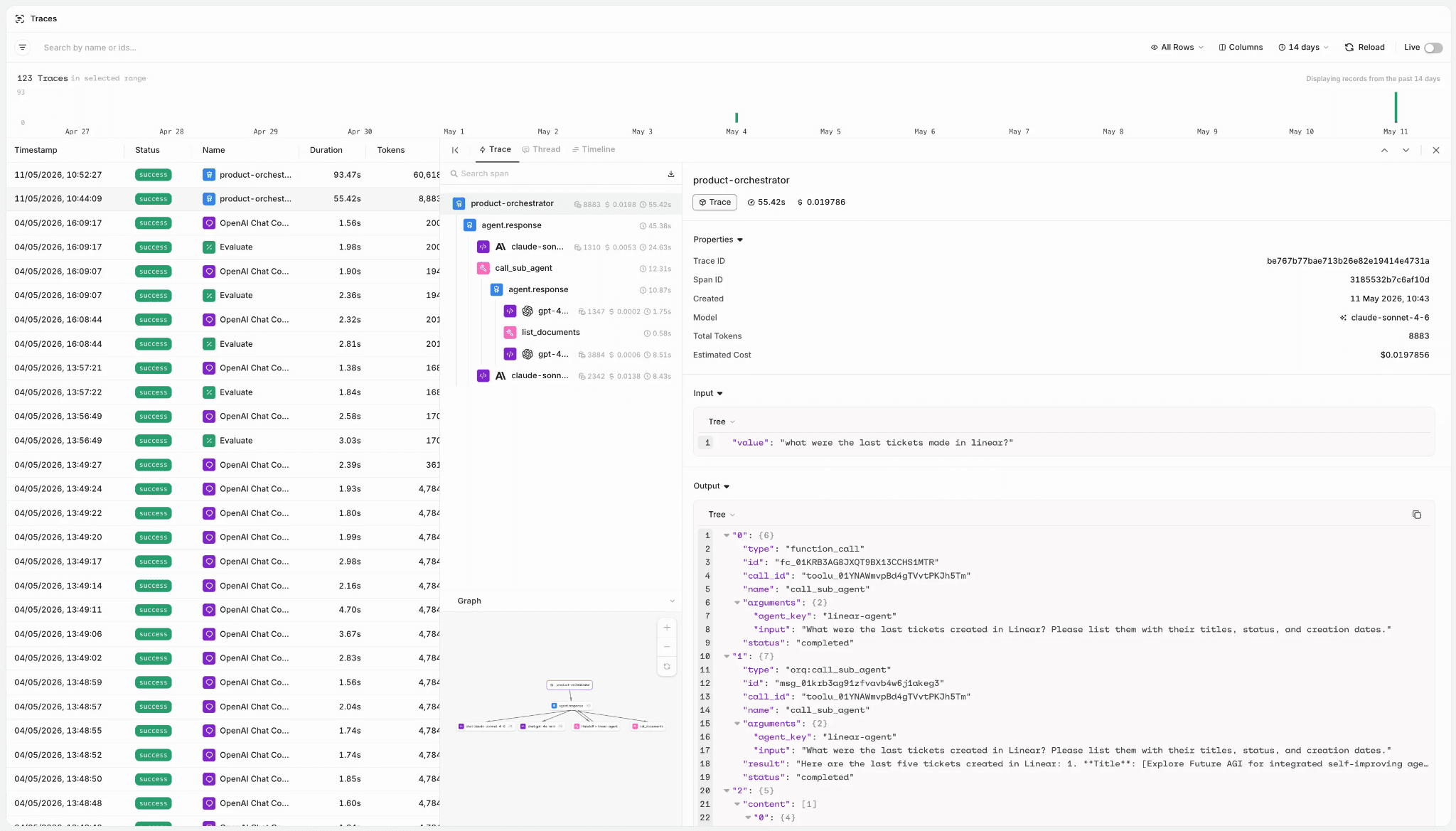
If the bill jumps 25% and you can’t connect that increase to application behavior, any fix is guesswork.
You need to know what became more expensive before deciding whether to change the model, the prompt, or the workflow.
Instrument every model request
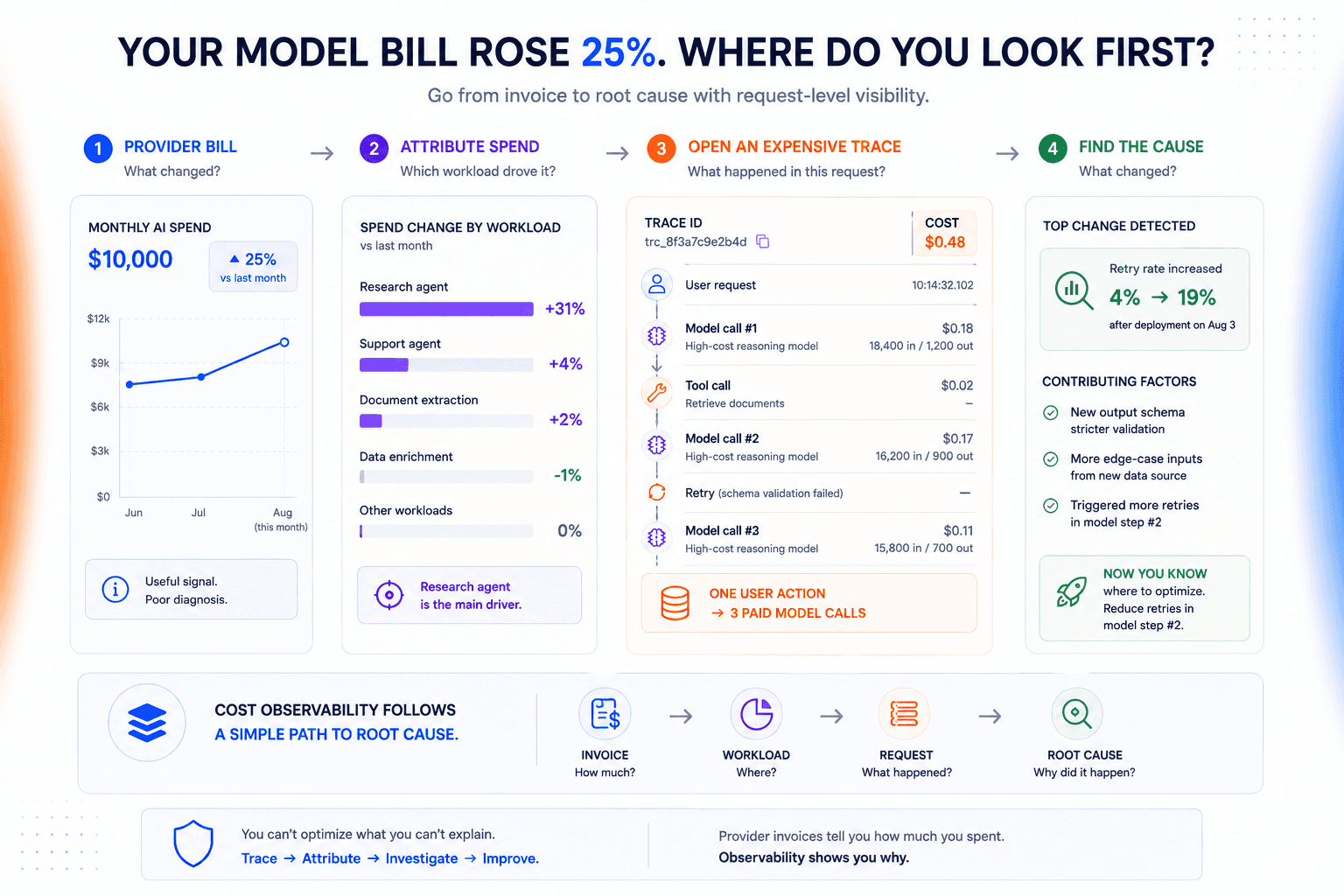
A request trace should let you answer a simple question: why did this call cost what it did?
Open an expensive request and you should be able to see:
What the call cost
Which model served it
How many tokens were billed
Whether another attempt happened afterward
That becomes invaluable when costs move unexpectedly. If one endpoint suddenly doubles in spend, you can inspect the requests behind it instead of starting with theories.
Provider invoices tell you how much you spent. They rarely tell you why.
Attach cost to the workload that created it
Request-level visibility becomes much more useful once the spend has context.

Add attribution when the request is created rather than trying to reconstruct it later. A document-processing call could carry enough metadata to associate its cost with the feature and team responsible for it.
Now a cost increase after a release is easier to investigate. You can see whether that workload changed rather than digging through one aggregate provider bill.
Attribution also puts the information in the hands of the people who can act on it. Engineers making model and workflow decisions can see their financial impact directly.
Put guardrails around unexpected spend
Observability helps explain an expensive workload after it happens. Budgets give you a chance to intervene before it runs away.
Alerts are the safest first line. A team that gets warned at 80% of its monthly budget still has time to investigate unusual traffic or a misbehaving workflow.
Hard limits need more care.
Stopping an internal batch job when its budget is exhausted may be perfectly reasonable. Doing the same to a customer-facing agent could turn a cost-control mechanism into an availability incident.
Our preference is to treat hard spend caps as an availability decision, not just a budgeting feature. The safer response for a critical workload is often to degrade gracefully rather than stop it outright.
For critical workloads, consider degrading gracefully instead.
Route suitable traffic to a lower-cost model, pause nonessential processing, or require approval before expensive work continues.
AI cost optimization starts with the biggest cost driver
Once you can explain the bill, optimize the part of the request path responsible for it.
If inference price dominates, changing the model mix can make a large difference. If repeated context is responsible for most of the tokens, switching models may barely move the bill.
That’s why we generally start from the trace rather than from a favorite optimization tactic. Routing, caching, and context reduction are only high-leverage when they attack the part of the workflow that’s actually expensive.
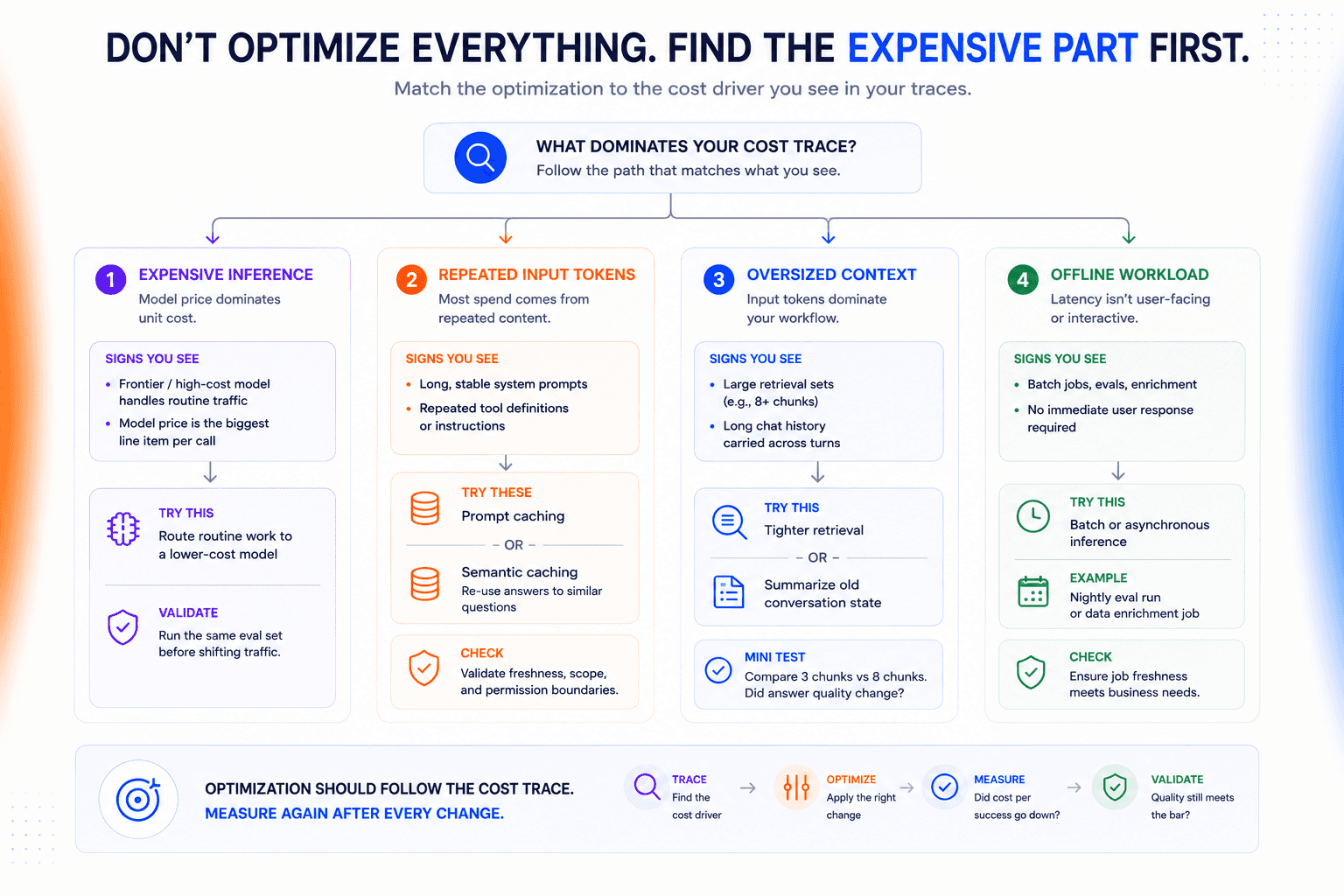
Route routine work away from your most expensive models
Not every request needs your most capable model.
A request that only has to return one category from a fixed set shouldn’t automatically take the same route as an open-ended analysis task. Routing those workloads differently can reduce inference cost without changing the experience users actually care about.
Don’t make the decision from public benchmarks alone. Run the candidate model against your own eval set and the failure cases that matter for that route.
Pay particular attention to the tail.
A cheaper model can look fine on average while consistently failing one class of high-value requests.
Cache only what is genuinely reusable
Caching pays off when expensive work is repeated without the underlying answer changing.
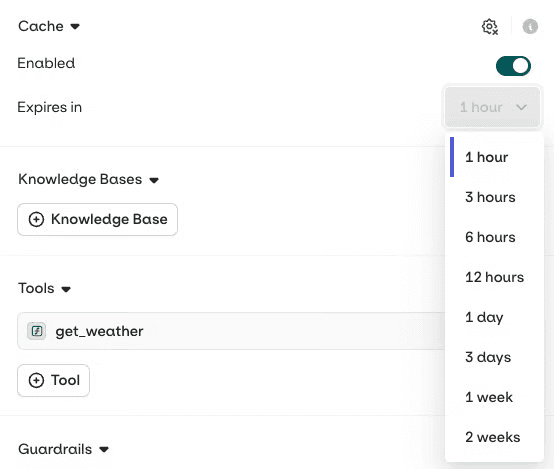
If every request starts with the same long system prompt or tool definitions, provider-side prompt caching can reduce the amount of input you pay to process repeatedly.
Semantic caching goes further by reusing an earlier answer for a sufficiently similar request. That needs more care.
Two questions can look similar while requiring different responses because the source data changed or the user has different permissions. Cache invalidation and scope are part of the cost decision, not an implementation detail to worry about later.
Stop resending context the model doesn’t need
Long contexts often grow incrementally until nobody is quite sure which parts still affect the answer.
Inspect the actual context on your expensive traces and test what you can remove.
For a RAG workflow, that might mean comparing answer quality with three retrieved chunks instead of eight. In a long-running conversation, summarizing older turns may work better than replaying the full transcript on every call.
Constrain outputs to what the caller actually uses
If downstream code expects one enum value, a paragraph is wasted work. If it consumes five JSON fields, there’s not much reason to generate prose around them.
Design the response contract accordingly.
Structured outputs and explicit response formats can keep generations focused. Use output-token limits as a guardrail rather than the primary optimization.
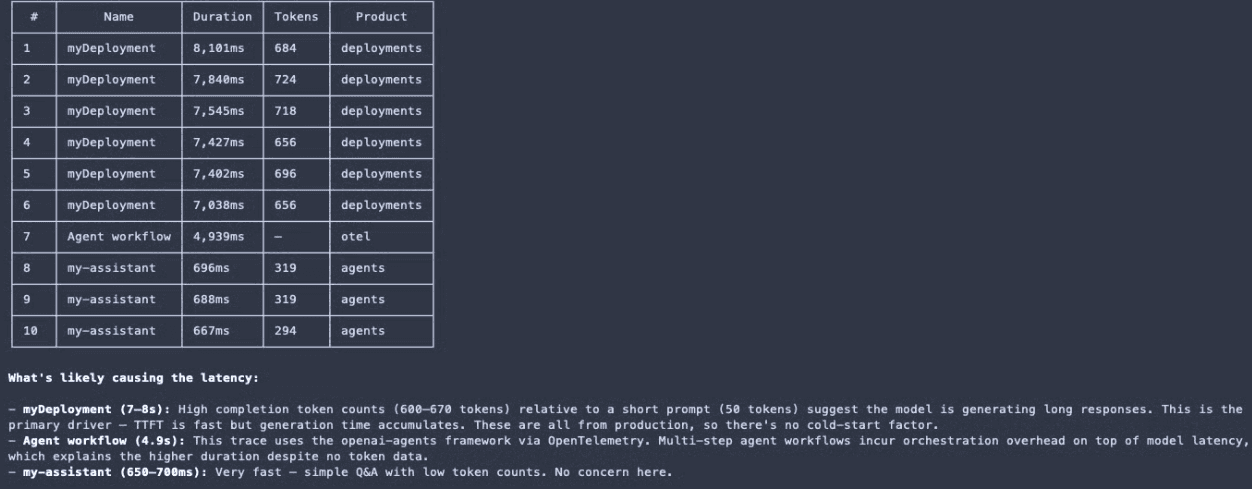
A low hard cap on an unconstrained response is more likely to truncate useful output than make the workflow efficient.
Move offline work out of the synchronous request path
A nightly evaluation run doesn’t need the same latency profile as a customer waiting on a support agent.
Work that can tolerate queueing can often move to batch or asynchronous processing. Some model providers price these workloads below synchronous inference, which lets you reduce cost without changing the model or prompt itself.
Keep interactive traffic interactive, though. Don’t trade a user-facing SLA for a lower unit price when nobody asked for the delay.
Measure whether the cheaper workflow is actually better
A lower bill only counts as an optimization if the workflow still meets its quality and reliability targets.
Before changing anything, capture a baseline on representative traffic. Then run the optimized version against the same workload. A slower week can make spend look better even when the cost of completing each task hasn’t changed.
Define the outcome before you calculate its cost
Cost per request can be misleading because a request isn’t always the thing the business cares about.
Take a document-extraction pipeline processing 10,000 invoices. The useful denominator will be the number of invoices extracted accurately enough to continue downstream without repair or human intervention, not the 10,000 API calls itself.
Define that acceptance condition first. Then divide the total workflow cost by the number of successful outcomes.
For a support agent, success might mean resolving the case without escalation. For extraction, it could mean clearing a field-level accuracy threshold.
The definition will vary by workload. The principle doesn’t.
Put cost on the same scorecard as system performance
Don’t optimize cost in isolation.
The same experiment that measures spend should tell you whether answer quality fell, tail latency moved, or failure behavior changed after the optimization.
Set the acceptance thresholds before you look at the result. If a 20% saving pushes the workflow below its quality target or materially increases escalation rates, reject the change.
The target is the lowest-cost configuration that still clears the workload’s acceptance criteria.
That’s the standard we’d use for shipping a cost optimization. If the cheaper configuration can’t clear the same quality bar on representative traffic, we don’t regard the saving as an improvement.
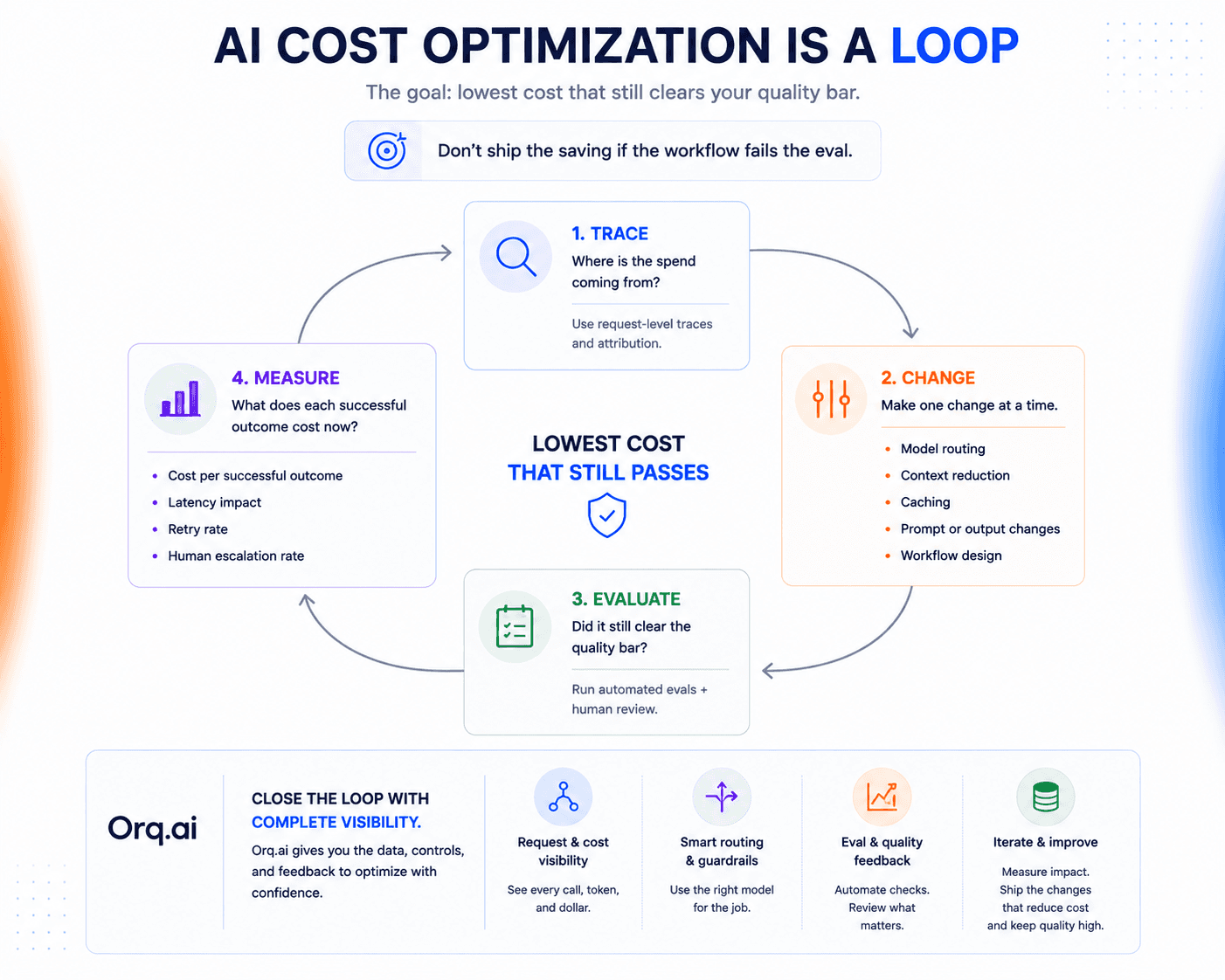
Manage spend where model decisions are made
Cost data is most useful when it sits close to the decisions that created it.
With Orq.ai’s AI Gateway, cost and token usage are attached to individual model requests across providers. If spend jumps, you can inspect the traffic behind the change instead of trying to reconstruct what happened from separate provider invoices.
That closes an important part of the loop.
Once you find an expensive route, you can change how traffic is distributed between models and see what happens to the workload afterward. Budgets and spend limits provide another backstop when usage grows faster than expected.
Retries and fallbacks stay visible in the same request path too, so the failed work behind a successful response doesn’t disappear from your cost analysis.
Optimize for cost per successful outcome
The cheapest model, request, or provider isn’t necessarily the cheapest way to complete the task.
Treat cost optimization like any other engineering change: find the part of the workflow responsible for the spend, change it, then rerun the same evals before you move traffic.
See how Orq.ai helps you trace model spend back to the requests and routing decisions that created it.