






LLM fallback sounds simple until the first provider starts failing under real traffic.
A request times out. Rate limits spike. The app should keep moving, but only if the backup model can actually take over without breaking the workflow.
Fallback only works when the replacement model can handle the same context, output shape, and safety constraints as the primary one.
If it can’t, you have a backup in name only.
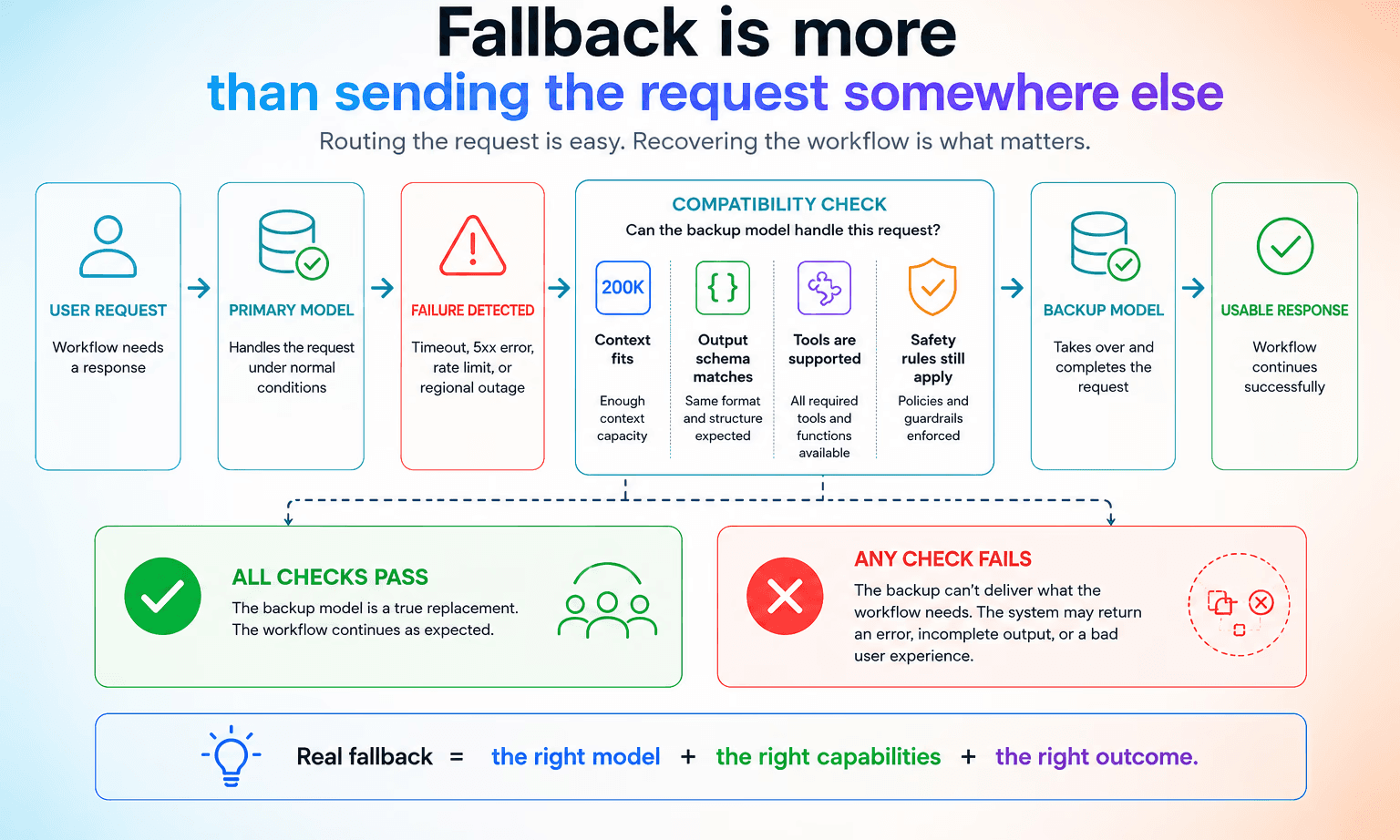
At Orq.ai, we’ve found that routing traffic to a second model is rarely the difficult part. The failures usually appear after the handoff, when the backup model can’t behavior the workflow expects.
This guide explains when fallback should trigger, what makes a fallback chain usable in production, and how to test it before an outage tests it for you.
What is LLM fallback?
LLM fallback is the path your system takes when the primary model cannot keep a request alive. That usually means a timeout, a 5xx error, a rate limit, or a regional outage. The request gets routed to a backup model or provider that can still finish the job.
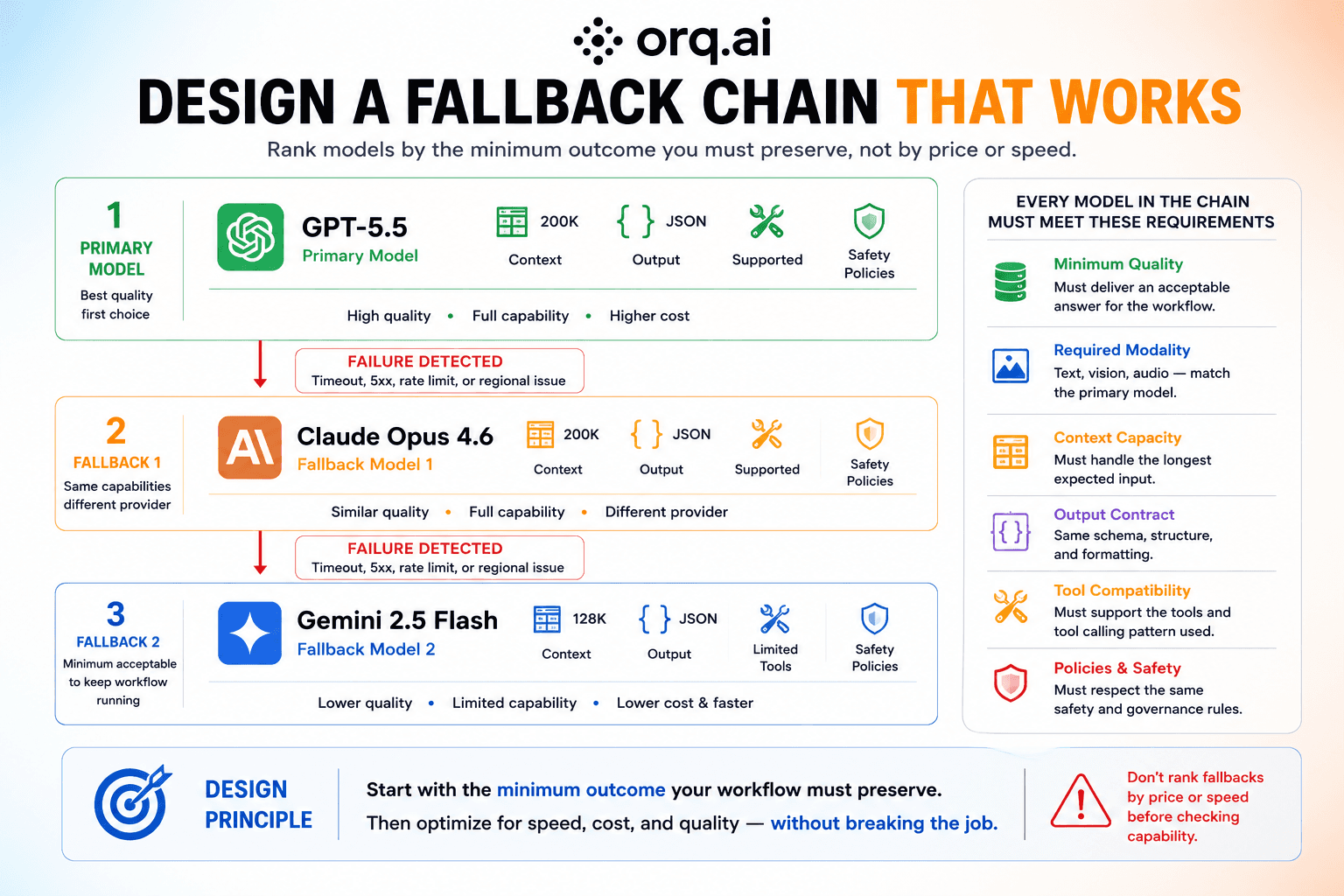
If a customer support app sends a request to GPT-5.5 and the call times out, the system might send that same request to Claude Opus 4.6 or another compatible model. The point is to return a usable result without breaking the workflow.
One study found median recovery times of 1.23 hours for OpenAI’s API and 0.77 hours for Anthropic’s API. Long enough to disrupt real-time workflows.
That only works when the backup model can match the primary one on the parts that matter: context window, output format, tool use, and policy boundaries.
Otherwise, the system has a fallback in theory and a failure in practice.
When does fallback actually trigger?
Fallback should trigger when the primary model can no longer meet the service level the workflow needs.
Our view is that fallback policies should be defined per workflow, not once for the entire platform. A timeout that’s acceptable for a background enrichment job might already signal failure in a customer-facing assistant.
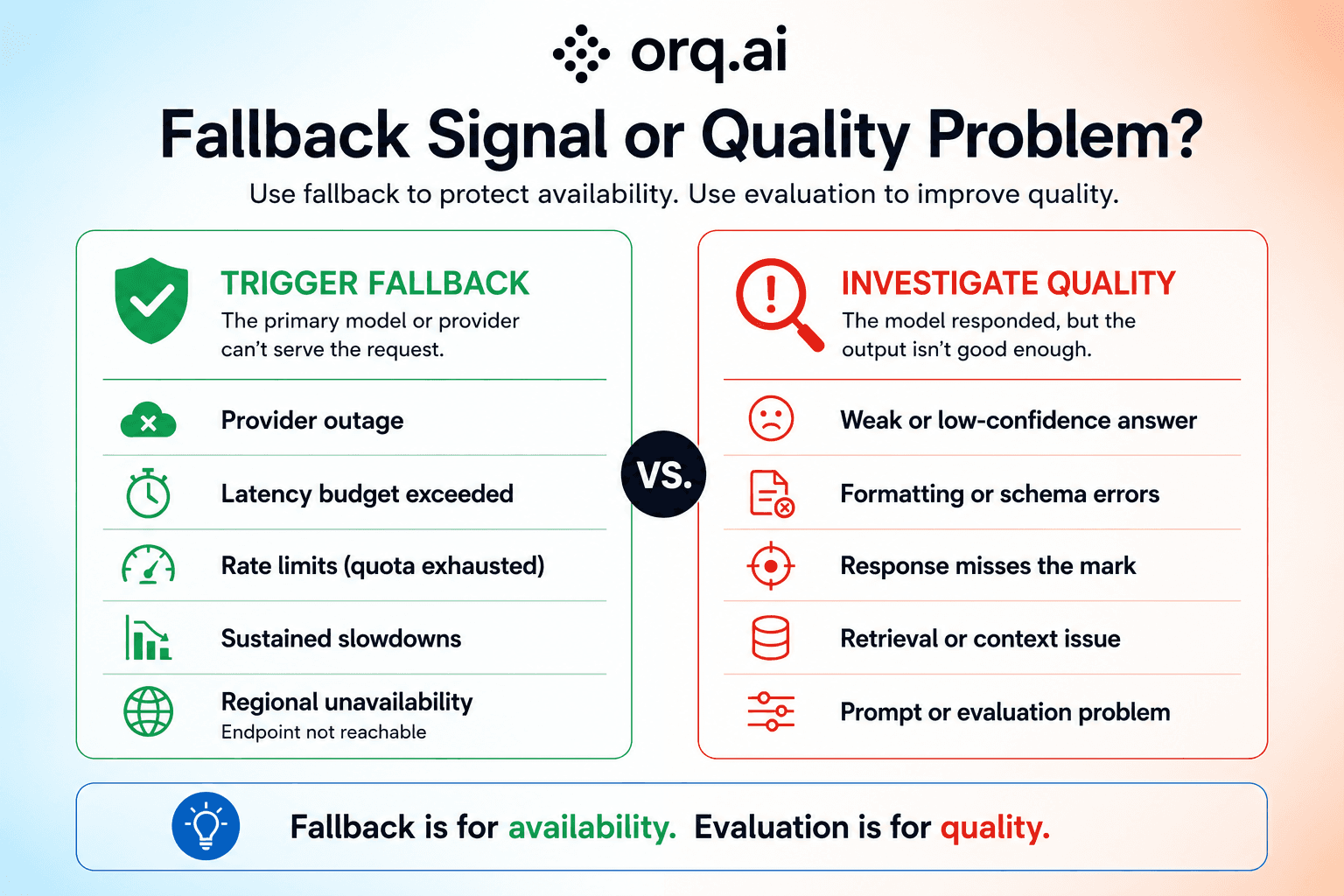
If the model returns a weak answer, that’s often a prompt or evaluation issue. Fallback is for when the request can’t be served well enough to keep moving.
The clearest triggers are:
Provider outages
Requests that exceed your latency budget
Rate limits when the provider is still healthy but refusing traffic
Sustained slowdowns that make the workflow feel broken
Regional unavailability when the required endpoint is not reachable
Just as important to note is that some failures shouldn’t trigger fallback. A low-confidence answer, a formatting mistake, or a response that misses the mark usually points to model quality.
Treat those as fallback signals, and you’ll end up switching models too often. We see teams use fallback as a catch-all response to bad outputs.
Fallback vs. retries vs. circuit breakers vs load balancers: what's the difference?
Retries, fallback, circuit breakers, and load balancing solve different problems.
Production systems usually need more than one of them.
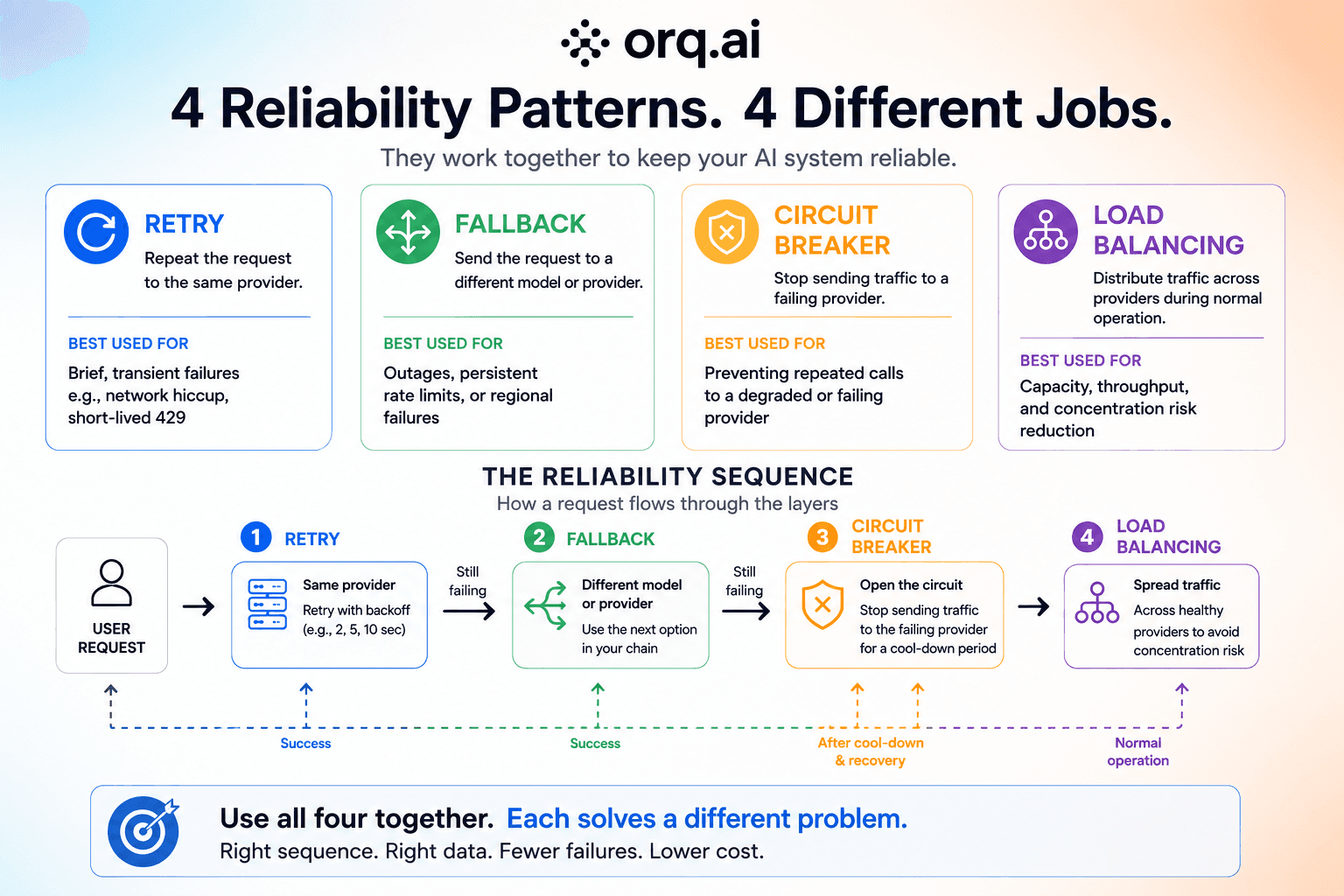
Retry repeats the same request to the same provider, usually with backoff. It makes sense when the failure is brief. Think of a network blip or a short-lived 429.
Fallback sends the request to a different model or provider when the primary one is not recovering fast enough. It’s for outages, persistent rate limits, and regional failures.
Circuit breaker stops sending traffic to a provider after repeated failures in a short window. It keeps the system from burning time and budget on a path that’s clearly degraded.
Load balancing spreads traffic across providers during normal operation. It reduces concentration risk and helps with capacity before any one provider becomes the bottleneck.
Used together, these layers form a sequence. The request retries first. If that fails, it can fall back. If a provider keeps failing, the circuit breaker pushes traffic away for a while. Load balancing sits below that logic so one provider doesn’t become the default path for everything.
Treating them as the same thing usually creates brittle systems. A circuit breaker needs recent failure history and recovery signals to make a good call.
It works best when retries and fallbacks are feeding it better data.
One pattern we repeatedly warn teams about is retry logic at several layers. When the application and gateway all retry independently, one failed user request might turn into a burst of expensive provider calls.
Designing your fallback chain
The right chain depends on what the workflow values most.
Cost, speed, or capability.
Most production systems don’t optimize for just one of those.
We recommend starting with the minimum outcome the workflow must preserve. Once that threshold is clear, you can optimize the remaining options for latency without routing requests to a model that can’t complete the task.
1. Cost-optimized
Start with cheaper models and accept some quality trade-off. This fits high-volume tasks like internal summarization, where “good enough” is often enough.
2. Speed-optimized
Prioritize the fastest available model. This works when latency matters more than output variation, such as customer-facing experiences with tight response targets.
3. Reliability-optimized
Spread the chain across different providers instead of stacking models from one vendor. That gives you a better chance of surviving a real outage.
4. Capability-matched
Only include models that can do the same job as the primary one. If the fallback can’t handle structured output or vision, it’ll fail even if the provider is up.
Most teams mix two or three of these.
That’s where fallback stops being a simple coding pattern and becomes an infrastructure choice.
Critical compatibility check: will your fallback work?
A fallback only works if the backup model can handle the same request shape as the primary one.
The most common failure is a mismatch between what the first model was doing well and what the second model can actually replace.
1. Context window differences
If the primary model can handle 200K tokens and the fallback only supports 128K, a long request can fail the moment fallback kicks in.
2. Structured output compatibility
If your system expects a strict JSON schema, the backup model has to return the same shape consistently. Valid text isn’t enough if the downstream parser breaks.
3. Tool calling differences
Different providers handle tools differently. Syntax, parameter handling, and multi-tool support can all break a workflow.
4. Multimodal support
If the primary model reads images or screenshots, the fallback needs that ability too. A text-only backup may keep the system online while still failing the task.
Monitoring your fallback system
Fallback should be monitored like a production system, not treated as a yes-or-no event.
You need to know when it fires, how often it fires, and whether it actually saves the request.
A chain that looks solid today can drift as providers change models, update APIs, or become less reliable.
Our view is that fallback chains should be versioned and tested like application code. Every change to the primary model should trigger the same compatibility and regression checks before it reaches live traffic.

The signals that matter most are:
Fallback activation rate. If it rises, the primary path is degrading.
Provider failure patterns. Track which providers fail, how often, and for what reasons. That helps you judge whether the chain is ordered correctly.
Latency impact. Every fallback adds delay. You need to know whether the extra resilience is worth the slower response.
Cost impact. Backup models can cost more, so fallback traffic can change spend quickly.
Recovery success rate. If fallback fires but the backup still fails, the chain needs work
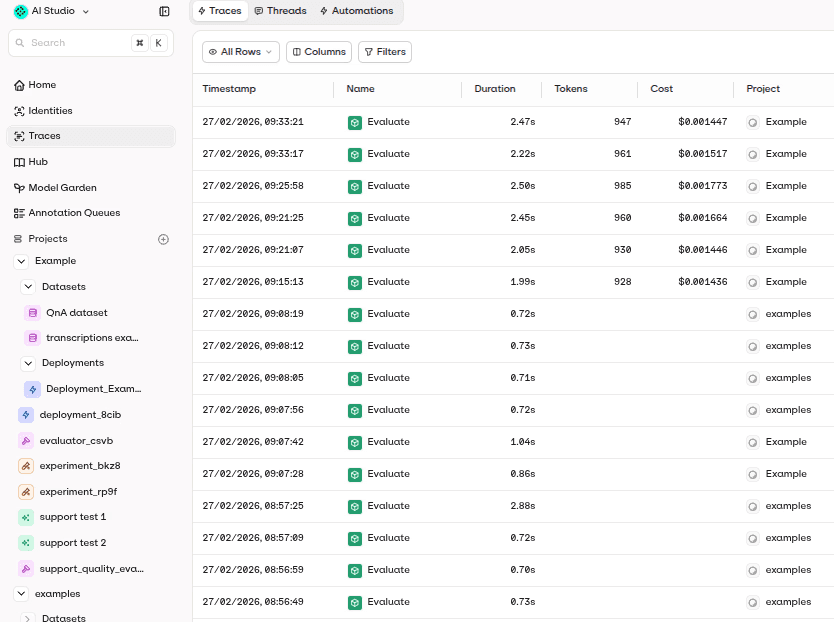
The best way to see all of that is with end-to-end traces. They show what happened, where it failed, and whether the backup actually completed the request.
Build reliable AI systems with routing & observability
Routing, fallback, and latency handling all determine whether production AI behaves predictably under real traffic.
That’s why teams need a control layer, not just a model endpoint. They need to see request flow and understand the quality trade-offs when traffic moves from one provider to another.
Book a demo to see how Orq.ai helps engineering teams keep production AI systems reliable with routing and observability built into the control layer.