






In July 2026, the MCP project reported close to half a billion monthly downloads across its Tier 1 SDKs.
A few direct MCP client-to-server connections are easy enough to reason about. Once several applications depend on the same servers, every tool call carries questions about identity and permission.
Those decisions become difficult to manage when credentials, access rules, and logs are scattered across individual clients and servers.
That’s the problem an MCP gateway is meant to solve.
Putting a shared control layer between MCP clients and the servers they depend on.
From a platform-engineering perspective, MCP stops being ‘just connectivity’ the moment a tool call can create a side effect you’d need to explain later
An MCP gateway centralizes control over tool access
An MCP gateway puts a shared control layer in the request path between MCP clients and servers. Rather than implementing the same access logic inside every agent, platform teams can apply it before requests reach downstream tools.
Without a gateway, the path is direct:
AI application → MCP client → MCP server → tool
Add a gateway and the request passes through another decision point:
AI application → MCP client → MCP gateway → MCP server → tool
That distinction matters as being able to connect to a tool doesn’t automatically mean an agent should be allowed to use everything it exposes.
An agent might be permitted to read a customer record without even being allowed to modify or delete it.
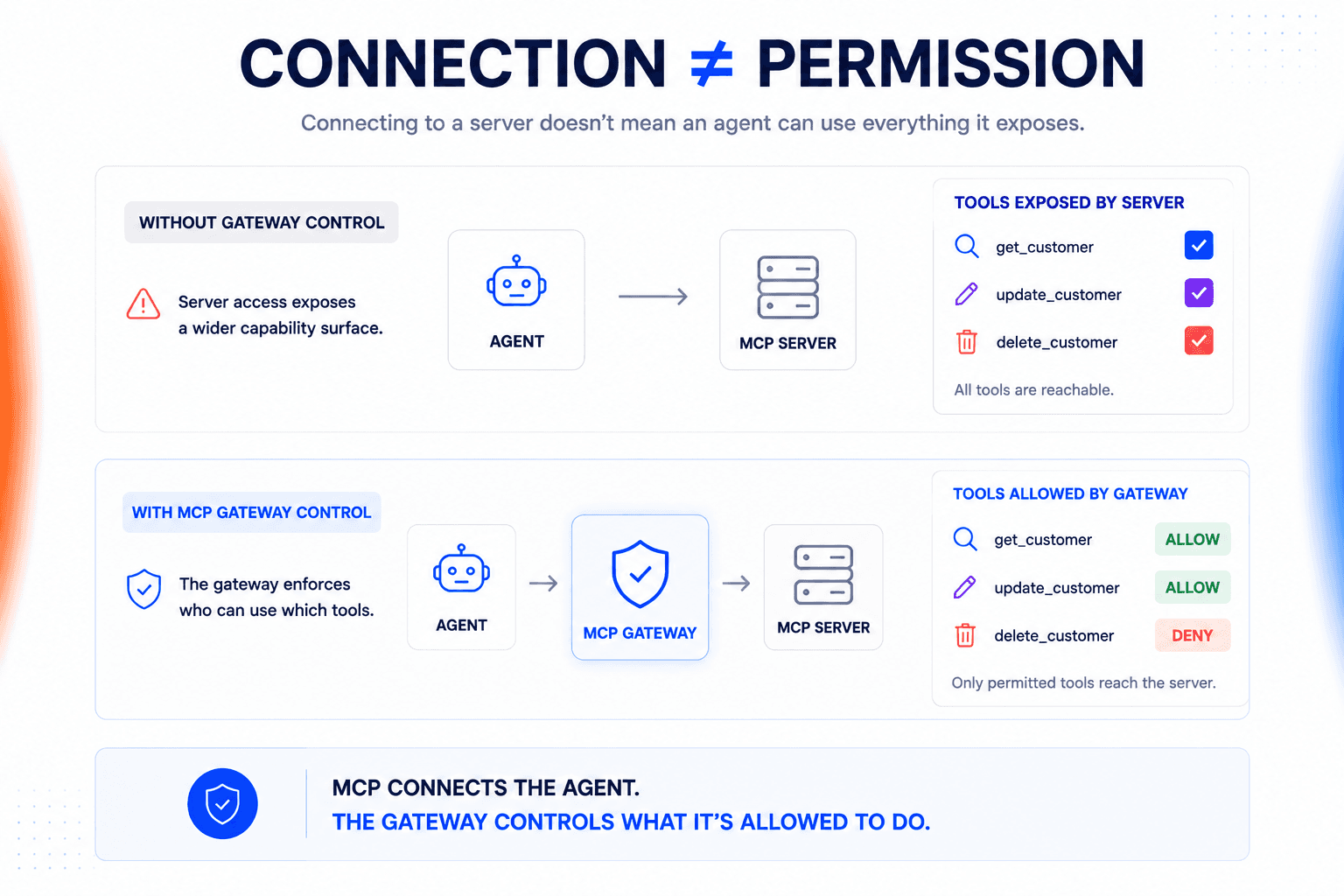
But bear in mind the gateway doesn’t replace MCP.
Clients and servers still communicate using MCP. The gateway adds control over the path between them.
Yet one important caveat to note is that “MCP gateway” isn’t a standardized product definition. Implementations vary. Some mainly centralize connections and routing. Others can make identity and policy-aware decisions before a tool call reaches the server.
So judge an MCP gateway by the controls it actually provides and not just by the label alone.
The label matters less than whether the component can make a meaningful decision before execution. If it can’t, it’s still mostly a routing layer in practice.
Add an MCP gateway when direct connections become hard to govern
Using MCP doesn’t automatically justify another infrastructure layer.
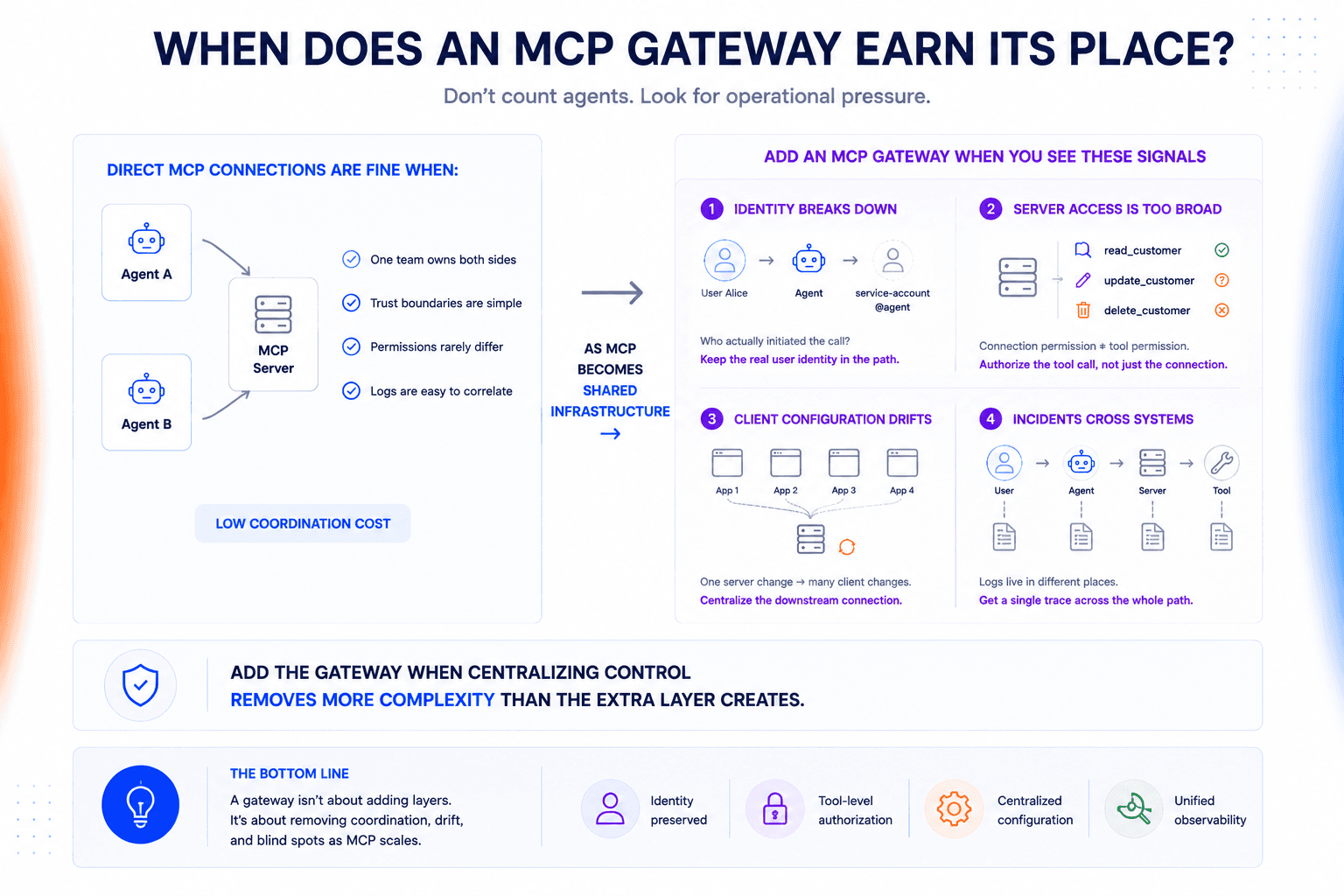
If one team owns the clients and servers and the trust model is simple, direct connections are usually easier to operate. A gateway starts earning its place when the same MCP infrastructure is shared and changes can no longer be handled cleanly inside individual applications.
There’s no magic threshold of five agents or ten servers. Look for the operational problems instead.
Preserve the caller’s identity across the tool path
An MCP server could know which service connected to it without knowing which person caused the action.
That distinction becomes important when an agent acts on behalf of a user. If the user isn’t allowed to perform an action directly, their agent shouldn’t inherit that permission simply because it connects with a more privileged service credential.
A gateway can keep the caller’s identity in the request path and use it when access is evaluated, rather than reducing every interaction to the agent’s shared account.
Once user identity collapses into a shared service account, you’ve lost the context you need for least privilege and for explaining who actually authorized the action.
Authorize the tool call, not just the server connection
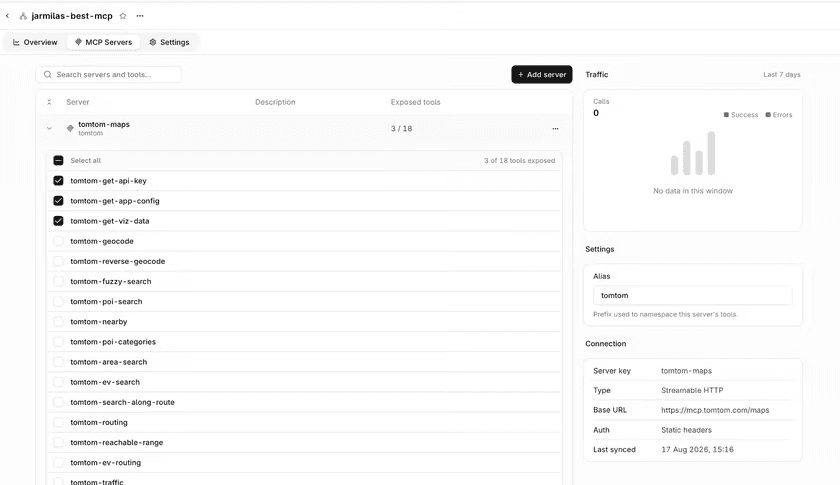
Permission to connect to an MCP server can be much broader than the permission an agent actually needs.
A support agent can read a customer record without being allowed to delete it.
If those rules live inside every client, one policy change has to be implemented correctly everywhere that server is used. A gateway moves that decision into the shared path.
Depending on the implementation, it can restrict which tools a client can discover and reject unauthorized calls before they reach the server.
Shared servers turn client configuration into operational debt
Let’s take a case where ten applications depend on the same MCP server and its authentication setup changes.
With direct connections, you may now have ten clients to update.
The bigger problem appears over time. Different teams implement the connection differently, upgrade at different times, and accumulate their own handling around the same server.
Put a gateway in front and the clients can keep one stable upstream contract while the platform team manages the downstream connection centrally.
Incidents expose the cost of scattered MCP logs
Distributed connections are easy to tolerate until something goes wrong.
If an agent unexpectedly modifies a customer record, the platform team needs to reconstruct how the action happened. Who initiated it and what came back from the server.
When every hop logs independently, that becomes a correlation exercise across systems.
A gateway gives MCP traffic a common observation point. The more consequential the tools your agents can call, the less acceptable it is to discover after an incident that no single trace shows the path the action took.
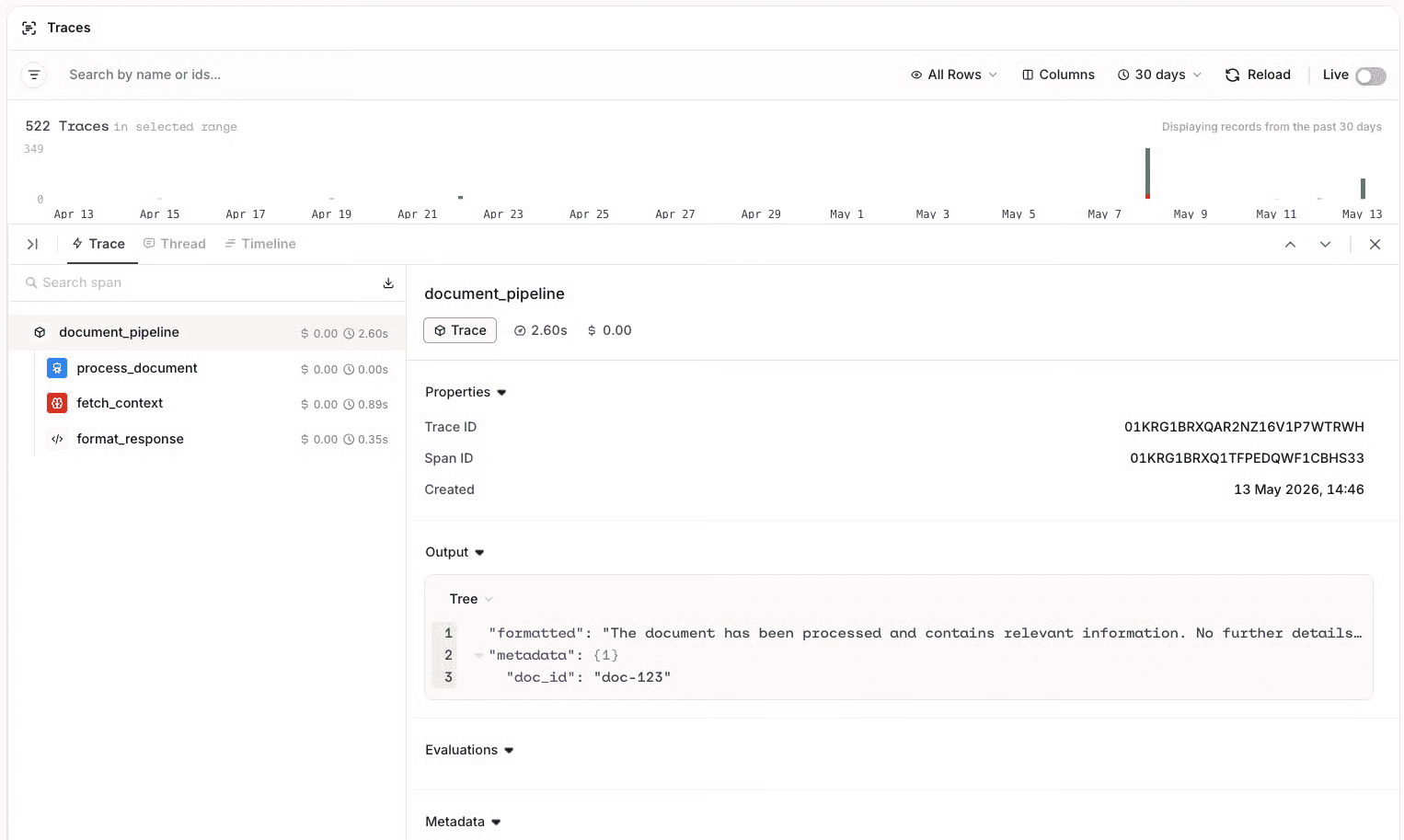
Here’s a simple test we often use: can you explain a sensitive tool action from one trace, or do you still need to open three systems and reconstruct the story manually?
How an MCP gateway controls the request path
In a typical gateway architecture, MCP clients connect through the gateway rather than maintaining independent paths to every downstream server.
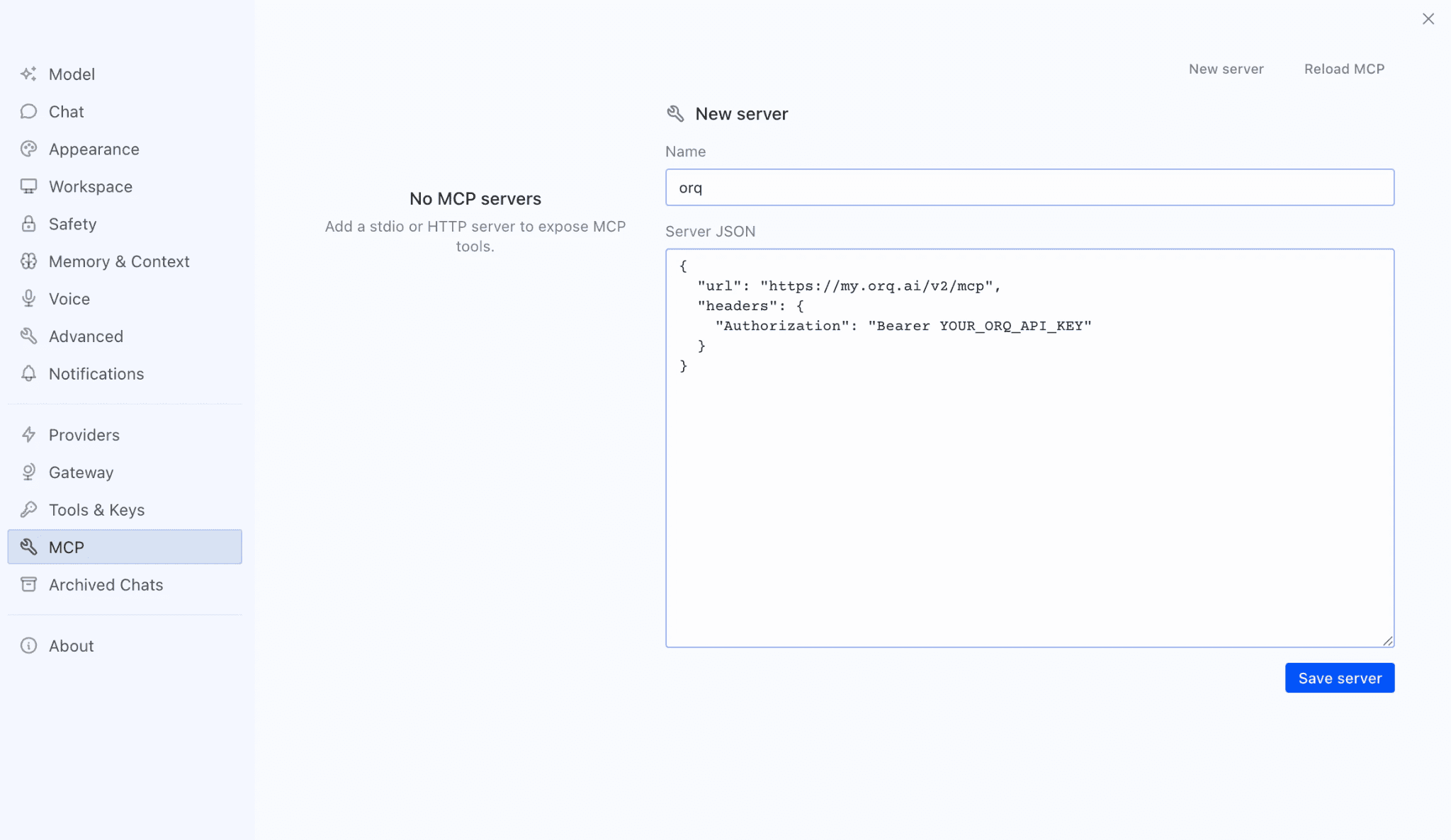
That puts the gateway in the request path before a tool call reaches its destination.
The gateway becomes the shared entry point to MCP servers
Imagine several internal agents depend on MCP servers for GitHub, Jira, and a production database.
With direct connections, every application has to know how to reach the servers it uses.
Add a gateway and the topology ends up becoming:
Agents → MCP gateway → GitHub / Jira / database
The MCP servers still expose the tools. What changes is where shared decisions can happen.
If the gateway supports authorization, two agents can connect through the same layer while receiving different access to the tools behind it. The policy lives in that shared request path instead of being reimplemented inside each client.
How much the gateway does there depends on the implementation.
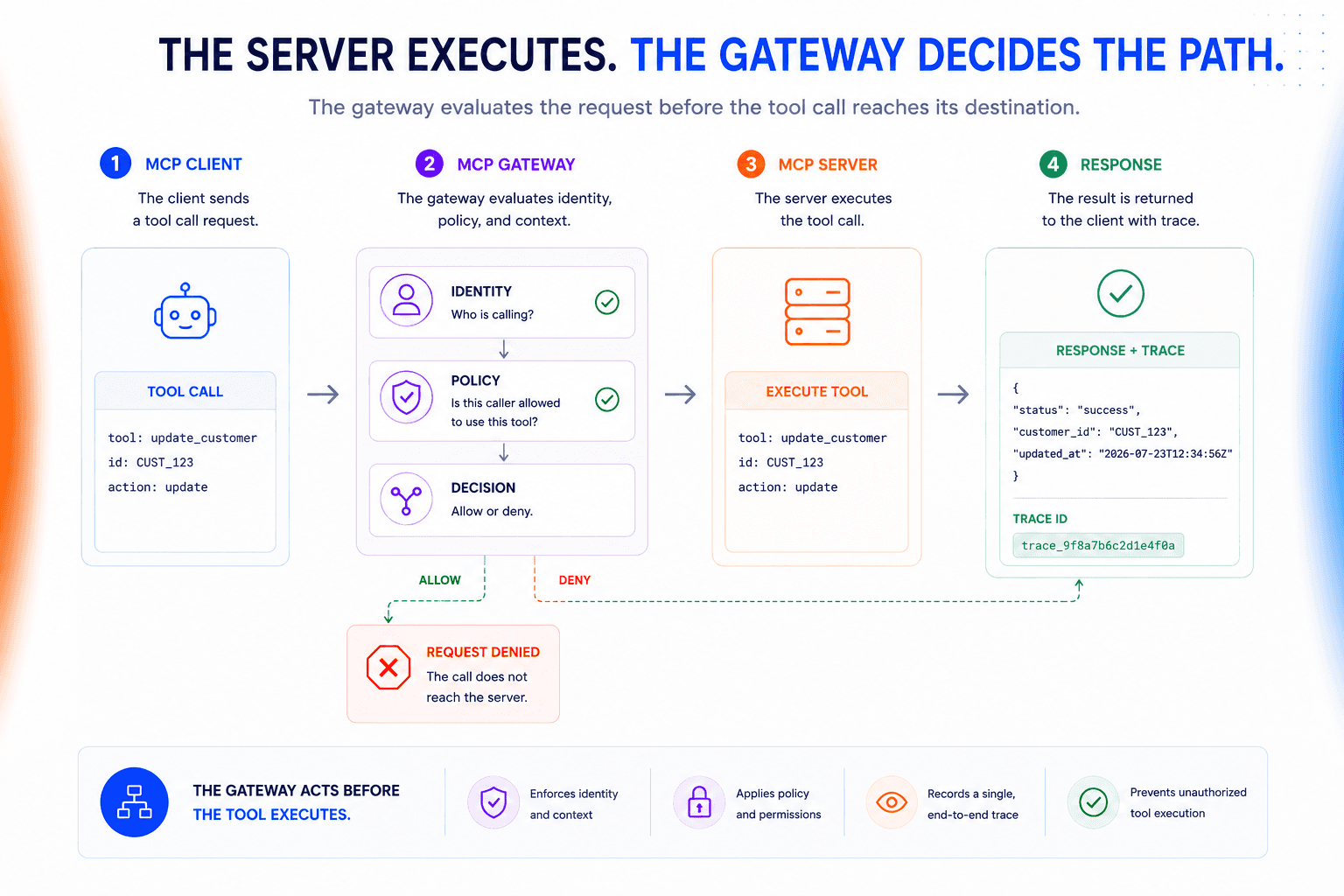
What happens when an agent calls a tool
Take an agent that wants to update a customer record.
A request could move through the gateway like this:
The MCP client sends the tool request to the gateway.
The gateway resolves the caller and relevant request context.
Any configured access or policy checks run before the request moves downstream.
If the call is allowed, the gateway forwards the MCP request to the target server.
The MCP server executes the tool and returns the result.
The response passes back through the gateway, where the interaction can be captured for tracing or audit.
The MCP server still executes the tool call. The gateway controls the path to it.
We believe that boundary is worth protecting. The gateway should govern the request, not become another place where business logic and tool execution slowly accumulate.
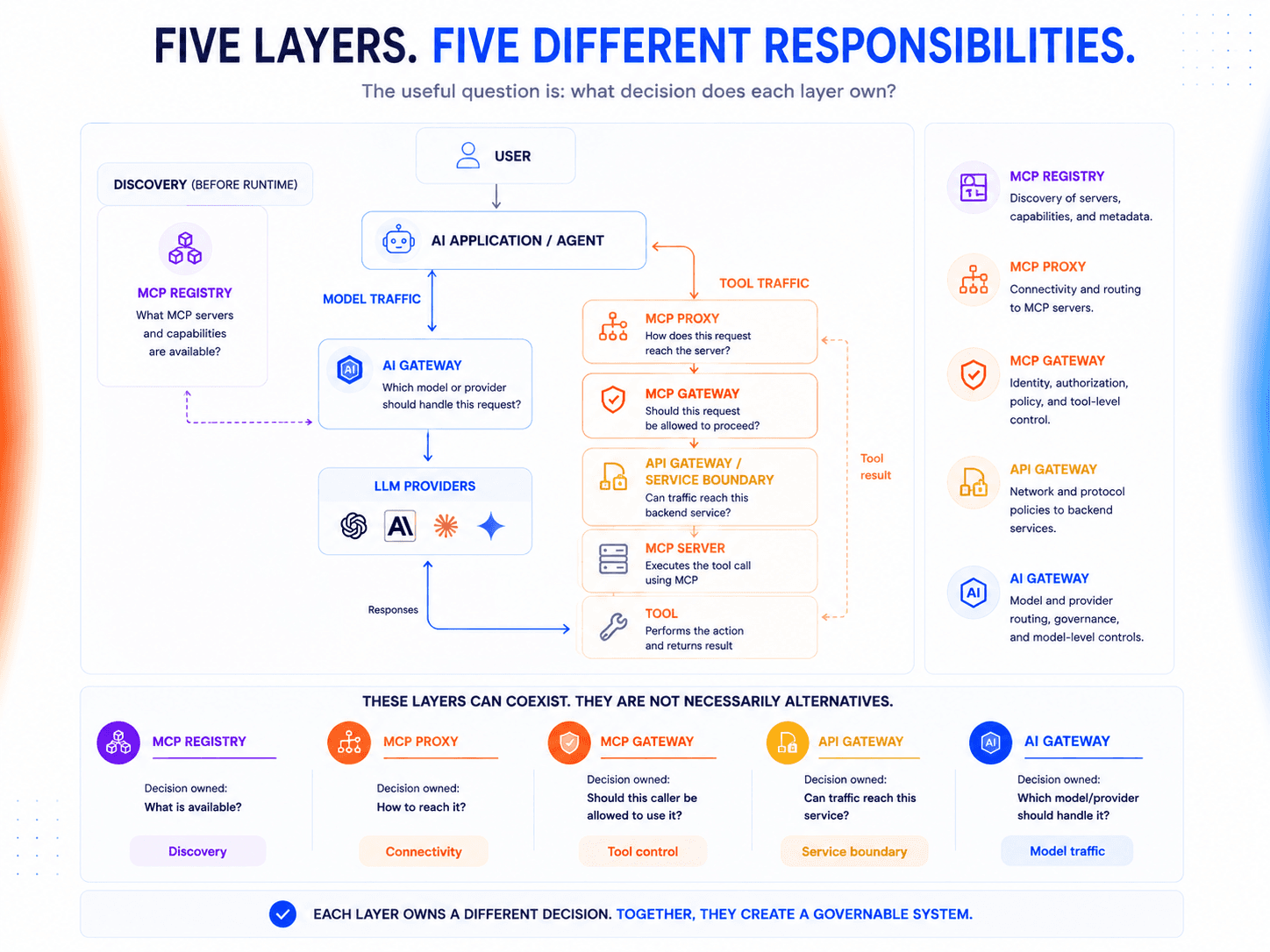
Where an MCP gateway fits alongside proxies, registries, and other gateways
MCP gateways sit close to several other infrastructure components.
That’s why the terminology gets confusing.
You’ll want to think about what decision it makes in the request path.
Layer | Main responsibility |
MCP Proxy | Mediates or forwards MCP connections |
MCP Registry | Catalogs MCP servers and capabilities |
API Gateway | Governs API traffic at the service boundary |
AI Gateway | Governs requests to models and providers |
MCP Gateway | Applies shared control to MCP tool traffic |
These layers aren’t mutually exclusive. A production agent stack can use several of them at once.
MCP Gateway vs MCP Proxy
An MCP proxy is primarily concerned with getting the connection or request where it needs to go.
It might expose several MCP servers through one endpoint or bridge a transport difference between client and server. When connectivity is the problem, that may be all you need.
A gateway goes further by making decisions about whether the request should proceed.
Put simply, a proxy primarily answers where this request should go.
A gateway can also answer should this caller be allowed to make it.
The boundary isn’t standardized. Some products sold as proxies enforce gateway-like policies. Some products called gateways do little beyond forwarding traffic.
Compare what the component actually does by looking past the label on the product page.
MCP Gateway vs MCP Registry
A registry is primarily a discovery layer. It keeps a catalog of the MCP servers available to your environment and the capabilities they expose.
A gateway operates in the runtime path. Once an agent actually tries to use one of those tools, the gateway can apply whatever access or policy controls have been configured for the request.
The two can work together. A platform might use a registry to maintain its approved MCP catalog, then send runtime connections through a gateway.
MCP Gateway vs API Gateway
An API gateway governs traffic to APIs and backend services. An MCP gateway operates with awareness of MCP’s client, server, and tool model.
That difference matters when endpoint-level controls become too coarse.
An API gateway might secure the HTTP endpoint hosting an MCP server. If that server exposes ten tools, permission to reach the endpoint doesn’t necessarily mean the caller should be allowed to invoke all ten.
The layers can still coexist. Use the API gateway to protect the service boundary and use an MCP-aware control layer when policy needs to follow the request down to the MCP tool being called.
Here’s our rule of thumb: if your policy question is ‘can this service be reached?’, an API gateway may be enough. If it’s ‘can this caller invoke this specific tool?’, you’ve moved into MCP-aware control.
MCP Gateway vs AI Gateway
An AI gateway governs traffic from applications to models. An MCP gateway governs traffic from agents to tools.
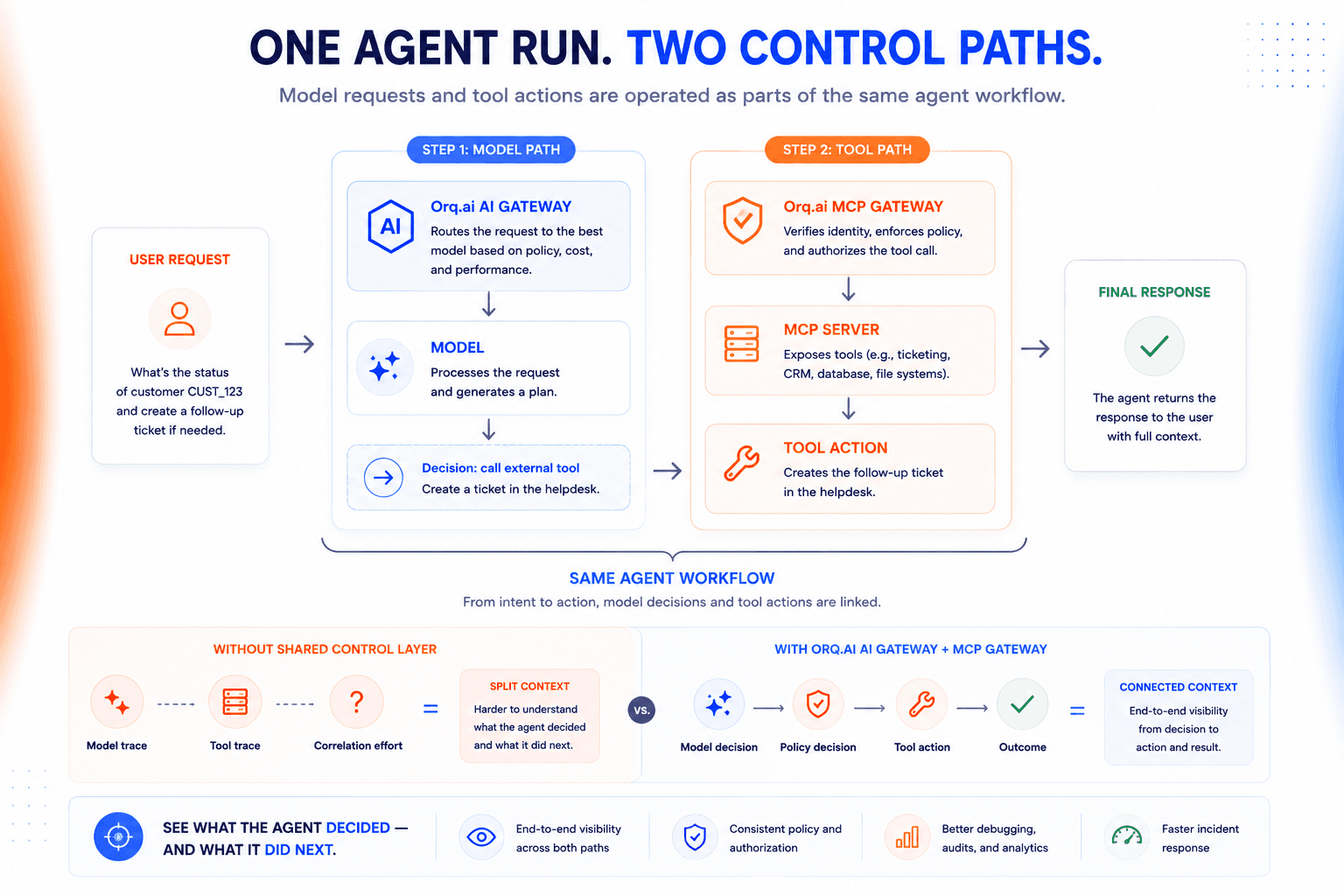
In an agentic application, those paths often belong to the same workflow:
User request → AI gateway → model → agent → MCP gateway → MCP server → tool
The model may decide that external action is required, then the agent moves onto the MCP path to perform it.
Operating those paths independently can make one agent run surprisingly difficult to reconstruct. Model traces may live in one system while the resulting tool calls live somewhere else.
That’s why it’s better to think of AI and MCP gateways as adjacent control layers rather than competing ones.
Evaluate an MCP gateway by the controls it can actually enforce
A long feature list doesn’t tell you much about how an MCP gateway behaves under real security and operational constraints.
Start with the decisions the gateway needs to make in your architecture.
Then test whether the implementation can actually make them.
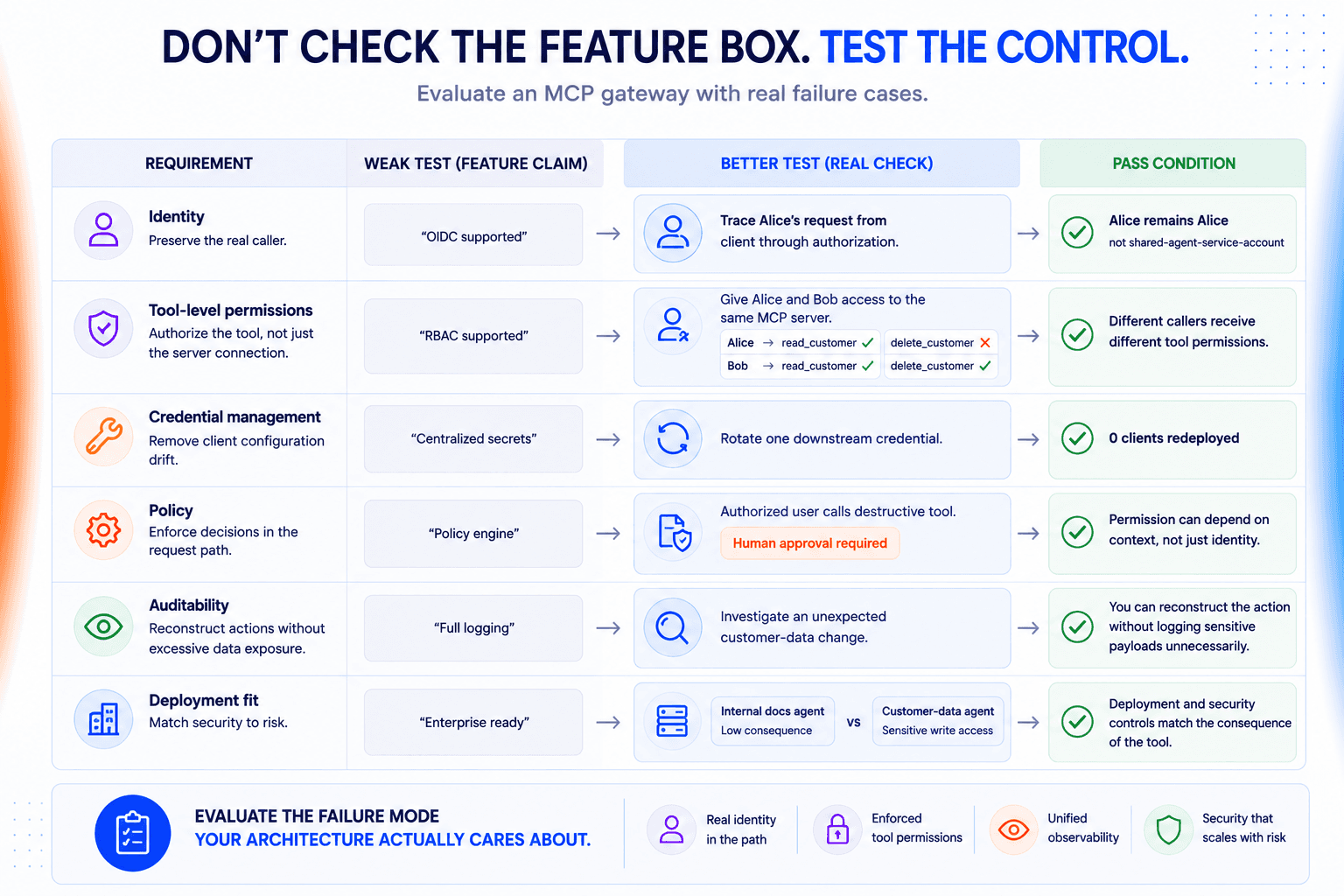
Check whether user identity survives the full request path
The gateway should know who or what is making each request.
Support for OAuth, OIDC, or SSO is certainly useful.
But the checkbox isn’t enough. Trace one request end to end and see what identity reaches the authorization layer.
If every user ultimately becomes the same service account, you’ve lost the distinction that matters most.
Test whether permissions reach the tool level
We find that server-level access is often too broad.
An agent may need one tool from an MCP server without needing everything the server exposes. A useful test is to give two callers access to the same server and verify that the gateway can expose or authorize different tool sets for each.
That lets you apply least privilege without creating a separate MCP server for every permission boundary.
Make credential rotation a gateway problem, not a client problem
Agents shouldn’t each carry their own copies of downstream credentials.
Rotate one credential and watch what has to change.
If the gateway owns that downstream connection, clients should keep working without being redeployed. If ten applications still need new secrets, most of the operational burden is still sitting in the clients.
Also check how revocation behaves. A credential that has been removed should stop working immediately, not after an arbitrary cache or deployment cycle.
Separate permission from policy
Access control answers who can use a tool. Policy decides under what conditions the call is allowed to proceed.
A support agent could be permitted to read a customer record while a destructive action requires human approval even for an otherwise authorized caller.
That logic should live in a shared policy layer rather than being rewritten inside every agent.
Just as importantly, teams should be able to inspect and test the policy before relying on it in a live workflow.
Make sure a tool call can be reconstructed after the fact
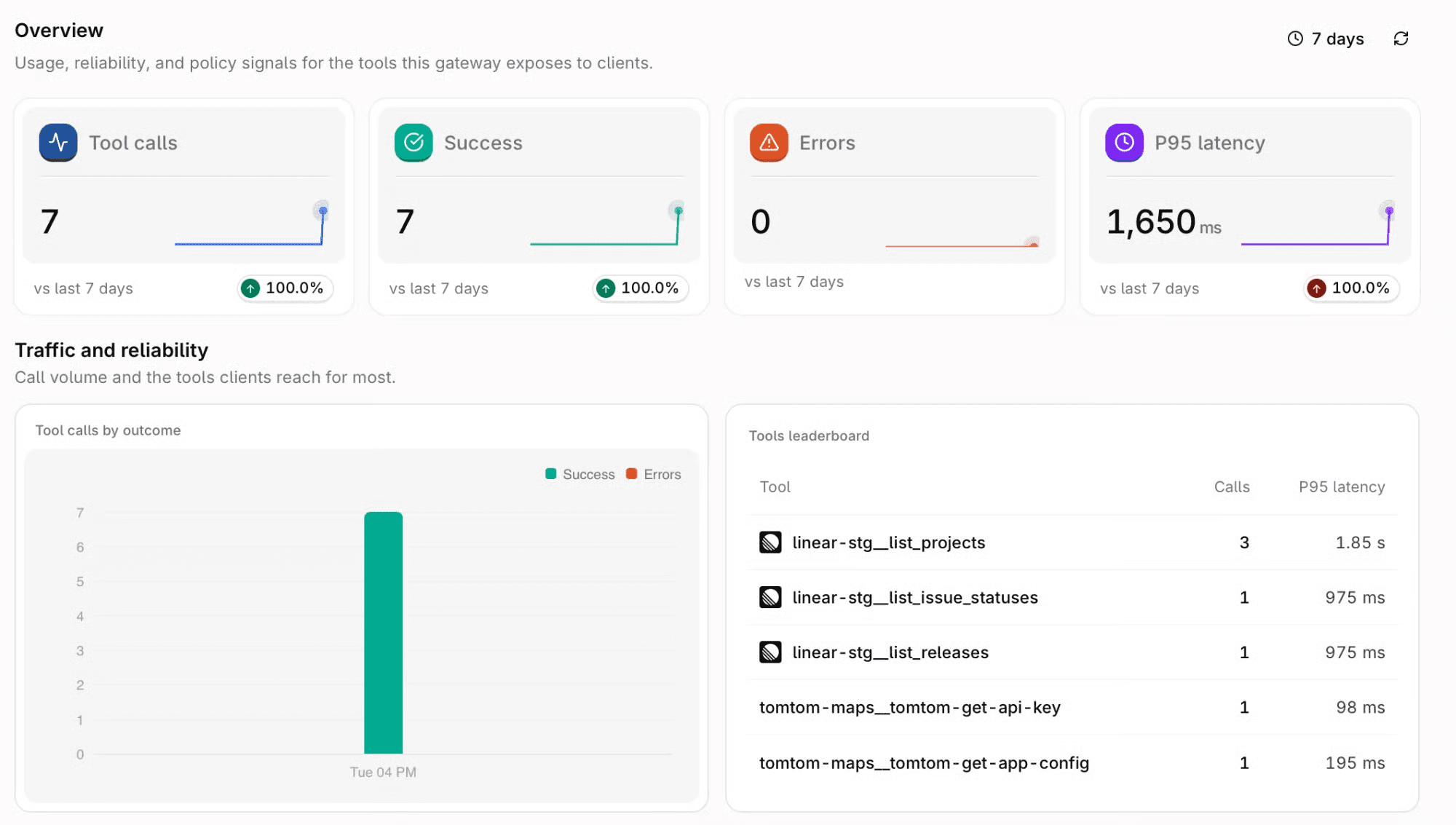
Basic request logs aren’t enough for agent incidents.
If an agent unexpectedly changes a customer record, can you reconstruct who initiated the action, which tool actually ran, and what came back from the server?
Check the other side of that trade-off too.
Logging every tool argument can expose credentials, personal data, or other sensitive values. Good auditability means capturing enough context to investigate an action without turning the gateway into another store of sensitive payloads.
Avoid creating a second disconnected control plane
An MCP gateway has to fit the rest of the agent stack.
If model traffic already flows through an AI gateway and identity comes from an existing provider, the MCP layer should integrate with those systems rather than inventing parallel versions of them.
This matters most when a single agent run crosses both paths. Otherwise, troubleshooting one workflow can mean stitching together model traces from one system and tool traces from another.
Match the deployment model to the tools the agent can reach
Security requirements should follow the consequence of the tool call.
An internal documentation agent and an agent that can modify customer records don’t necessarily need the same deployment model or network boundary.
Work backwards from what the agent can touch, then decide what you need around:
Isolation
Residency
Audit controls
Private networking
A gateway that’s perfectly adequate for low-risk internal tools might very well end up being a poor fit once MCP reaches sensitive production systems.
Bring model and tool traffic into the same control plane
Agent workflows don’t stop at the model response. A model may decide that an external action is required, which moves the same execution from the model path onto the MCP tool path.
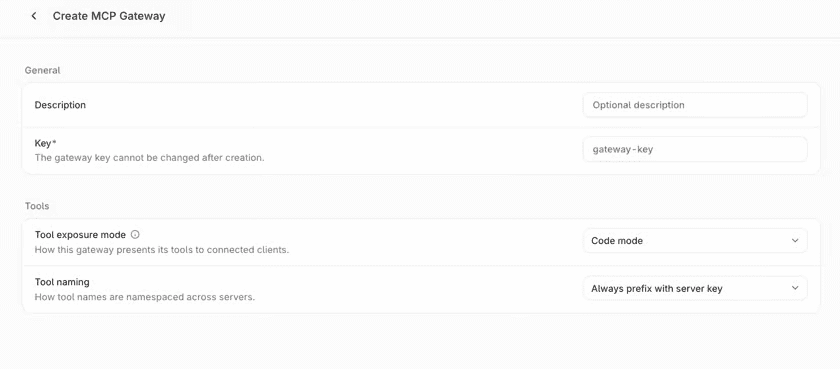
Orq.ai’s AI Gateway already sits on the model side of that flow. Its MCP Gateway brings tool traffic into the same operational layer, rather than forcing teams to treat the two halves of an agent run as separate infrastructure.
That becomes useful when something goes wrong. If an agent chooses a model, receives a response, then modifies data through an MCP tool, the platform team shouldn’t have to reconstruct the first half of the execution in one system and the second half somewhere else.
The architectural advantage is continuity.
Model requests and tool actions can be operated as parts of the same agent workflow.
That’s the operational model we prefer. The model decision and the tool action can remain separate architectural concerns without becoming separate stories when you have to debug the run.
Centralize MCP control before complexity spreads
Once MCP becomes shared infrastructure, connection management stops being your main concern.
You don’t need a gateway for every MCP deployment.
Add one when individual clients start carrying identity or tracing logic that should really be shared. That’s the point where an extra layer can simplify the architecture instead of adding unnecessary machinery.
See how Orq.ai gives teams one control plane across model requests and MCP tool traffic.