





Most teams choose an LLM for the job in front of them.
Later, they discover that choice has shaped response handling across the app.
We’ve found provider lock-in is usually behavioral before it’s contractual. The SDK may be easy to replace. Meanwhile schemas and tool assumptions have already spread through the workflow.
The model name and provider changes. The prompts, tool calls, and response handling often don’t.
That’s where switching gets expensive. A model swap can turn into code edits, test updates, and sometimes a full migration task.
Teams feel it most when costs rise, a better model appears, or compliance requirements force a different provider.
This guide explains how to keep provider-specific logic out of the application, so model changes stay inside configuration and not business code.
Why do teams switch LLM providers?
Teams switch providers when the current model becomes too expensive, too slow, too limited, or no longer fits the workload.
Cost and token economics
Frontier models are often the wrong default for high-volume workloads. A cheaper model can be good enough for extraction or routing, especially when the output doesn’t need deep reasoning.
At scale, even a small per-token gap changes the economics of the product.
We believe you should measure the total cost of the workflow, not just token prices. A cheaper model can become the more expensive option if it needs additional retries, validation, or human review.
Model quality improvements
Model releases move quickly.
The best option six months ago isn’t always the best one now.
A newer provider may do better on reasoning, instruction following, or domain-specific tasks.
Teams switch when they find a model that produces better results with less prompt scaffolding or less post-processing.
There’s rarely one new model that wins across every task. We see stronger results when teams compare models per deployment or workflow instead of replacing the default everywhere at once.
Reliability and failover
No provider is immune to outages, latency spikes, or rate limits. When a production workflow depends on one model, the vendor’s uptime becomes your uptime. That’s a hard dependency to accept for customer-facing systems.
Compliance and data residency
Some workloads can only run on providers that satisfy security, residency, or regulatory requirements.
That matters in regulated industries, but it also matters for enterprises that have to keep certain data in specific regions or under specific contractual terms.
Access to new capabilities
New capabilities rarely arrive everywhere at once. If a workflow needs multimodal input or a specific fine-tuning path the right provider may change even if the current one still performs well on the old task.
The real sources of provider lock-in
Provider lock-in usually starts in the obvious place: the SDK.
If every call site reaches straight into one vendor’s client, switching providers means touching a lot of code.
Yet, the SDK is only the surface layer.
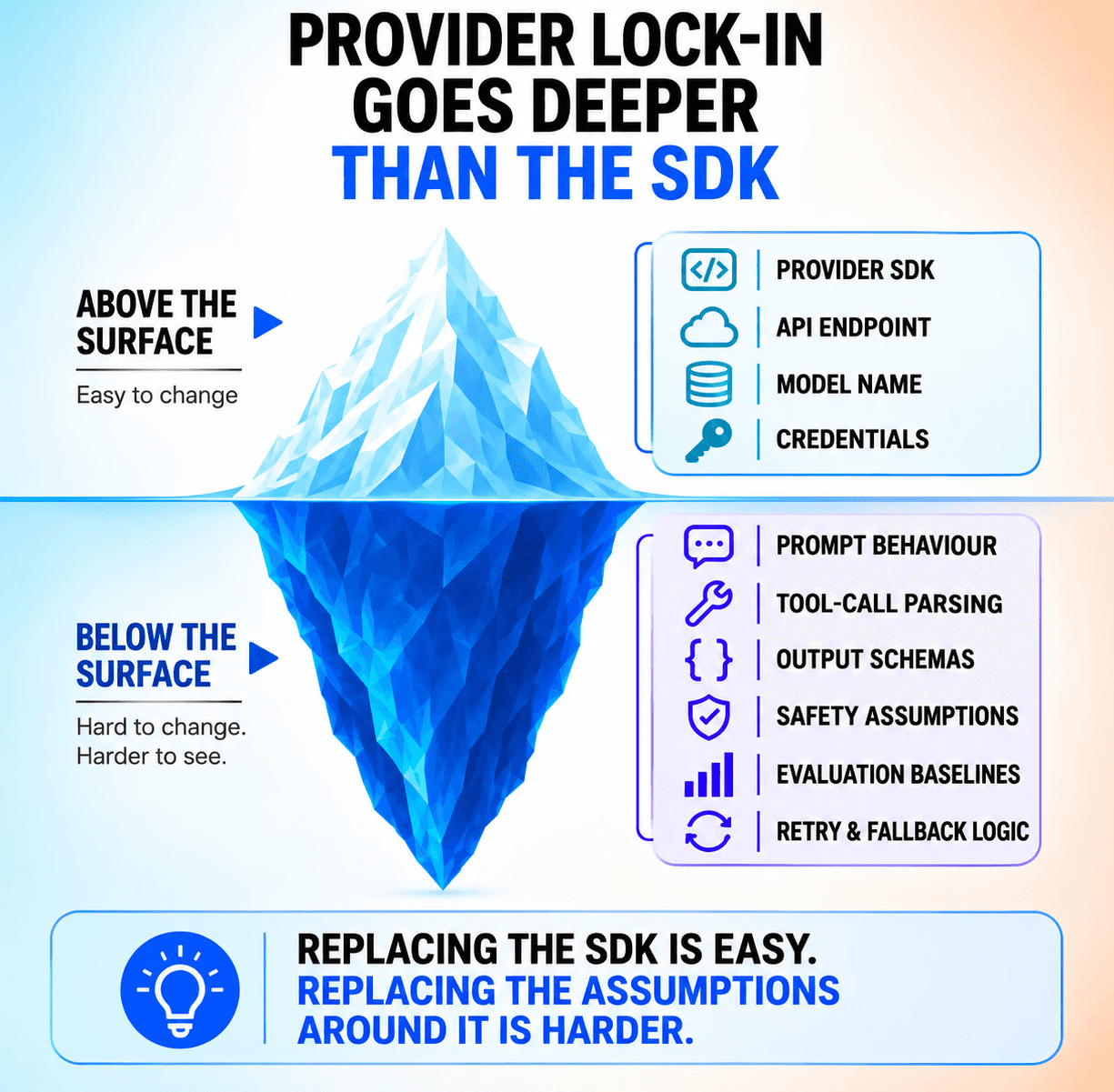
The harder dependencies are the ones that build up around it. Prompts tuned for one model family and evaluation logic that only makes sense for the current provider.
Model-specific prompt patterns
A prompt that works well on one model can behave very differently on another. You usually see the gap in instruction following or how much scaffolding the model needs to stay on task.
Over time, prompts drift toward the provider they were written for, which makes them harder to move than the application team expects.
Tool use and function calling
Tool calling is where provider differences become hard to ignore.
At Orq.ai, tool-heavy workflows are usually where a supposedly simple model swap becomes a real migration. Small differences in argument generation or error handling can change how the entire agent behaves.
Structured output handling
Structured output creates another layer of dependence. Some providers enforce schemas strictly. Others rely more on prompt design and cleanup after the fact.
That difference matters when downstream systems expect valid JSON or another fixed format, because the app may keep running while the output quality quietly degrades.
Evaluation and testing baselines
Evaluation can lock teams in just as much as prompts do.
If your test set was built around one provider’s style of output, it may stop giving you a fair comparison once you introduce another model family.
Building provider-portable applications
OpenAI-compatible endpoints can reduce migration effort at the request layer, but don’t solve the harder problems underneath:
Tool calls differ
Safety rules vary
Prompt behavior changes
Output quality shifts between model families
One answer is to keep provider-specific logic out of the application.
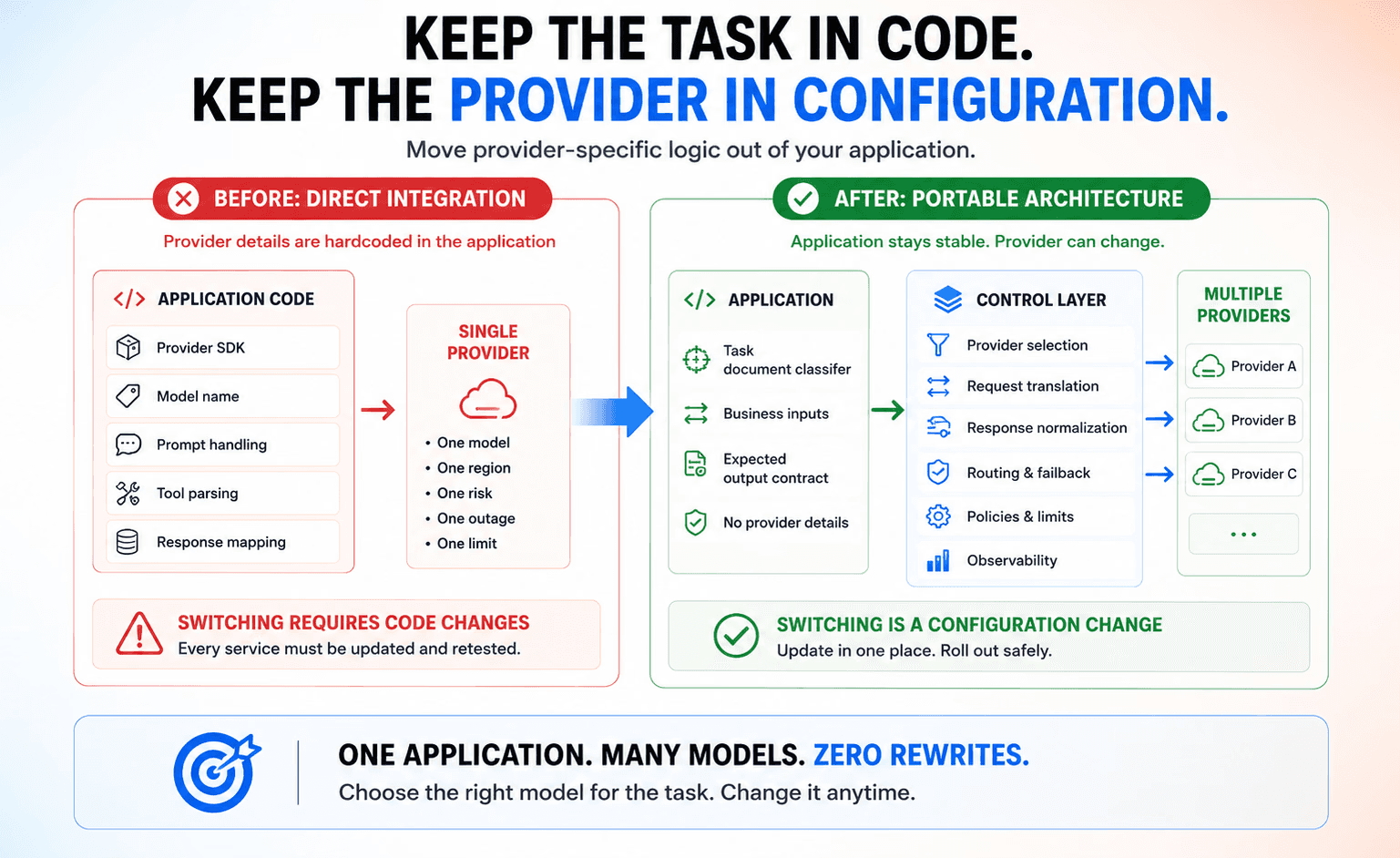
The app should express the task it wants completed. A routing layer should decide which provider handles the request, translate it into the right format, and normalize the response on the way back. That keeps model changes from turning into application changes.
What teams usually build first
Most enterprises start with a direct provider integration since it’s the fastest way to ship. One SDK gets imported into the codebase, prompts sit next to application logic, and responses get parsed at the call site.
python
from openai import OpenAI
client = OpenAI(api_key=os.getenv("OPENAI_API_KEY"))
def classify_document(document_text: str) -> str:
response = client.chat.completions.create(
model="gpt-4o",
messages=[
{"role": "system", "content": SYSTEM_PROMPT},
{"role": "user", "content": document_text},
],
temperature=0.1,
)
return response.choices[0].message.content
That’s a reasonable starting point.
Problem is that the provider SDK, model name, and response shape all become part of the application contract. Once that happens, switching providers is code work.
What a portable setup changes
A more durable setup moves those provider details behind a stable interface. The application still asks for document classification.
We prefer stable deployment identifiers like document-classifier over model names in application code.

The deployment represents the business task and the underlying model can change without altering the application contract.
Yet, it no longer needs to know which provider runs the task or how the response is formatted internally.
python
from orq_ai_sdk import Orq
client = Orq(api_key=os.getenv("ORQ_API_KEY"))
def classify_document(document_text: str) -> str:
response = client.deployments.invoke(
key="document-classifier",
inputs={"document": document_text},
)
return response.choices[0].message.content
That change looks small in code, but it changes a lot operationally.
A provider switch becomes something the platform team can control and validate, not something every service owner has to patch by hand.
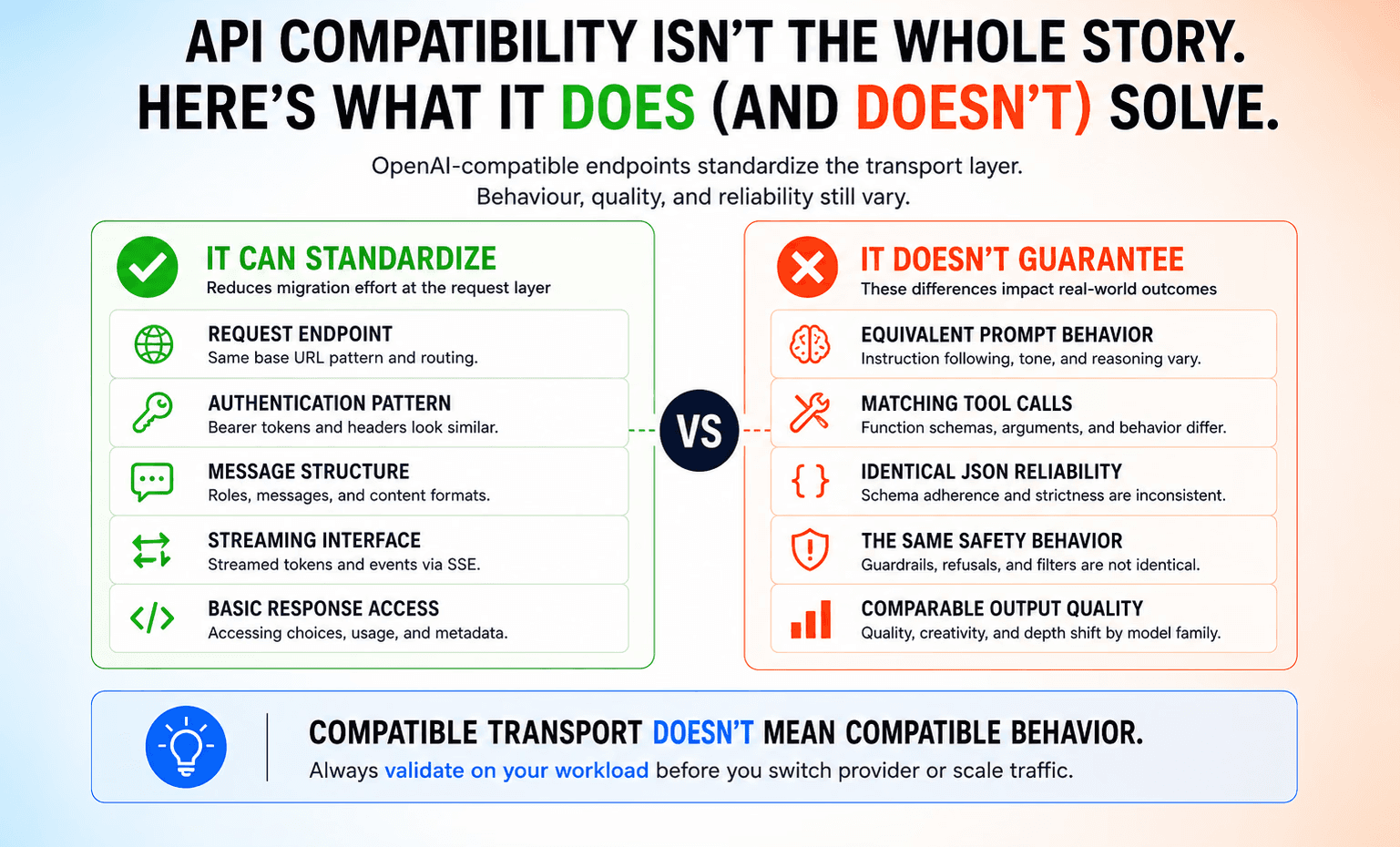
That distinction matters because provider portability should be a repeatable operating capability, rather than a one-time migration project rebuilt whenever the model market changes.
Where configuration belongs
Model names and fallback policy should live in one control layer, not inside business logic.
That gives teams one place to test changes, compare providers, and roll traffic gradually.
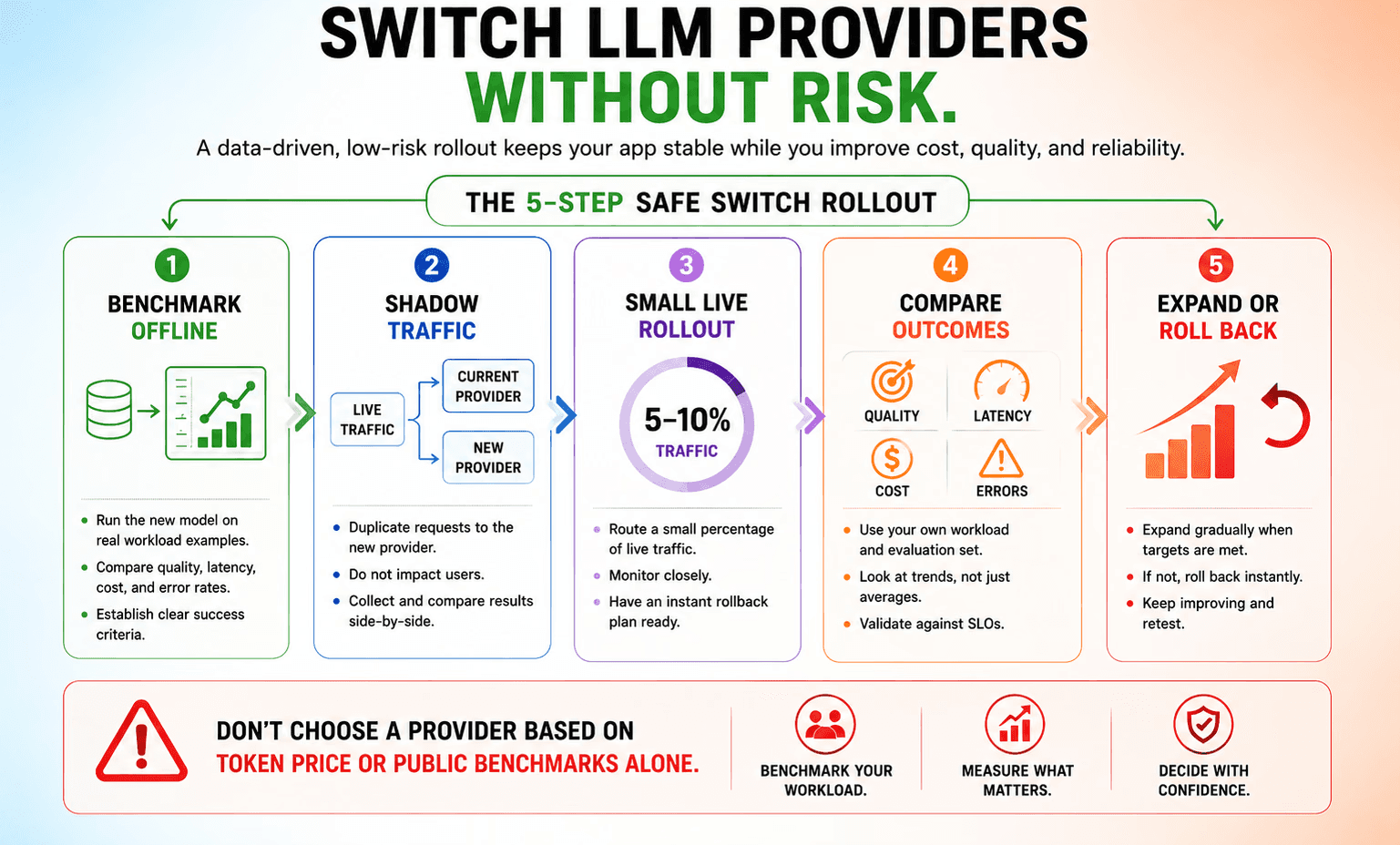
The safest provider changes we see start with shadow evaluations or a small percentage of live traffic. Teams compare quality and cost before expanding the new model’s share.
It also makes production validation easier because the unit of change is a deployment configuration, not a chain of code edits across the stack.
The multi-provider operating model
Portability only matters if it gives you routing choices.
Once the application can move between models, you can match requests to the model that fits them best.
Fast, inexpensive models can handle extraction and other low-risk tasks. Stronger models can stay reserved for reasoning-heavy or high-stakes work.
That’s the real value of a multi-provider setup.
It gives teams a way to reserve stronger models for harder requests and cheaper models for lighter ones. It also gives them a clean fallback path when a provider slows down or goes out entirely.
The catch is routing only works when teams make decisions from their own workload data. Provider marketing pages won’t be sufficient. You need to benchmark latency and cost on the tasks your application actually runs in production.
Make provider switching a configuration change
When the application is built around a control layer instead of a single vendor, teams can compare models on real traffic and keep moving without turning every decision into a rewrite.
That matters because model choice keeps changing under your feet. A provider that’s right today might be the wrong fit next quarter.
Teams that stay flexible will be able to adapt without paying a migration penalty each time the market shifts.
Book a demo to see how Orq.ai supports provider portability with routing, fallback, and observability built into the control layer.