






Most hallucinations never trigger an alert.
The request succeeds and the answer looks plausible enough to ship.
A support assistant can invent a refund exception, or a RAG system can pin a claim on a source that never made it.
Every infrastructure chart can stay green.
One bad answer leaves you with several possible causes. The model might have made it up. Retrieval may have supplied stale evidence. A tool could have returned the wrong data. A prompt or routing change may have introduced a regression across a whole class of requests.
Finding out which one happened requires more than checking individual traces after someone complains.

You need to know what failure looks like for the application, measure it consistently, and see when the pattern starts to change.
Until you define the failures that matter, a hallucination score is just a number.
Hallucination monitoring starts by defining what “wrong” means for your application
Start with the failure your product actually needs to catch.
For a RAG assistant, that might be a claim the retrieved documents don’t support. In customer support, it could be an invented refund rule or a false statement about an account.
A coding assistant has its own version: code that looks perfectly valid, then breaks against the customer’s environment.
Those failures need different checks. A single hallucination score can penalize harmless paraphrasing and still miss the mistake that gets you into trouble.

So define the boundary first.
What evidence should support them?
Which mistakes require someone to intervene?
What claims is the application allowed to make?
The answers determine what you monitor.
If product information changes frequently, check both factual support and source freshness.
If an agent can modify customer records, verify that the tool call was authorized and that the final response matches what the tool actually returned.
A useful hallucination signal should map to a failure you know how to act on.
Match the detection signal to the hallucination you need to catch
The right check depends on what the answer is supposed to agree with.

You can check whether a citation exists or whether a balance matches the system of record with ordinary code. When the rule is exact, an exact check is usually easier to debug.
Orq.ai supports Python evaluators for deterministic checks that don’t need another model.
The example below compares the length of the generated output with a reference and turns the difference into a guardrail:
curl --request POST \ |
The example checks output length rather than hallucination, but the pattern is useful. When a failure can be expressed as an exact rule, encode it directly and make the threshold enforceable.
The harder cases involve meaning. A response can cite a real document and still claim something the document never says. It can repeat the right account balance and draw the wrong conclusion from it.
A model-based evaluator becomes useful here. Give it the request, the evidence available to the application, and one narrowly defined job.

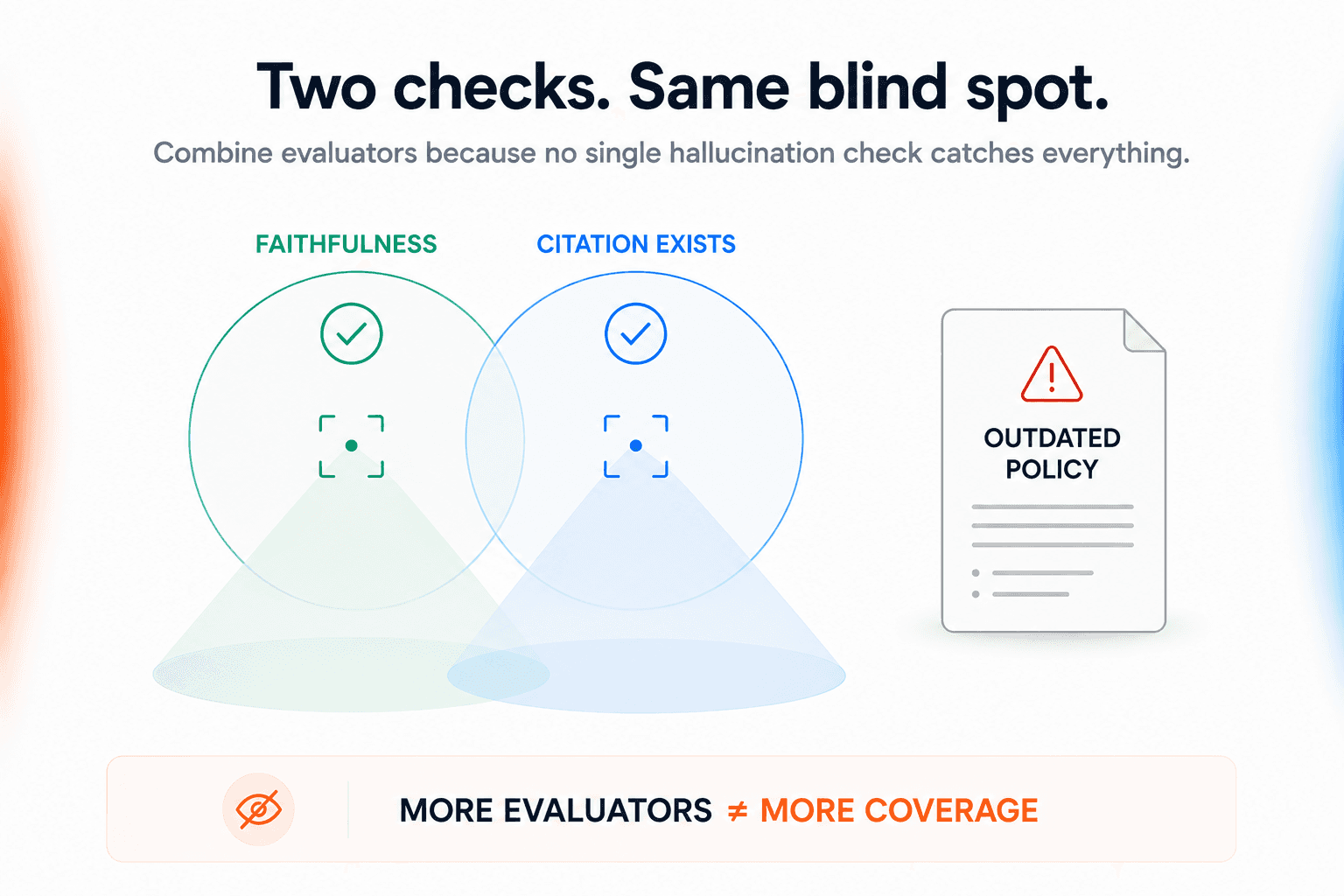
Combine evaluators because no single hallucination check catches everything
Faithfulness alone can give you false confidence.
Take a case where a support assistant answers entirely from the documents it retrieved. The faithfulness evaluator gives it a clean score. Unfortunately, the document contains last year’s refund policy.
Now let’s think about citations. Checking that a URL or document exists catches fabricated sources. It doesn’t tell you anything about whether the source actually backs the sentence beside it.
This is why useful monitoring usually combines a few narrow checks.
A RAG application might measure whether retrieval returned relevant context and whether time-sensitive sources are still current.

For an agent making account changes, you’ll probably also need to verify what the tool returned and whether the final answer accurately reflects it.
Keep each evaluator responsible for one failure you understand. If two scores consistently tell you the same thing, one may be redundant.
Two evaluators that fail on the same cases aren’t necessarily two lines of defense. You could just be measuring the same blind spot twice.
Establish an application-specific hallucination baseline before monitoring production
A 3% hallucination rate doesn’t tell you very much on its own.
The denominator matters too. A model that starts making far more factual claims has more opportunities to hallucinate, even if the percentage of responses flagged by your evaluator barely moves.
For a support assistant answering questions about customer eligibility, even a small number of unsupported claims can demand attention. An internal research tool has more room for uncertainty when users can see the sources and verify the answer themselves. The acceptable rate comes from the consequences of getting the answer wrong.

Work that out before you start firing alerts.
Run your evaluators over the kinds of requests the application actually receives. Include the uninteresting questions that make up most traffic, along with cases you already know are difficult and workflows where a wrong answer carries more risk.

Then read some of the outputs yourself.
This way, you’re checking two things: how often the application fails and whether the evaluator recognizes those failures when a human would.
For a high-risk workflow, pay particular attention to false negatives. A judge can agree with humans 95% of the time and still be dangerous if the remaining 5% contains the unsupported claims you most need it to catch.
That’s what the baseline gives you. A way to distinguish ordinary variation from a regression worth investigating.
We would read that rate alongside answer coverage. An assistant can appear to hallucinate less simply because it has started refusing more requests.
Production monitoring should reveal regressions, not just individual bad answers
One bad answer gives you something to debug. Twenty more appearing after yesterday’s retrieval release gives you a regression.
That difference is what production monitoring needs to expose.
Track hallucination signals over time, then break them down by whatever changed:
Model
Tool path
Workload
Prompt version
Retrieval setup
Knowledge base
An application-wide average can look perfectly normal even when one important slice of traffic is getting worse.
Say the overall faithfulness failure rate stays at 2%. Nothing looks unusual. Split the traffic by model route and you find that requests sent through a new route have climbed from 1% to 6% since deployment.

Check the workload mix before blaming the model. If the router deliberately sends harder requests down one route, a higher hallucination rate there may reflect the traffic it receives rather than a worse model.
Now there’s somewhere specific to investigate.
Same principle applies to alerts.
A single failed evaluation is usually a case to inspect, not an incident. Escalate when failures move outside the range you established at baseline.
The useful alert is the one that tells you what changed, where it changed, and when it started.
Trace hallucinations back to the component that caused them
The model might have invented the claim. Retrieval could have returned the wrong document.
Maybe the right passage was retrieved and then dropped before the prompt reached the model.
In an agentic workflow, the bad information may have entered through a tool call several steps earlier.
You need enough of the request history to replay what happened.
Keep the following in the same trace:
Tool calls
Original input
Final response
Prompt version
Guardrail results
Retrieved context
Model configuration
Orq.ai lets you instrument individual workflow steps as separate spans.
For example, retrieval and document-processing steps can be traced independently:
import os |
That separation matters during a hallucination investigation.
If the final response contains an unsupported claim, the trace can help distinguish a retrieval failure from something introduced later in the workflow.
When an evaluator flags an unsupported claim, an engineer can work backwards through that path instead of trying to reconstruct it from separate logs.
Orq.ai’s SDK can retrieve the logs for a specific trace directly:
from orq_ai_sdk import Orq |
That gives the engineer the trace context needed to inspect which step introduced the unsupported claim, whether it came from retrieval, a tool call, or the model response itself.
The pattern across failures often narrows the search quickly. If unsupported answers appear only after a knowledge-base update, inspect retrieval and the underlying sources. If the spike begins with a prompt release, compare the old and new versions.

You want to get from “this answer is wrong” to “this change caused these requests to fail.”
The shorter that path is, the faster the team can fix the right part of the system.
Respond according to hallucination risk, not every detection in the same way
What happens after a hallucination is detected should depend on what the mistake can actually do.
An internal research assistant might have added an unsupported detail to a summary. Logging the response for review could be enough. If a support agent wrongly tells a customer they qualify for a refund, letting the answer through and reviewing it tomorrow is a lot harder to justify.
Decide those responses before production starts.
Some failures only need to be recorded so the team can look for a pattern. Others can trigger another retrieval attempt, a different model, or a request for clarification. Once an application can affect an account or trigger another system, the safer response might be to stop the action and hand the case to a person.
Evaluator confidence still matters but doesn’t tell you the consequence of being wrong. An uncertain answer about a low-stakes research question and an uncertain answer about customer eligibility create very different decisions.

Map each monitored failure to an intervention in advance.
When the evaluator fires, the application already knows whether to log it or stop.
Hallucination monitoring should feed the application improvement loop
Every useful production failure should leave behind a test.
Say a support assistant retrieves an outdated policy and promises a refund it should not offer. You fix the source or retrieval logic, but keep the original request, context, and failed response. Add that case to the evaluation dataset.
Now the next prompt edit or model switch has to handle it correctly before you ship.
Do this repeatedly and the test set starts to reflect the unstructured cases users actually uncover:
Stale sources
Retrieval misses
Awkward questions
Misleading tool output
Prompts that behave differently outside the examples used during development
The important part is closing the loop. A production failure gets reviewed, the cause gets fixed, and the case stays behind as a regression test.
Otherwise, you could end up solving the same hallucination twice.

Orq.ai connects hallucination detection to the request that produced it
A hallucination score is much more useful when you can open the request behind it.
In Orq.ai, evaluator results and hallucination annotations can sit alongside the trace that produced the response. From a flagged answer, teams can inspect the prompt and tool steps to see where the unsupported claim entered the workflow.
That makes the evaluator the start of the investigation. An engineer can compare the failed response with its evidence and narrow the problem to retrieval or another step in the trace.

Once the failure has been reviewed, keep it.
Add the case to an evaluation dataset and run it against the next prompt, model, or retrieval change before release.
The production mistake becomes a test the application has to pass next time.
Make hallucination monitoring a regression system, not a one-time test
You won’t be able to anticipate every bad answer before production.
What you can do is make sure the same failure does not keep surprising you.
When a hallucination appears, trace it back to the prompt or tool that produced it. Fix the cause, then keep the request as an eval case.
The next model swap, prompt edit, or retrieval change has to pass that case before it ships.
Do that consistently and production traffic improves the test suite for you. The failures users uncover today become the cases your application is expected to handle tomorrow.
See how Orq.ai helps teams detect and prevent recurring AI failures.