





AI agents are getting better at using tools, accessing data, and taking action, and Model Context Protocol (MCP) is a huge part of that shift. It gives agents a structured way to connect with external tools and services.
But as you continue adding agents and MCP servers, things can get messy. How do you know who has access, who controls tool calls, and how to keep everything secure and up to date?
That’s where an MCP gateway comes in. It gives teams a single place to connect, route, secure, and monitor MCP traffic.
But choosing the right MCP gateway can be confusing. Some focus on flexibility and self-hosting, while others focus on enterprise governance, observability, and broader AI infrastructure.
In this guide, we’ll look at 8 of the best MCP gateways in 2026, comparing their key features, architecture, pricing, pros and cons, and ideal use cases, so you can identify which one makes the most sense for your AI stack.
What is an MCP gateway?
An MCP gateway offers a central layer between AI agents and the tools, APIs, and services they access through the MCP. Depending on the platform, it can help teams:
Connect and manage MCP servers from a central location.
Authenticate and authorize agents/users before they access tools.
Route tool calls to the right MCP servers.
Apply policies and access controls regularly.
Monitor and trace tool calls for improved visibility.
Manage usage and costs across teams and applications.
Scale reliability with controls such as retries and failover.
It is similar to how an AI gateway can centralize access to multiple LLM providers instead of having every application handle separate model connections.
Best MCP Gateway Tools in 2026
Orq.ai
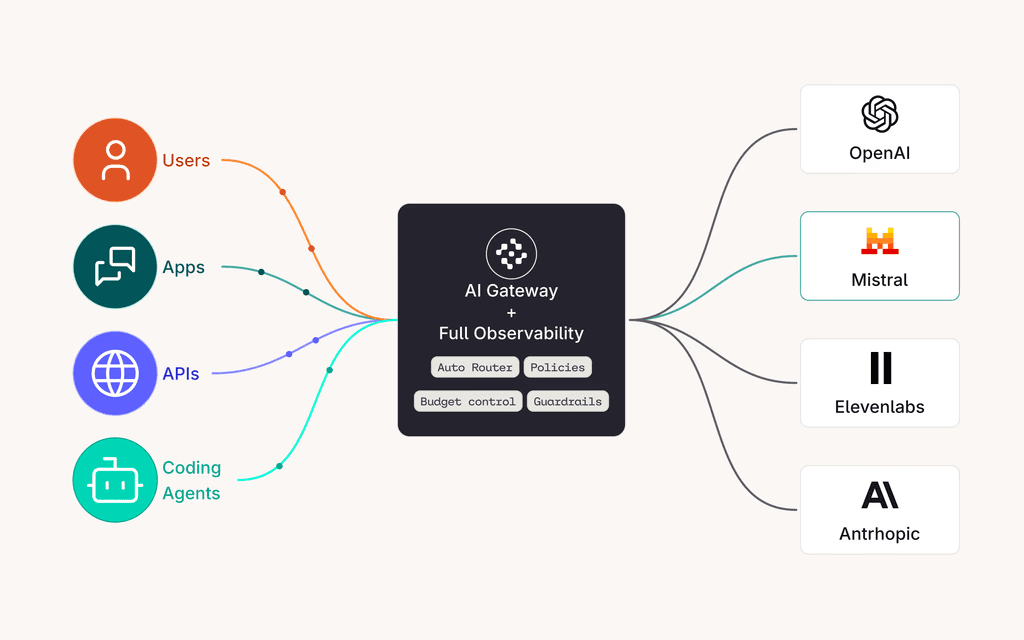
Orq.ai brings MCP tools and LLMs together within one AI gateway. Teams can connect remote MCP servers and control how agents access and use those tools from the same platform. It is especially helpful for teams that want MCP and LLM governance in one platform, rather than adding a separate gateway just for MCP.
Key Features:
Connect remote MCP servers through a centralized gateway.
Route and govern MCP tool calls.
Apply policies across model and tool traffic
Trace tool calls alongside other AI activity
Role-based access controls and audit logs
Budgets, alerts, and usage controls
PII detection and redaction
Fallbacks, retries, and load balancing
OpenTelemetry support for observability
Support for Cloud, VPC, and on-premises deployment options for enterprise use
Architecture:
Orq.ai brings MCP into its broader AI gateway, so teams can manage MCP tools and LLM traffic in one place. It handles routing, access controls, policies, and monitoring before requests reach the right model or MCP server.
Teams can manage MCP tools and an LLM setup without adding another platform. It also provides a shared library for MCPs, tools, prompts, and skills, making it easier to keep AI resources organized in one place.
Pros:
Combines MCP and LLM governance on one platform
Strong observability and tracing
Built-in governance and access controls
Supports enterprise deployment requirements
No need to build and maintain a separate MCP management layer
Cons:
Not suitable for small MCP setup
Teams looking for a lightweight, open-source MCP gateway may prefer a simpler solution
Pricing: The platform offers a pay-as-you-go plan that includes its MCP gateway. It also has an Enterprise plan with additional governance features, and on-premise and VPC deployment options.
Best for: Enterprise teams that want MCP and LLM traffic managed through one governed AI infrastructure layer, particularly when observability, access control, cost management, and centralized governance are important.
2. TrueFoundry
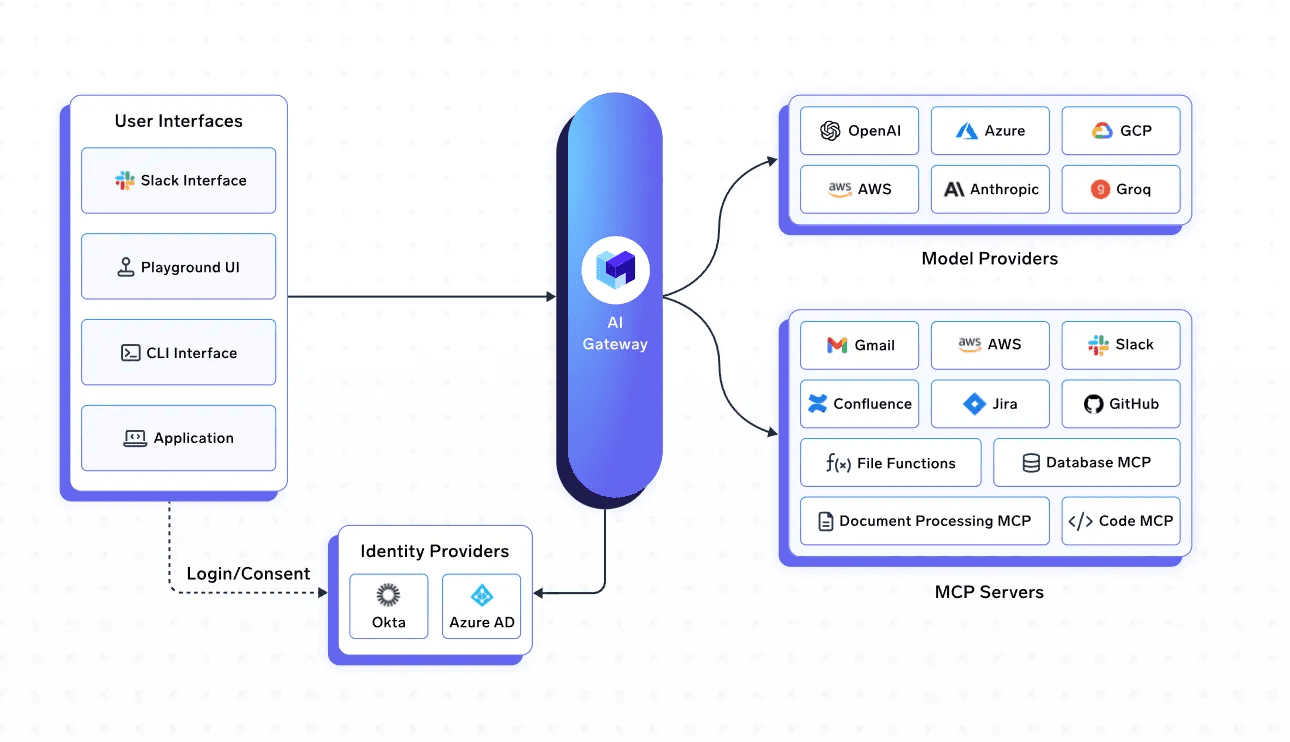
TrueFoundry brings LLM requests and MCP tool calls into the same management layer. This gives teams a single place to handle their AI traffic instead of maintaining separate systems for models and tools. It provides one integrated control panel to simplify day-to-day operations.
Key features:
Centralized MCP server registry and discovery
OAuth 2.0 and federated authentication
RBAC for controlling access to MCO servers
Request tracing and audit logs
Support for internal, third-party, cloud, and self-hosted MCP servers
Integration with enterprise identity providers such as Okta and Azure AD
Observability for tool usage, latency, errors, and costs
Support for VPC, on-premises, hybrid, and air-gapped deployments
Architecture:
TrueFoundry uses a centralized gateway between agents and MCP servers. It handles authentication, access policies, and routing giving teams one place to manage which tools are available and who can use them.
Pros
Strong enterprise security and access controls
Centralized MCP server management
Detailed observability and auditing
Flexible deployment options
Works alongside TrueFoundry’s LLM and agent infrastructure
Cons
Enterprise-focused features can add complexity to simpler MCP setups
Not suitable for smaller teams
Pricing
Developer: Free (50k requests/month, 3 users, up to 5 MCP servers)
Pro: $499/month (1M requests/month, 10 users, up to 25 MCP servers)
Pro Plus: $2,999/month (SSO, GDPR/HIPAA certificates, VPC/air-gapped, up to 50 MCP servers)
Enterprise: Custom (10M+ requests, dedicated onboarding)
Self-hosting adds ~$600-$1,000/month infrastructure
Best for: Enterprise teams that need central MCP management, strong access controls, and flexible deployment options.
3. Docker MCP Gateway
Docker’s MCP Gateway is an open-source gateway that makes it easier to run and manage multiple MCP servers. It uses Docker containers to isolate MCP servers and gives AI clients a single connection point instead of requiring separate connections to each server.
Key Features:
Centralized access to multiple MCP servers
Container-based isolation
Credential and OAuth management
Server and tool filtering
Architecture: The basic setup is AI Client → MCP Gateway → MCP Servers. The gateway manages MCP servers running in containers and routes requests to the right server. This also keeps individual MCP servers isolated from the client.
Pros
Open source
Strong container isolation
Large MCP server catalog
Good fit for Docker-based environments
Cons
Best suited for teams already using Docker
Some governance capabilities require Docker’s commercial offerings
Pricing: Infrastructure costs only.
Best for: Developers and teams that are already using Docker who want a straightforward way to run and manage multiple MCP servers.
4. Microsoft MCP Gateway
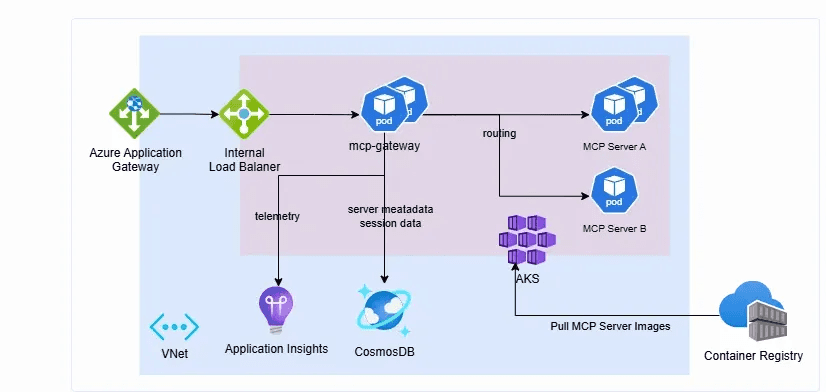
Microsoft’s MCP Gateway is a reverse proxy and management layer for MCP servers. It is designed for scalable deployments, particularly in a Kubernetes environment, where teams need centralized routing, authorization, and MCP server lifecycle management.
Key Features
Session-aware routings for MCP servers
Microsoft Entra ID authentication and role-based access
MCP server lifecycle management
Kubernetes-native deployment and scaling
Architecture: The gateway sits between AI clients and MCP servers, handling routing and access before requests reach the appropriate server. Its control panel also lets teams deploy, update, and manage MCP servers from a central location.
Pros
Open source
Strong fit for Kubernetes native
Supports both local and remote MCP servers
Cons
Infrastructure-heavy for smaller deployments
Best suited to teams with Kubernetes and Azure expertise
Pricing: Infrastructure costs only
Best for: Enterprise and platform teams running MCP workloads on Kubernetes, especially those already using Azure and Microsoft Entra ID.
5. Zapier MCP
Zapier MCP exposes Zapier’s library of 9,000+ apps through MCP, letting AI agents work with tools such as Gmail, Slack, Salesforce, and Google Calendar without building each integration from scratch. You can use existing Zapier connections through a remote endpoint configured in the browser, while Zapier handles the credentials and app connections.
Key Features
Works with major MCP clients such as ChatGPT, Claude, and Cursor
Access to 9000+ app integrations
Managed authentication and app connections
Control over which apps and actions AI can access
Architecture: Zapier MCP acts as the bridge between the AI client and the apps connected to Zapier. The AI calls a Zapier MCP tool, and Zapier executes the corresponding action in the connected app.
Pros
Huge app ecosystem
Easy to set up
No separate MCP infrastructure to maintain
Cons
Less focused on managing large numbers of independent MCP servers
Tool calls consume Zapier tasks
Sharing MCP servers with teammates requires Team or Enterprise plan
Task based pricing
Pricing
Free: $0, 100 tasks/month
Professional: from $19.99/month annual, 750 tasks/month
Team: from $69/month annual, 25 users
Enterprise: Contact sales
MCP tool calls confirmed at 2 tasks each from the shared pool, directly on the pricing page
Best for: Teams that want to give AI agents access to a large number of business apps without building and maintaining individual integrations.
6. IBM ContextForge
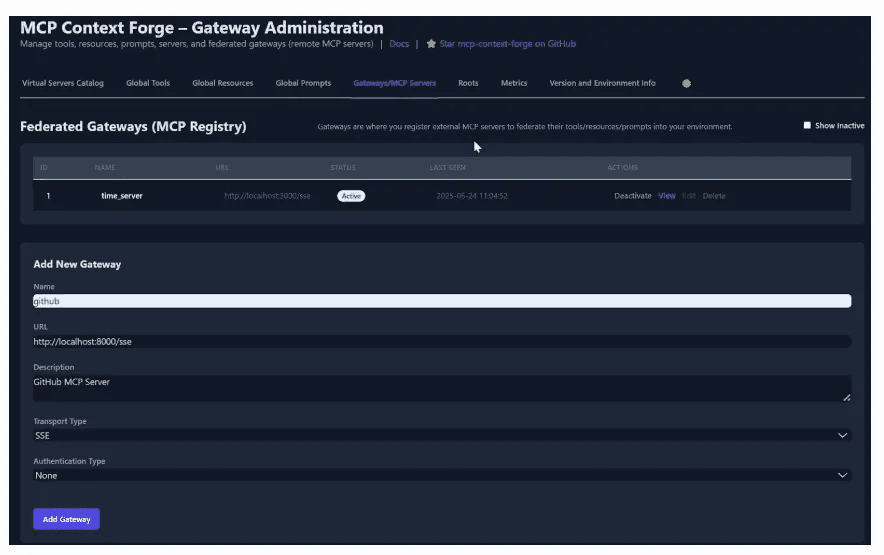
ContextForge brings multiple MCP servers, REST APIs, gRPC services, and agents into a single gateway. Its main focus is to give teams one place to discover, manage, secure, and monitor these connections.
Key Features
MCP, REST, and gRPC
Centralized authentication and access controls
Rate limiting and retries
OpenTelemetry-based observability
Architecture: ContextForge acts as a central proxy between AI clients and connected tools or services. It can also turn REST and gRPC services as MCP tools, so teams can work with different backends through a common interface.
Pros
Broad protocol support
Strong governance and security controls
Flexible self-hosting options
Built-in observability
Cons
Can be more complex than a basic MCP gateway
Self-hosted deployments require infrastructure management
Its broad protocol support can add complexity for teams only using MCP
Pricing: Infrastructure costs only
Best for: Teams that need to bring MCP servers and other APIs under one gateway, with stronger governance and protocol flexibility.
7. Bifrost
Bifrost is an AI gateway that also works as an MCP gateway, letting teams connect multiple MCP servers through a single endpoint. It focuses on keeping tool access fast and controlled while giving teams visibility into how those tools are used.
Key Features:
Connects MCP servers through a single gateway
Supports STDIO, HTTP, and SSE connections
Per-user OAuth and tool-level filtering
Code mode for working with large tool sets
Architecture:
Bitfrost can connect to external MCP servers and expose their tools through one gateway URL. It can also act as an MCP server, allowing clients such as Claude Desktop to connect to Bitfrost and access the available tools.
Pros:
Combines LLM and MCP gateway capabilities
Low-latency, high-throughput architecture
Useful for teams managing many MCP tools
Cons:
Features such as SSO, RBAC, audit logs, and federated MCP authentication are limited to the Enterprise plan
Teams that need only an MCP gateway may find its broader LLM gateway capabilities complex
Pricing
OSS: Free forever, Apache 2.0, self-hosted
Enterprise: Custom pricing, contact sales. 14-day free trial available
What's enterprise-only: guardrails, clustering, adaptive load balancing, SSO via SAML/OIDC, vault support, federated MCP auth, log exports, audit logs, RBAC, in-VPC deployment, identity provider integrations
Best for: Teams that want a high-performance MCP gateway alongside their existing LLM gateway, especially while managing a large number of tools.
8. Kong MCP Gateway
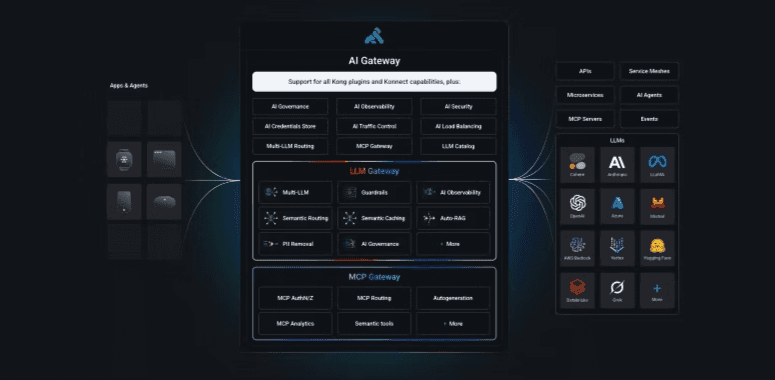
Kong integrates MCP gateway capabilities into its existing AI gateway, enabling teams to manage MCP traffic alongside their APIs, LLMs, and agent traffic. It focuses heavily on security and governance, with controls for authentication, tool-level access, traffic management, and observability.
Key Features:
Fine-grained access controls for individual MCP tools
OAuth and authentication support
MCP traffic monitoring and audit logs
Load balancing and traffic management
Architecture:
Kong sits between AI clients and MCP servers, applying security and traffic policies before requests reach the tools. It can also turn the existing APIs into MCP tools, which makes it useful for teams that want to bring APIs and MCP into the same gateway layer.
Pros:
Strong enterprise security and governance
Fine-grained, tool-level authorization
Flexible cloud and self-managed deployment options
Cons:
Can be overkill for teams only looking for a basic MCP gateway
Some advanced enterprise capabilities require paid plans
Teams may need Kong expertise to make full use of its wider gateway ecosystem
Pricing
Free trial: 30 days
Plus: Per gateway per month. Serverless $25/month each, Hybrid $200/month each, Dedicated Cloud $500/month per control plane. 1M API requests included, $200 per additional million. LLM models $100/month each, up to 5. Unlimited MCP server proxies included. SSO and audit logs are Enterprise-only.
Enterprise: Custom, contact sales
Best for: Enterprise teams that want MCP governance alongside their existing API and AI gateway infrastructure.
How to Choose the Right MCP Gateway
The right MCP gateway depends on what you need it to handle. Here are a few important things to consider:
Security and access control: Look for authentication, RBAC, tool-level permissions, and support for your existing identity provider.
Observability: Make sure you can track tool calls, errors, latency, and usage from one place.
Deployment: Check whether you need a managed service, self-hosted setup, VPC deployment, or support for Kubernetes and on-premises environments.
Scalability: Consider how easily the gateway can handle more agents, MCP servers, users, and tool calls as your AI stack grows.
Governance: If you are running AI in production, look for policies, audit logs, usage controls, and governance across both MCP tools and LLM traffic.
Integration with your stack: A gateway that works with your existing AI, API, identity, and observability infrastructure can be easier to operate than adding another disconnected layer.
Mistakes to Avoid While Evaluating MCP Gateways
Focusing only on the number of features: More features do not mean a better gateway. Focus on your actual requirements. Start with the capabilities your team actually needs.
Ignoring tool-level permissions: Broad access can give agents more permissions than they need. Look for granular controls that let you restrict access to specific tools and actions.
Treating the gateway as the entire security layer: A gateway can handle authentication, authorization, and auditing. It does not replace secure MCP servers, network controls, or proper credential management.
Overlooking observability: Debugging and auditing become much harder if you cannot see which agent called which tool,
Choosing without considering scale: A setup that works for a few MCP servers may become difficult to manage as the number of agents, tools, and users grows.
Not checking deployment requirements: Make sure the gateway fits your existing environment, whether that means cloud, VPC, Kubernetes, or self-hosted infrastructure.
Why Should You Choose Orq.ai for Integrated MCP + LLM Governance?
Keeping everything in separate systems can get complicated when you start managing multiple MCP tools and LLMs. Orq.ai brings both together, giving teams one place to manage models, agents, and MCP tools. Orq.ai helps teams:
Manage MCP and LLM traffic together: Route and govern both through the same AI gateway.
Control access: Set permissions for models and MCP tools based on team or user needs.
Monitor activity: Track LLM requests and MCP tool calls from one place.
Manage usage: Set budgets, alerts, and usage limits across your AI stack.
Protect sensitive data: Detect and redact PII to reduce the risk of exposing sensitive information.
Plus, Orq.ai is designed for teams running AI applications in production. It supports VPC and on-premise deployments, along with features such as RBAC, audit logs, and OpenTelemetry support.
This unified setup can make governance easier to manage as the AI stack grows for teams already working with multiple LLMs and MCP tools,
Choose the best MCP Gateway Today
MCP is making it easier for AI agents to work with tools and external services. But as those connections grow, keeping everything secure, visible, and easy to manage becomes more important.
That is where Orq.ai can help. By bringing MCP tools and LLMs under one governance layer, Orq.ai gives teams a simpler way to manage routing, access, observability, and usage from one platform.
Want to avoid managing separate systems for your models and MCP tools? Orq.ai gives you one place to bring them together and manage them as your AI stack grows.