

Why ship two backends?
LangGraph gives you a lot out of the box, graph-as-code, typed state transitions, tool loops, built-in streaming. Once you’re past the “hello world” example and wire up a real agent with a safety guardrail, a router, a tool loop, and a handful of LLM calls per turn, the question becomes: how do I actually see what happened in this run?
I’ve been working on a reference implementation of a LangGraph agent on top of orq.ai, the Hybrid Data Agent, a runnable demo that reasons over both a Knowledge Base of PDFs and an analytical SQL database, and when I started the repo, the only path from LangGraph spans to the orq.ai Studio was OpenTelemetry. It worked, but it took about 40 lines of setup, depended on a six-env-var dance with LangChain’s LangSmith integration.
Then orq_ai_sdk>=4.7.5 (see the 4.7.5 release notes) shipped a LangChain callback handler. Suddenly the happy path was one line. I rewrote the repo’s tracing layer to ship both backends side by side, switchable with a single ORQ_TRACING_BACKEND env var, so you can see the same LangGraph spans arriving in orq.ai Studio via two completely different transports and make an informed choice for your own app.
This post is a walkthrough of how each backend works, what the tradeoffs are, and when I’d reach for one over the other.
Backend 1: The callback handler
One line of setup, zero boilerplate
Here’s the entire callback backend, lifted verbatim from src/assistant/tracing_callback.py:
The only line that’s actually doing the work is orq_langchain_setup(api_key=api_key). The rest is an idempotency guard and an error message. That’s the whole setup.
How it works under the hood
orq_ai_sdk.langchain.setup() constructs an OrqLangchainCallback, a LangChain BaseCallbackHandler, and stores it in a module-level ContextVar inside the SDK. The SDK registers ContextVar with LangChain via langchain_core.tracers.context.register_configure_hook. That registration is the important bit: LangChain’s configure-hook system automatically picks up any callback in a registered ContextVar and attaches it to every Runnable invocation.
Because LangGraph is built on top of LangChain Runnables, every node, every tool call, every LLM call is a Runnable, the callback flows through the entire execution tree without any per-call wiring. You register it once and every span in every graph gets captured.
Under the hood, the callback builds OTLP-formatted span dicts and POSTs them as batched envelopes to https://my.orq.ai/v2/otel/v1/traces. The SDK’s OrqTracesClient debounces spans on a one-second timer so all the spans from a single trace arrive in one request, and this is the part I care about most, it registers its own atexit drain, so short-lived scripts like an eval pipeline or a CLI run don’t lose their final batch to a stuck debounce buffer.
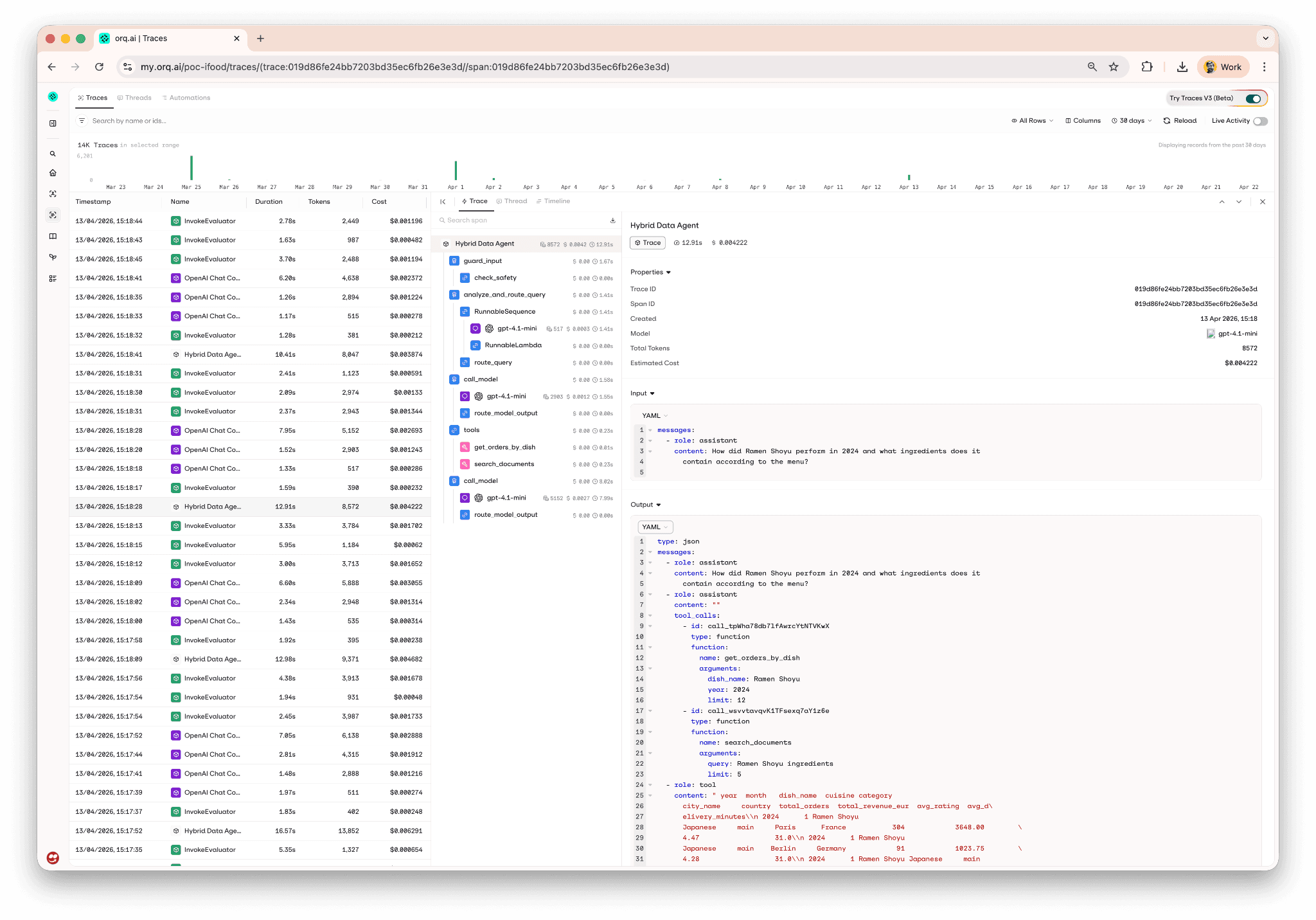
What you see in Studio
Here’s a real trace tree from a Margherita Pizza query running through the callback backend, every LangGraph node is captured, with the tool calls and LLM calls nested underneath the node that owns them:
Backend 2: The OpenTelemetry exporter
The portable alternative
Here’s the OTEL backend, lifted from src/assistant/tracing_otel.py:
There’s more going on here, and it’s worth walking through.
How it works under the hood
The six environment variables at the top are the load-bearing part. LangChain has a built-in tracer that talks to LangSmith. When you set LANGSMITH_TRACING=true, LangChain will start emitting trace data, but by default it goes to LangSmith’s cloud. LANGSMITH_OTEL_ENABLED=true tells LangChain to route through OTEL instead, and LANGSMITH_OTEL_ONLY=true tells it to only go through OTEL (no double tracing). The two OTEL_EXPORTER_OTLP_* variables point the OTEL exporter at orq.ai’s OTLP endpoint with your API key as bearer auth.
You’re setting LANGSMITH_* variables but nothing is ever sent to LangSmith.
On top of the env-var stomp, the backend creates an SDK TracerProvider, attaches a BatchSpanProcessor that wraps an OTLPSpanExporter, and sets it as the global tracer provider.
What you see in Studio
Here’s a trace tree from the same Margherita Pizza query, captured through the OTEL backend:
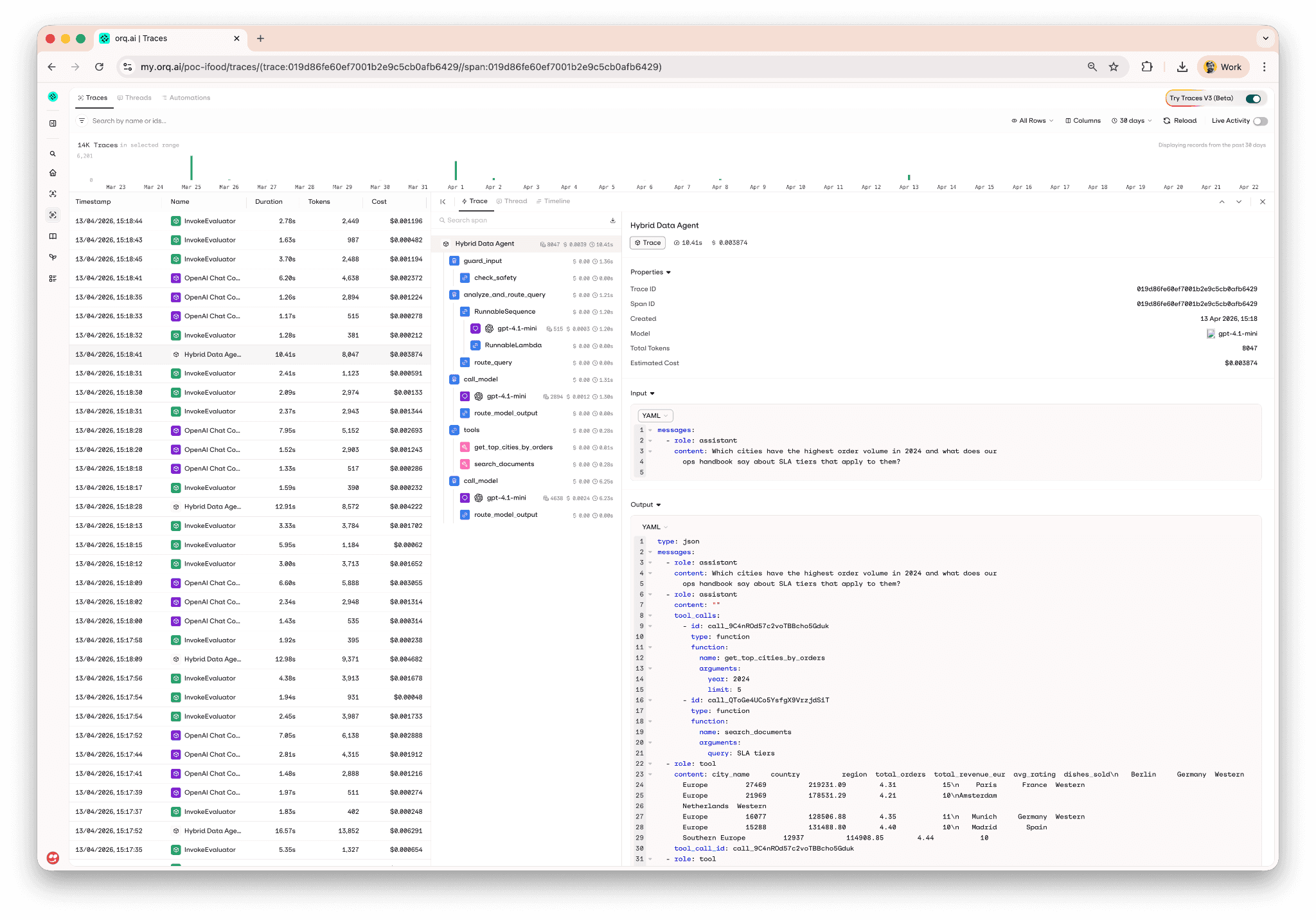
That’s the same screenshot as before. It’s the same view, the entire point of supporting two backends is that the resulting trace tree in orq.ai Studio is indistinguishable. Both paths capture every node, every tool call, every LLM call, with the same timing and cost data attached.
The import-order caveat
One sharp edge worth mentioning: the env-var stomp has to run before any langchain module is imported. LangChain reads those variables at import time to decide whether to register its tracer. If you import langchain_core before calling setup_otel_tracing(), the decision is already made and your spans won’t route correctly.
In the repo, every entry point (Chainlit UI, eval pipeline, bootstrap scripts) calls setup_tracing() at the top of the module before any LangChain import, that pattern is load-bearing for the OTEL backend and cosmetic for the callback backend. If you go with OTEL, keep that pattern; if you go with callback, you don’t need to worry about that.
Side-by-side comparison
Aspect | Callback | OTEL |
|---|---|---|
Setup complexity | One | 6 env vars + |
Span coverage | Every LangChain Runnable (LangGraph nodes, tools, LLMs) | Same, plus any other OTEL-instrumented library in the process |
Flush on exit | SDK’s |
|
Custom span attributes | Limited to what the SDK handler exposes | Full OTEL API, grab the current span and |
Vendor coupling | High, handler is orq-specific | Low, OTLP is a standard, you can repoint the exporter |
Upgrade path | New SDK versions ship handler improvements automatically | OTEL APIs are stable; endpoint changes need env-var edits |
Import-order requirement |
|
|
LangSmith env-var conflicts | None, fully orthogonal | Requires |
Lines of code | ~5 | ~35 |
When to pick which
Pick the callback backend if you’re building a new LangGraph app on orq.ai and just want spans in Studio. It’s the happy path and the default in the reference repo for a reason.
Pick the OTEL backend if you already have OTEL infrastructure you want to feed (you can swap the exporter for a different endpoint without touching any other code), or if you need the full OTEL SDK to attach custom attributes to spans from non-LangChain code paths in your application.
Set
ORQ_TRACING_BACKEND="none"when you’re running bootstrap scripts or other tooling where you don’t want trace noise polluting Studio.
For most LangGraph apps I’d start with the callback handler. It’s simpler, has no env-var conflicts with LangSmith, auto-flushes on interpreter shutdown, and the SDK keeps improving without forcing you to touch your wiring. The only reasons I’d reach for OTEL are the two I listed above, existing OTEL infrastructure or a need for the full OTEL API.
The rest of the reference repo
Tracing is one slice of what lives in the repo. The Hybrid Data Agent demo is a reference repo for educational purposes. It also covers:
orq.ai Knowledge Base for hybrid PDF search (menu book, refund/SLA policy, food safety, allergen labeling, ops handbook, customer-service playbook)
orq.ai AI Router for all LLM calls, swap providers with a one-line env change
System prompts managed in the orq.ai Studio, with a local fallback so offline dev still works
evaluatorq pipeline with four scorers (
tool-accuracy,source-citations,response-grounding,hallucination-check), runnable locally or in CI/CDA/B prompt comparison as a single orq.ai experiment
Two implementations of the same agent side by side, code-first LangGraph and a Studio-managed Agent, so you can see the tradeoffs of code-first vs. Studio-first development concretely, not in the abstract
Try it yourself
Then flip the backend by changing one line in .env:
Restart, ask a query, and watch the same trace tree land in Studio via a completely different transport.
If you want to see what this looks like running against a real orq.ai workspace without cloning anything, book a demo or get started.