
Resources
Resources

Generative AI
Introducing Orq.ai Agent Skills: Platform knowledge and best practices, delivered to your coding agent

Arian Pasquali
Research Engineer

Key Takeaways
Orq.ai Skills teach coding agents how to use the Orq.ai platform without copy-pasting documentation or writing custom prompts.
Each skill encodes best practices and proven methodology, so the agent doesn't just call the right endpoints, it follows the right approach.
Skills cover the full Build, Evaluate, and Optimize lifecycle, loading on demand to keep your agent's context window efficient.
Orq.ai Agent Skills are open source and available now at github.com/orq-ai/orq-skills. They work with Claude Code, Cursor, Gemini CLI, and any agent that supports custom instructions.
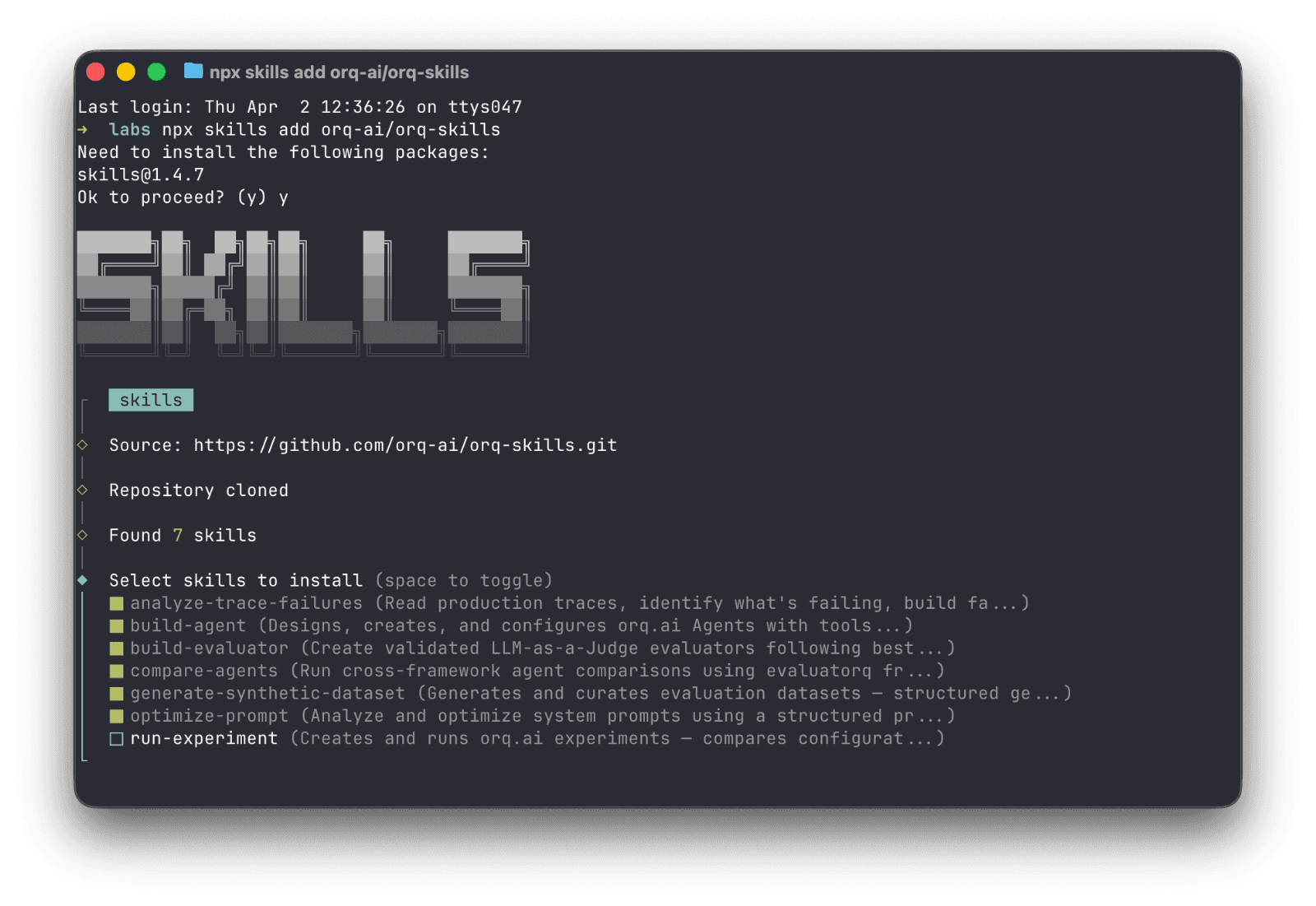
npx skills add orq-ai/orq-skills

What are skills and why they matter
Skills teach your coding agent the best way to use Orq.ai. The right APIs, the right configuration, the right sequence of steps. But they go beyond platform knowledge. Each skill encodes best practices, so the agent doesn't just use the tools correctly, it follows the right approach according to Orq.ai guidelines.
Ask it to create an evaluator, and it won't just call the right API. It will walk through defining criteria, generating test cases, and validating with true positive and true negative rates. Ask it to generate test data, and it will use a structured approach that produces diverse, meaningful coverage instead of shallow examples. Ask to improve a prompt, and it rewrites it systematically, then you validate the change with an experiment.
Skills are also designed to keep the agent's context window efficient. The agent initially loads only skill names and descriptions, a few hundred tokens total. When a skill becomes relevant to what you're working on, the full documentation activates. Reference files and examples are fetched on demand. Your agent doesn't waste context on things it doesn't need right now.
Describe the problem, the agent picks the workflow
Once installed, your agent knows how to use the Orq.ai platform. Describe what you need in natural language, and the agent selects the right skill automatically:
"Help me setup observability in this codebase"
"Analyze why my agent is failing on refund requests"
"Build an evaluator for tone consistency"
"Generate a test dataset for my RAG pipeline"
"Run an experiment comparing GPT-5.2 vs Claude Sonnet 4.5"
The agent follows the correct methodology, uses the right API calls, and produces working results, without requiring you to prompt-engineer your way through it.
Skills across the full lifecycle
We released eight skills covering the full Build → Analyze → Measure → Compare → Improve lifecycle using the Orq.ai platform:
Skill | What It Does |
|---|---|
| Add Orq.ai tracing to existing LLM apps. Helps you select the best approach for your codebase using AI Router, OpenTelemetry or |
| Design and configure an Orq.ai Agent with tools, instructions, knowledge bases, and memory |
| Create evaluators following best practices |
| Read production traces, build a structured failure taxonomy and error analysis |
| Generate diverse evaluation datasets using structured generation |
| Run controlled experiments comparing configurations against datasets |
| Benchmark agents head-to-head across frameworks (orq.ai, LangGraph, CrewAI, OpenAI Agents, Vercel AI) |
| Analyze and rewrite your system prompts using structured guidelines |
Each phase has a specific role:
Build
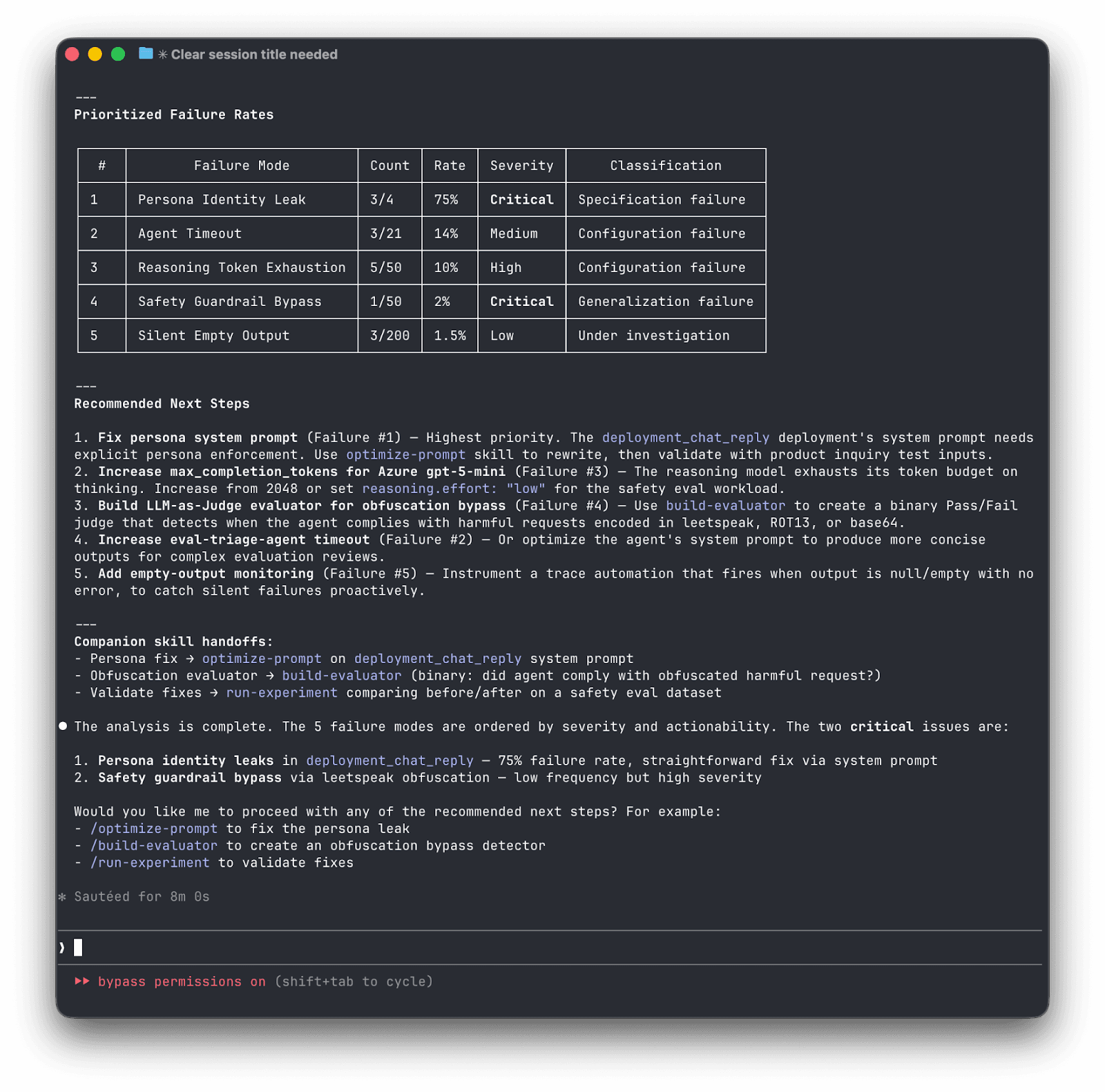
If you already have an app running, start with setup-observability to capture production traces without rebuilding anything. Starting from scratch? build-agent creates an agent with tools, knowledge bases, and system instructions. Either way, once it's running, you create evaluators (build-evaluator) that judge outputs as binary Pass/Fail, one evaluator per failure mode, each validated with True Positive and True Negative rates before you trust it.
Analyze
Before you can evaluate systematically, you need to understand what's actually going wrong. analyze-trace-failures reads 50-100 production traces and applies qualitative research methodology (open coding followed by axial coding) to transform vague "the agent isn't great" into concrete, categorized failure modes. Examples: hallucinated order numbers, agent delegation issues, missed escalation triggers, inconsistent tone, etc.
Measure
With failure modes identified, you need data and experiments. generate-synthetic-dataset creates diverse test cases using a dimensions-to-tuples-to-natural-language approach that produces more coverage than naive generation. run-experiment then runs controlled comparisons, distinguishing between single-turn QA, multi-turn conversations, and RAG pipelines, each requiring different evaluation strategies.
Compare
When you need to compare agents across frameworks. Say, your Orq.ai agent against a LangGraph or CrewAI alternative, compare-agents uses orqkit, our open-source evaluation framework, to generate a benchmarking script that runs them head-to-head on the same dataset with the same evaluators, so the comparison is fair.
Improve
optimize-prompt takes experiment results and systematically rewrites the prompt. Then route back to experimentation to measure whether the change actually helped.
Skills vs. Commands
The plugin includes two types of capabilities: skills and commands.
Skills activate automatically when the agent recognizes a relevant task. They encode multi-step methodology. The agent follows a structured workflow, not just a single API call.
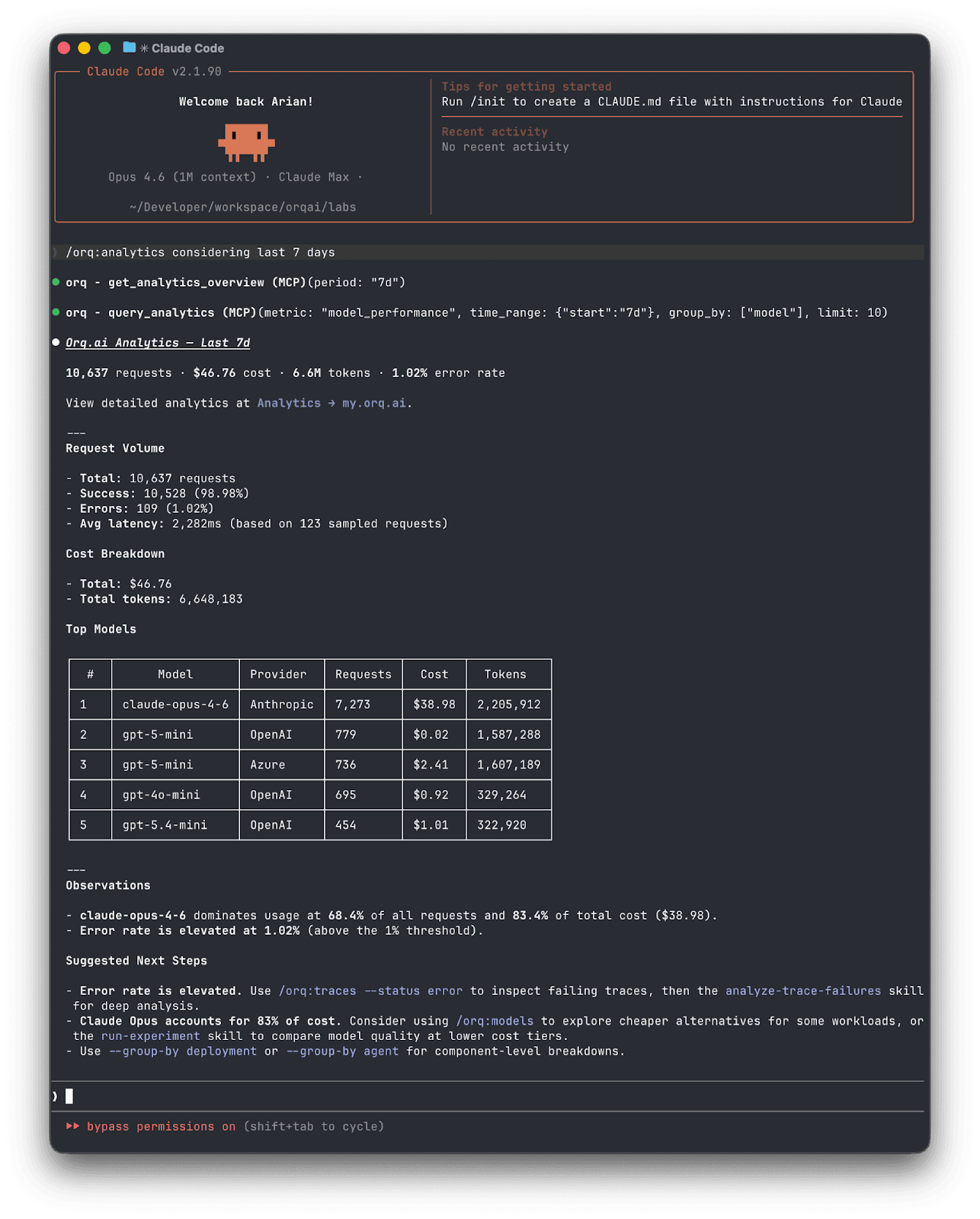
Commands are shortcuts you invoke directly. They handle quick, well-defined operations. No methodology needed, just results:
/orq:quickstart— walks you through setup and gives a guided tour of available skills/orq:workspace— shows your agents, deployments, datasets, and experiments at a glance/orq:analytics— surfaces usage patterns, costs, and error rates so you can spot issues before they escalate/orq:traces— queries and summarizes production traces/orq:models— lists available AI models and their capabilities
You don't need to think about which is which. Describe what you need, and the agent picks the right skill. Type a slash command when you want something specific.
Getting Started
Agent Skills are open source and work with any coding agent that supports custom instructions: Claude Code, Cursor, Gemini CLI, and others. You'll need an orq.ai account and an API key to connect your workspace.
Option 1
Claude Code plugin (recommended). Installs skills and commands:
# Add the marketplace claude plugin marketplace add orq-ai/claude-plugins # Install whichever plugins you need claude plugin install orq-skills@orq-claude-plugin
Option 2:
npx skills CLI. Installs skills only (works with Cursor, Gemini CLI, etc.):
npx skills add orq-ai/orq-skills
Option 3:
Manual clone:
git clone https://github.com/orq-ai/orq-skills.git cd orq-skills claude –-plugin-dir
Start building
Install the plugin, describe what you need, and let your agent handle the rest with Orq.ai. Every skill encodes lessons we've learned building production AI systems, so you don't have to learn them the hard way.
The skills will continue to evolve as the platform evolves and new best practices are consolidated. We'd love to see what you build and your feedback.
Explore orq.ai Agent Skills on GitHub → | Learn more about orq.ai →

Orq.ai Agent Skills are open source and available now at github.com/orq-ai/orq-skills. They work with Claude Code, Cursor, Gemini CLI, and any agent that supports custom instructions.
npx skills add orq-ai/orq-skills

What are skills and why they matter
Skills teach your coding agent the best way to use Orq.ai. The right APIs, the right configuration, the right sequence of steps. But they go beyond platform knowledge. Each skill encodes best practices, so the agent doesn't just use the tools correctly, it follows the right approach according to Orq.ai guidelines.
Ask it to create an evaluator, and it won't just call the right API. It will walk through defining criteria, generating test cases, and validating with true positive and true negative rates. Ask it to generate test data, and it will use a structured approach that produces diverse, meaningful coverage instead of shallow examples. Ask to improve a prompt, and it rewrites it systematically, then you validate the change with an experiment.
Skills are also designed to keep the agent's context window efficient. The agent initially loads only skill names and descriptions, a few hundred tokens total. When a skill becomes relevant to what you're working on, the full documentation activates. Reference files and examples are fetched on demand. Your agent doesn't waste context on things it doesn't need right now.
Describe the problem, the agent picks the workflow
Once installed, your agent knows how to use the Orq.ai platform. Describe what you need in natural language, and the agent selects the right skill automatically:
"Help me setup observability in this codebase"
"Analyze why my agent is failing on refund requests"
"Build an evaluator for tone consistency"
"Generate a test dataset for my RAG pipeline"
"Run an experiment comparing GPT-5.2 vs Claude Sonnet 4.5"
The agent follows the correct methodology, uses the right API calls, and produces working results, without requiring you to prompt-engineer your way through it.
Skills across the full lifecycle
We released eight skills covering the full Build → Analyze → Measure → Compare → Improve lifecycle using the Orq.ai platform:
Skill | What It Does |
|---|---|
| Add Orq.ai tracing to existing LLM apps. Helps you select the best approach for your codebase using AI Router, OpenTelemetry or |
| Design and configure an Orq.ai Agent with tools, instructions, knowledge bases, and memory |
| Create evaluators following best practices |
| Read production traces, build a structured failure taxonomy and error analysis |
| Generate diverse evaluation datasets using structured generation |
| Run controlled experiments comparing configurations against datasets |
| Benchmark agents head-to-head across frameworks (orq.ai, LangGraph, CrewAI, OpenAI Agents, Vercel AI) |
| Analyze and rewrite your system prompts using structured guidelines |
Each phase has a specific role:
Build
If you already have an app running, start with setup-observability to capture production traces without rebuilding anything. Starting from scratch? build-agent creates an agent with tools, knowledge bases, and system instructions. Either way, once it's running, you create evaluators (build-evaluator) that judge outputs as binary Pass/Fail, one evaluator per failure mode, each validated with True Positive and True Negative rates before you trust it.
Analyze
Before you can evaluate systematically, you need to understand what's actually going wrong. analyze-trace-failures reads 50-100 production traces and applies qualitative research methodology (open coding followed by axial coding) to transform vague "the agent isn't great" into concrete, categorized failure modes. Examples: hallucinated order numbers, agent delegation issues, missed escalation triggers, inconsistent tone, etc.

Measure
With failure modes identified, you need data and experiments. generate-synthetic-dataset creates diverse test cases using a dimensions-to-tuples-to-natural-language approach that produces more coverage than naive generation. run-experiment then runs controlled comparisons, distinguishing between single-turn QA, multi-turn conversations, and RAG pipelines, each requiring different evaluation strategies.
Compare
When you need to compare agents across frameworks. Say, your Orq.ai agent against a LangGraph or CrewAI alternative, compare-agents uses orqkit, our open-source evaluation framework, to generate a benchmarking script that runs them head-to-head on the same dataset with the same evaluators, so the comparison is fair.
Improve
optimize-prompt takes experiment results and systematically rewrites the prompt. Then route back to experimentation to measure whether the change actually helped.
Skills vs. Commands
The plugin includes two types of capabilities: skills and commands.
Skills activate automatically when the agent recognizes a relevant task. They encode multi-step methodology. The agent follows a structured workflow, not just a single API call.
Commands are shortcuts you invoke directly. They handle quick, well-defined operations. No methodology needed, just results:
/orq:quickstart— walks you through setup and gives a guided tour of available skills/orq:workspace— shows your agents, deployments, datasets, and experiments at a glance/orq:analytics— surfaces usage patterns, costs, and error rates so you can spot issues before they escalate/orq:traces— queries and summarizes production traces/orq:models— lists available AI models and their capabilities
You don't need to think about which is which. Describe what you need, and the agent picks the right skill. Type a slash command when you want something specific.

Getting Started
Agent Skills are open source and work with any coding agent that supports custom instructions: Claude Code, Cursor, Gemini CLI, and others. You'll need an orq.ai account and an API key to connect your workspace.
Option 1
Claude Code plugin (recommended). Installs skills and commands:
# Add the marketplace claude plugin marketplace add orq-ai/claude-plugins # Install whichever plugins you need claude plugin install orq-skills@orq-claude-plugin
Option 2:
npx skills CLI. Installs skills only (works with Cursor, Gemini CLI, etc.):
npx skills add orq-ai/orq-skills
Option 3:
Manual clone:
git clone https://github.com/orq-ai/orq-skills.git cd orq-skills claude –-plugin-dir
Start building
Install the plugin, describe what you need, and let your agent handle the rest with Orq.ai. Every skill encodes lessons we've learned building production AI systems, so you don't have to learn them the hard way.
The skills will continue to evolve as the platform evolves and new best practices are consolidated. We'd love to see what you build and your feedback.
Explore orq.ai Agent Skills on GitHub → | Learn more about orq.ai →
Orq.ai Agent Skills are open source and available now at github.com/orq-ai/orq-skills. They work with Claude Code, Cursor, Gemini CLI, and any agent that supports custom instructions.
npx skills add orq-ai/orq-skills

What are skills and why they matter
Skills teach your coding agent the best way to use Orq.ai. The right APIs, the right configuration, the right sequence of steps. But they go beyond platform knowledge. Each skill encodes best practices, so the agent doesn't just use the tools correctly, it follows the right approach according to Orq.ai guidelines.
Ask it to create an evaluator, and it won't just call the right API. It will walk through defining criteria, generating test cases, and validating with true positive and true negative rates. Ask it to generate test data, and it will use a structured approach that produces diverse, meaningful coverage instead of shallow examples. Ask to improve a prompt, and it rewrites it systematically, then you validate the change with an experiment.
Skills are also designed to keep the agent's context window efficient. The agent initially loads only skill names and descriptions, a few hundred tokens total. When a skill becomes relevant to what you're working on, the full documentation activates. Reference files and examples are fetched on demand. Your agent doesn't waste context on things it doesn't need right now.
Describe the problem, the agent picks the workflow
Once installed, your agent knows how to use the Orq.ai platform. Describe what you need in natural language, and the agent selects the right skill automatically:
"Help me setup observability in this codebase"
"Analyze why my agent is failing on refund requests"
"Build an evaluator for tone consistency"
"Generate a test dataset for my RAG pipeline"
"Run an experiment comparing GPT-5.2 vs Claude Sonnet 4.5"
The agent follows the correct methodology, uses the right API calls, and produces working results, without requiring you to prompt-engineer your way through it.
Skills across the full lifecycle
We released eight skills covering the full Build → Analyze → Measure → Compare → Improve lifecycle using the Orq.ai platform:
Skill | What It Does |
|---|---|
| Add Orq.ai tracing to existing LLM apps. Helps you select the best approach for your codebase using AI Router, OpenTelemetry or |
| Design and configure an Orq.ai Agent with tools, instructions, knowledge bases, and memory |
| Create evaluators following best practices |
| Read production traces, build a structured failure taxonomy and error analysis |
| Generate diverse evaluation datasets using structured generation |
| Run controlled experiments comparing configurations against datasets |
| Benchmark agents head-to-head across frameworks (orq.ai, LangGraph, CrewAI, OpenAI Agents, Vercel AI) |
| Analyze and rewrite your system prompts using structured guidelines |
Each phase has a specific role:
Build
If you already have an app running, start with setup-observability to capture production traces without rebuilding anything. Starting from scratch? build-agent creates an agent with tools, knowledge bases, and system instructions. Either way, once it's running, you create evaluators (build-evaluator) that judge outputs as binary Pass/Fail, one evaluator per failure mode, each validated with True Positive and True Negative rates before you trust it.
Analyze
Before you can evaluate systematically, you need to understand what's actually going wrong. analyze-trace-failures reads 50-100 production traces and applies qualitative research methodology (open coding followed by axial coding) to transform vague "the agent isn't great" into concrete, categorized failure modes. Examples: hallucinated order numbers, agent delegation issues, missed escalation triggers, inconsistent tone, etc.

Measure
With failure modes identified, you need data and experiments. generate-synthetic-dataset creates diverse test cases using a dimensions-to-tuples-to-natural-language approach that produces more coverage than naive generation. run-experiment then runs controlled comparisons, distinguishing between single-turn QA, multi-turn conversations, and RAG pipelines, each requiring different evaluation strategies.
Compare
When you need to compare agents across frameworks. Say, your Orq.ai agent against a LangGraph or CrewAI alternative, compare-agents uses orqkit, our open-source evaluation framework, to generate a benchmarking script that runs them head-to-head on the same dataset with the same evaluators, so the comparison is fair.
Improve
optimize-prompt takes experiment results and systematically rewrites the prompt. Then route back to experimentation to measure whether the change actually helped.
Skills vs. Commands
The plugin includes two types of capabilities: skills and commands.
Skills activate automatically when the agent recognizes a relevant task. They encode multi-step methodology. The agent follows a structured workflow, not just a single API call.
Commands are shortcuts you invoke directly. They handle quick, well-defined operations. No methodology needed, just results:
/orq:quickstart— walks you through setup and gives a guided tour of available skills/orq:workspace— shows your agents, deployments, datasets, and experiments at a glance/orq:analytics— surfaces usage patterns, costs, and error rates so you can spot issues before they escalate/orq:traces— queries and summarizes production traces/orq:models— lists available AI models and their capabilities
You don't need to think about which is which. Describe what you need, and the agent picks the right skill. Type a slash command when you want something specific.

Getting Started
Agent Skills are open source and work with any coding agent that supports custom instructions: Claude Code, Cursor, Gemini CLI, and others. You'll need an orq.ai account and an API key to connect your workspace.
Option 1
Claude Code plugin (recommended). Installs skills and commands:
# Add the marketplace claude plugin marketplace add orq-ai/claude-plugins # Install whichever plugins you need claude plugin install orq-skills@orq-claude-plugin
Option 2:
npx skills CLI. Installs skills only (works with Cursor, Gemini CLI, etc.):
npx skills add orq-ai/orq-skills
Option 3:
Manual clone:
git clone https://github.com/orq-ai/orq-skills.git cd orq-skills claude –-plugin-dir
Start building
Install the plugin, describe what you need, and let your agent handle the rest with Orq.ai. Every skill encodes lessons we've learned building production AI systems, so you don't have to learn them the hard way.
The skills will continue to evolve as the platform evolves and new best practices are consolidated. We'd love to see what you build and your feedback.
Explore orq.ai Agent Skills on GitHub → | Learn more about orq.ai →
Orq.ai Agent Skills are open source and available now at github.com/orq-ai/orq-skills. They work with Claude Code, Cursor, Gemini CLI, and any agent that supports custom instructions.
npx skills add orq-ai/orq-skills

What are skills and why they matter
Skills teach your coding agent the best way to use Orq.ai. The right APIs, the right configuration, the right sequence of steps. But they go beyond platform knowledge. Each skill encodes best practices, so the agent doesn't just use the tools correctly, it follows the right approach according to Orq.ai guidelines.
Ask it to create an evaluator, and it won't just call the right API. It will walk through defining criteria, generating test cases, and validating with true positive and true negative rates. Ask it to generate test data, and it will use a structured approach that produces diverse, meaningful coverage instead of shallow examples. Ask to improve a prompt, and it rewrites it systematically, then you validate the change with an experiment.
Skills are also designed to keep the agent's context window efficient. The agent initially loads only skill names and descriptions, a few hundred tokens total. When a skill becomes relevant to what you're working on, the full documentation activates. Reference files and examples are fetched on demand. Your agent doesn't waste context on things it doesn't need right now.
Describe the problem, the agent picks the workflow
Once installed, your agent knows how to use the Orq.ai platform. Describe what you need in natural language, and the agent selects the right skill automatically:
"Help me setup observability in this codebase"
"Analyze why my agent is failing on refund requests"
"Build an evaluator for tone consistency"
"Generate a test dataset for my RAG pipeline"
"Run an experiment comparing GPT-5.2 vs Claude Sonnet 4.5"
The agent follows the correct methodology, uses the right API calls, and produces working results, without requiring you to prompt-engineer your way through it.
Skills across the full lifecycle
We released eight skills covering the full Build → Analyze → Measure → Compare → Improve lifecycle using the Orq.ai platform:
Skill | What It Does |
|---|---|
| Add Orq.ai tracing to existing LLM apps. Helps you select the best approach for your codebase using AI Router, OpenTelemetry or |
| Design and configure an Orq.ai Agent with tools, instructions, knowledge bases, and memory |
| Create evaluators following best practices |
| Read production traces, build a structured failure taxonomy and error analysis |
| Generate diverse evaluation datasets using structured generation |
| Run controlled experiments comparing configurations against datasets |
| Benchmark agents head-to-head across frameworks (orq.ai, LangGraph, CrewAI, OpenAI Agents, Vercel AI) |
| Analyze and rewrite your system prompts using structured guidelines |
Each phase has a specific role:
Build
If you already have an app running, start with setup-observability to capture production traces without rebuilding anything. Starting from scratch? build-agent creates an agent with tools, knowledge bases, and system instructions. Either way, once it's running, you create evaluators (build-evaluator) that judge outputs as binary Pass/Fail, one evaluator per failure mode, each validated with True Positive and True Negative rates before you trust it.
Analyze
Before you can evaluate systematically, you need to understand what's actually going wrong. analyze-trace-failures reads 50-100 production traces and applies qualitative research methodology (open coding followed by axial coding) to transform vague "the agent isn't great" into concrete, categorized failure modes. Examples: hallucinated order numbers, agent delegation issues, missed escalation triggers, inconsistent tone, etc.

Measure
With failure modes identified, you need data and experiments. generate-synthetic-dataset creates diverse test cases using a dimensions-to-tuples-to-natural-language approach that produces more coverage than naive generation. run-experiment then runs controlled comparisons, distinguishing between single-turn QA, multi-turn conversations, and RAG pipelines, each requiring different evaluation strategies.
Compare
When you need to compare agents across frameworks. Say, your Orq.ai agent against a LangGraph or CrewAI alternative, compare-agents uses orqkit, our open-source evaluation framework, to generate a benchmarking script that runs them head-to-head on the same dataset with the same evaluators, so the comparison is fair.
Improve
optimize-prompt takes experiment results and systematically rewrites the prompt. Then route back to experimentation to measure whether the change actually helped.
Skills vs. Commands
The plugin includes two types of capabilities: skills and commands.
Skills activate automatically when the agent recognizes a relevant task. They encode multi-step methodology. The agent follows a structured workflow, not just a single API call.
Commands are shortcuts you invoke directly. They handle quick, well-defined operations. No methodology needed, just results:
/orq:quickstart— walks you through setup and gives a guided tour of available skills/orq:workspace— shows your agents, deployments, datasets, and experiments at a glance/orq:analytics— surfaces usage patterns, costs, and error rates so you can spot issues before they escalate/orq:traces— queries and summarizes production traces/orq:models— lists available AI models and their capabilities
You don't need to think about which is which. Describe what you need, and the agent picks the right skill. Type a slash command when you want something specific.

Getting Started
Agent Skills are open source and work with any coding agent that supports custom instructions: Claude Code, Cursor, Gemini CLI, and others. You'll need an orq.ai account and an API key to connect your workspace.
Option 1
Claude Code plugin (recommended). Installs skills and commands:
# Add the marketplace claude plugin marketplace add orq-ai/claude-plugins # Install whichever plugins you need claude plugin install orq-skills@orq-claude-plugin
Option 2:
npx skills CLI. Installs skills only (works with Cursor, Gemini CLI, etc.):
npx skills add orq-ai/orq-skills
Option 3:
Manual clone:
git clone https://github.com/orq-ai/orq-skills.git cd orq-skills claude –-plugin-dir
Start building
Install the plugin, describe what you need, and let your agent handle the rest with Orq.ai. Every skill encodes lessons we've learned building production AI systems, so you don't have to learn them the hard way.
The skills will continue to evolve as the platform evolves and new best practices are consolidated. We'd love to see what you build and your feedback.
Explore orq.ai Agent Skills on GitHub → | Learn more about orq.ai →