
Generative AI

Building a LangGraph agent on orq.ai

A production-ready reference implementation that wires LangGraph to orq.ai's prompts, Knowledge Base, router, guardrails, and evals.

Image of Reginald Martyr

Arian Pasquali

Research Engineer

aiagenticworkflowsfeaturedimage

TL;DR

I shipped a runnable reference implementation of a LangGraph agent on orq.ai. It answers complex questions that trigger both an analytical SQL database and a corpus of operational PDFs. It shows how to use Orq.ai features in combination with LangGraph agent in production: tracing, prompts, knowledge base, AI router, safety guardrail, evals, A/B experiments.

Clone it, run make setup-workspace && make ingest-data && make run, and you have a production-shaped starting point:

git clone https://github.com/orq-ai/orq-langgraph-demo

This post is a walkthrough of the repo. What you get when you clone it, learn how to leverage some features from orq.ai , and how to extend it for your own domain.

The question that drives the whole demo

I want to ground the rest of this post in a single concrete query. Every pattern in the repo exists because this kind of question is surprisingly hard to answer well:

"How is Margherita Pizza performing in sales for 2024, and what allergens does it contain?"

That's a question an operations analyst at a food-delivery company could reasonably ask. It spans two completely different data sources:

  • Structured: monthly sales numbers from an orders database. For instance, dishes × restaurants × cities, aggregated by month

  • Unstructured: the company's internal menu book, where allergen information lives as prose inside a PDF

Neither a plain SQL agent nor a plain RAG agent can answer it alone. You need both, orchestrated by something that knows when to call which tool, how to merge the results, and how to cite the sources so an analyst can audit the answer.

LangGraph is great as a framework and here we demonstrate how to use orq.ai the operational layer. The prompts, the Knowledge Base, the AI Router, the observability, the evaluation pipeline. The repo shows how to wire them together without either side getting in the way of the other.

Once running, here's what it looks like in the demo Chainlit UI:
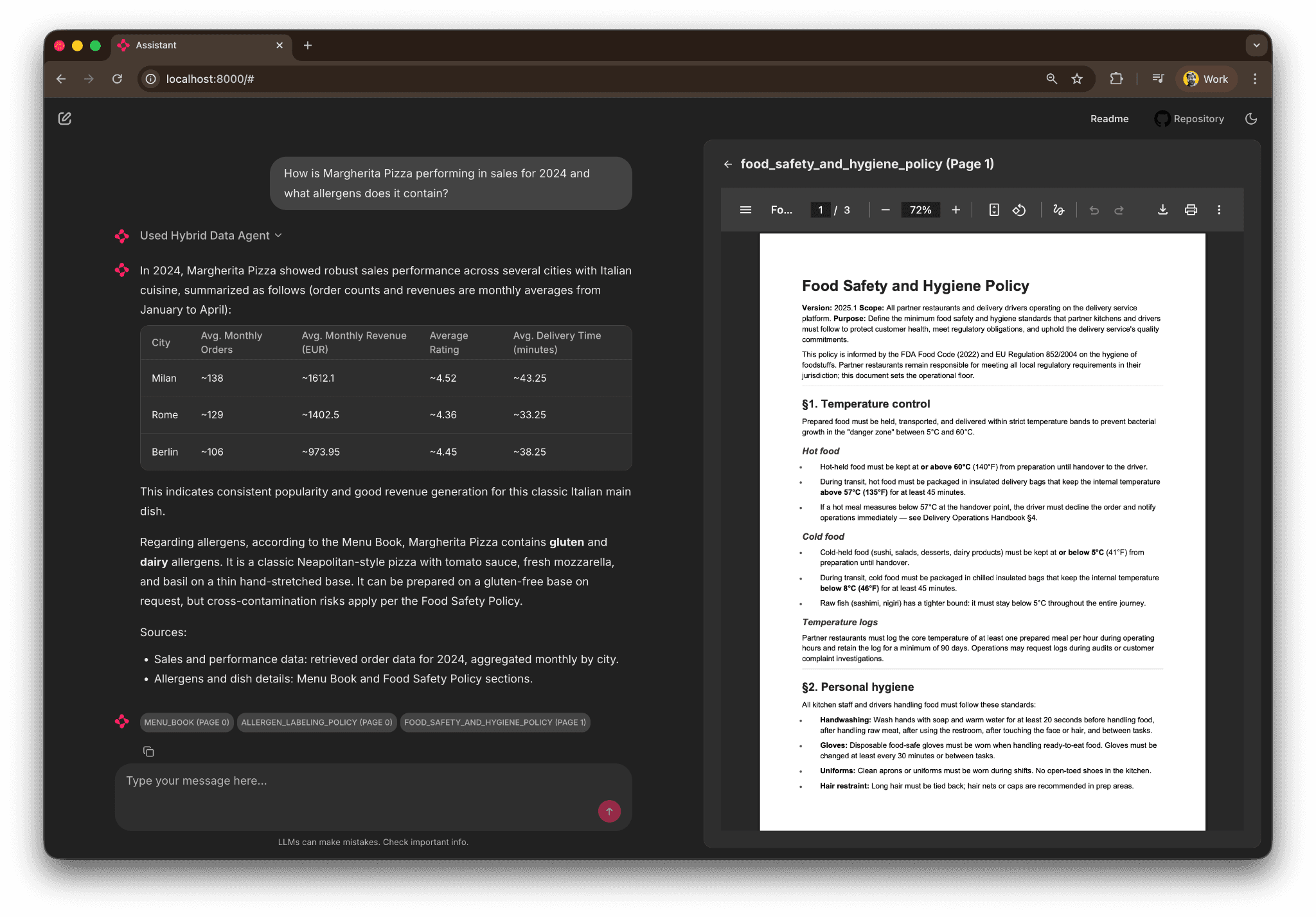
The agent returns a city-by-city sales table for 2024, the allergen text from the Menu Book, and an inline PDF preview opened to the exact page it cited. Every claim has references and we attribute where in the document or in the database the info was found. That's the baseline.

The agent's shape

The LangGraph flow is intentionally a little more complex than the textbook ReAct example, because production agents aren't just "LLM in a loop calling tools." You want an input safety check, you want routing so off-topic questions don't reach the tool loop, and you want a clean exit path for questions that need clarification. We simulate that scenario. Here's the whole graph:
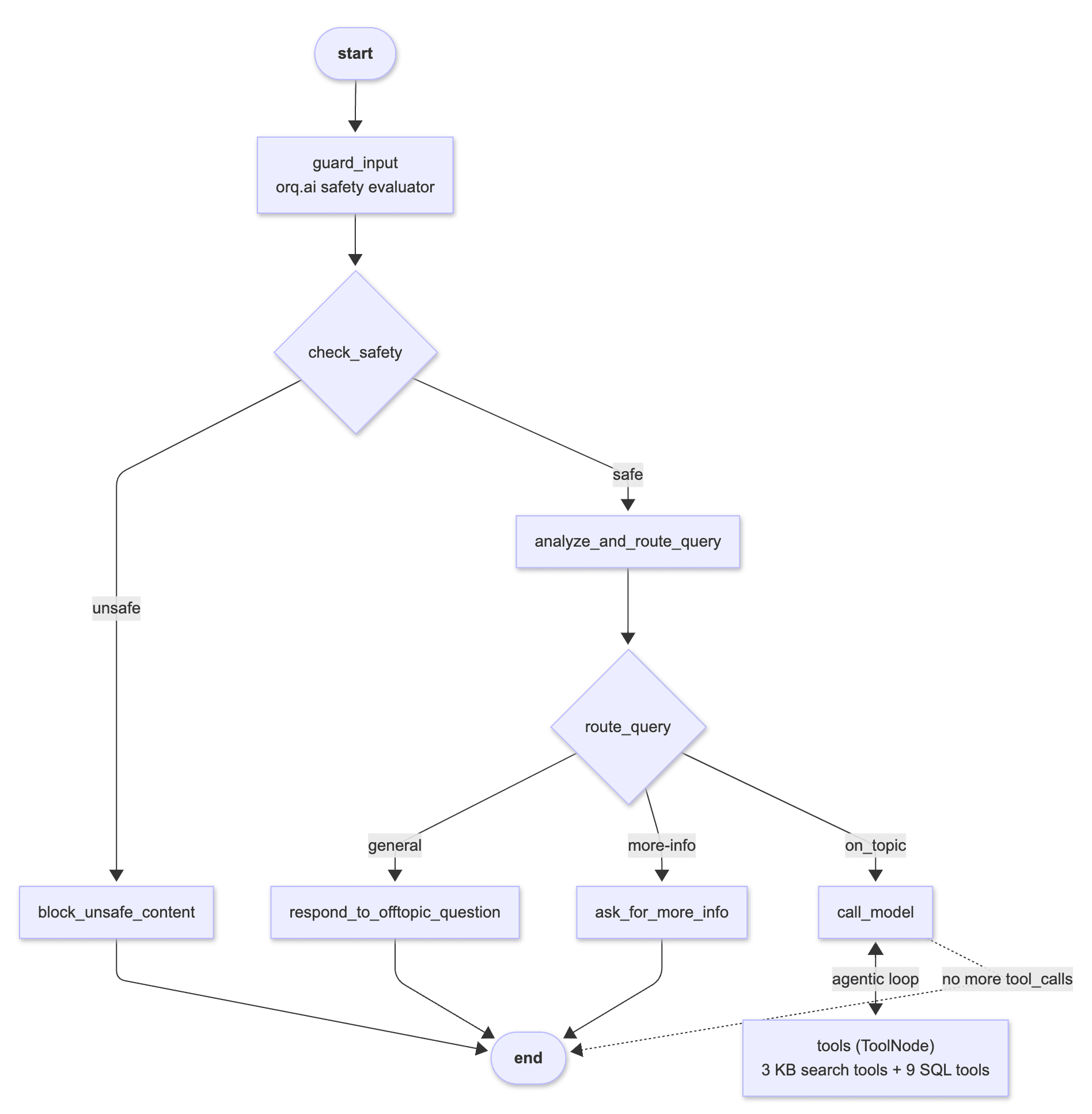
Every box in the diagram is a node defined in src/assistant/graph.py. The between call_model and tools is the agentic loop. The model keeps calling tools and looking at the results until it has enough context to answer. Which is our example is what makes the Margherita query work. It finds and calls a SQL tool (get_orders_by_dish), looks at the monthly order numbers, calls a KB search (search_documents with query "Margherita allergens"), reads the Menu Book chunk, and only then writes the final answer.

The graph also counts with a safety evaluator nod, the router that classifies the question and off-topic prompts to a polite refusal, and the explicit "need more info" node for vague questions. 

What orq.ai fills in

LangGraph gives you the graph and the state machine. orq.ai adds the operational layer with observability, prompts management, experimentation, guardrails, routing, knowledge base,, and managed agents among other features. Every surface below is wired in the repo as a concrete example you can read and extend.

Knowledge Base managed hybrid search over PDFs

The repo ships six operational PDFs: a menu book, refund and SLA policy, food safety policy, allergen labeling policy, delivery operations handbook, and customer-service playbook. They're ingested into an orq.ai Knowledge Base, which handles chunking, embeddings, and hybrid (vector + keyword) search.

The KB is exposed to LangGraph as three typed tools in src/assistant/kb_tools.py:

  • search_documents(query, limit) : hybrid search across all PDFs

  • search_in_document(filename, query, limit) : scoped search in a single PDF

  • list_available_documents() : useful when the LLM needs to decide which PDF to search

Each tool uses LangChain's response_format="content_and_artifact" pattern so the LLM sees a text-formatted search result as its tool output and the structured SearchResult objects ride along on the ToolMessage.artifact field. That's what lets the Chainlit UI render the PDF preview side panel. It walks the tool messages, pulls the artifacts, and turns them into cl.Pdf elements without the LLM needing to know anything about the UI.

Ingestion is executed using one  make command: make ingest-kb. The script under scripts/unstructured_data_ingestion_pipeline.py reads PDFs from ./docs/, chunks them locally, and uploads the chunks. orq.ai handles the embeddings. If you wanted you could also use orq.ai Knowledge Base API and leave even the chunking for the platform to manage, but we kept the manual chunking logic to showcase how you could customize chunking logic and leave that in your hands for flexibility purposes. 

AI Router

Every LLM call in the repo goes through https://api.orq.ai/v2/router, which is OpenAI-protocol-compatible. That means you can swap providers by changing one line in .env:

DEFAULT_MODEL="openai/gpt-4.1-mini"        # default
DEFAULT_MODEL="anthropic/claude-sonnet-4-5"
DEFAULT_MODEL="groq/llama-3.3-70b-versatile"
DEFAULT_MODEL="google/gemini-2.5-flash"

No code changes. The orq.ai Router handles authentication, protocol translation, cost tracking, and provider fallbacks. The trace for each run shows the exact model that served it, so you can A/B-compare providers side by side in the Studio without changing anything in the graph.

Prompts, manage system prompts in the Studio, not the repo

The agent's system prompt is fetched from orq.ai at startup. That means product managers and prompt engineers can edit it in the Studio — with full version history and a built-in playground — and the next make run picks up the change without a redeploy. There's a local fallback in src/assistant/prompts.py so offline development still works when orq.ai is unreachable.

A second variant of the same prompt is bootstrapped by make setup-workspace as hybrid-data-agent-system-prompt-variant-b. That's there for A/B testing, which I'll come back to in the evals section.

Safety guardrail, an LLM-judge evaluator before the graph runs

The guard_input node classifies every user message as SAFE or UNSAFE using an orq.ai LLM Evaluator. The classification prompt lives in the Studio, so it's tunable without a code change or deploy. You can tighten or loosen the policy and the next run picks it up. Every evaluator invocation is captured in the trace tree under guard_input, so blocked queries are auditable. The guardrail can also  fall back to the OpenAI Moderation API. 

This is simple for the sake of the demo. For more sophisticated guardrails best practices I recommend reading about protecting and Red Teaming AI agents with Orq.ai. 

Tracing, two backends, one env var

Every LangGraph execution, whether it comes from the Chainlit UI, an eval run, or a direct invocation, emits a full span tree into the orq.ai Studio Traces view. The repo ships two tracing backends side by side:

  • Callback handler (default) : orq_ai_sdk.langchain.setup(), one line, auto-attaches to every LangChain Runnable

  • OpenTelemetry exporter : the original integration, kept as reference for teams that already run their own OTEL collector

You pick one with ORQ_TRACING_BACKEND="callback" or "otel" in .env. I wrote a separate post on the tradeoffs, but for a new LangGraph app on orq.ai the callback backend is the happy path and what I'd recommend.

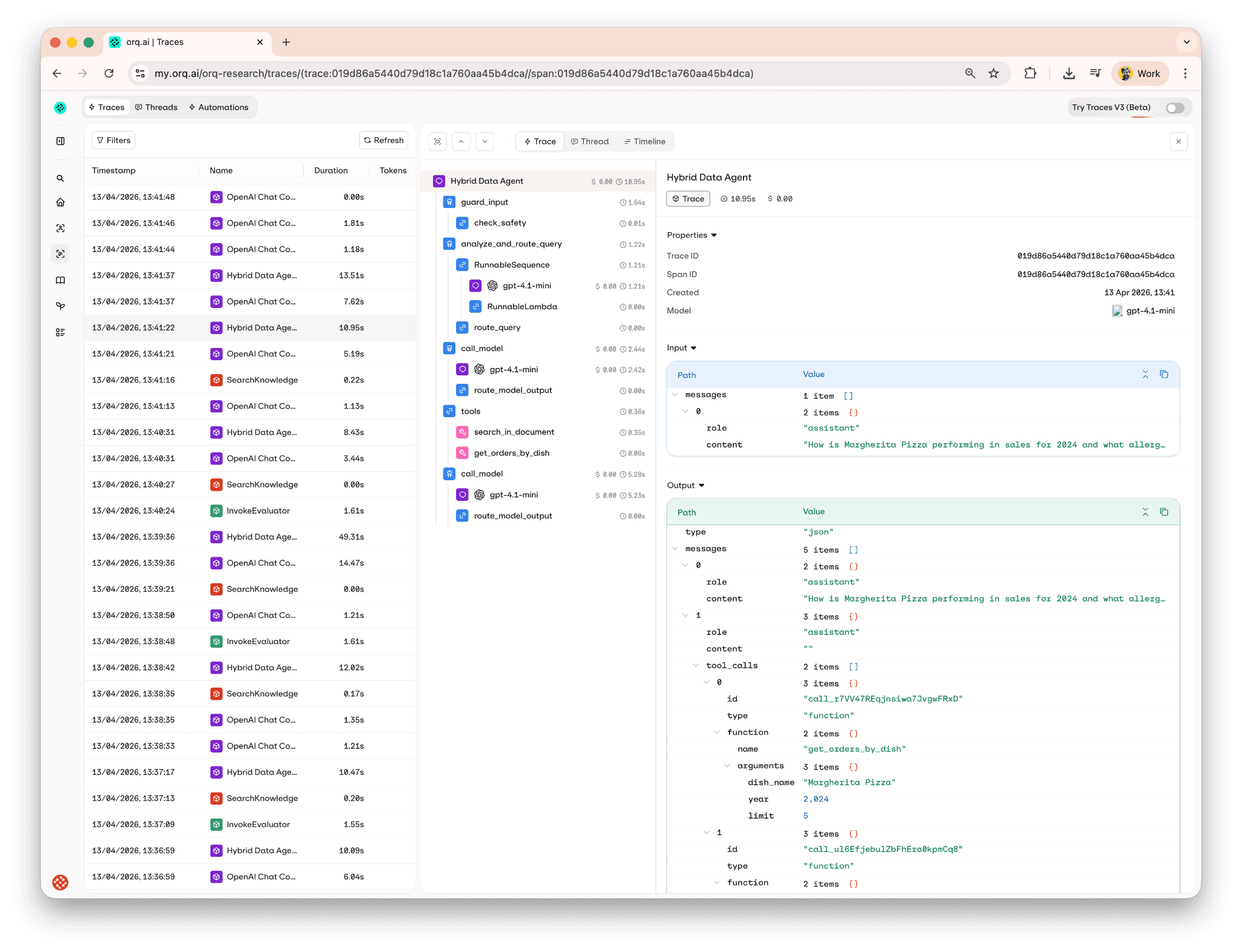
Here's what a trace tree looks like for the Margherita query,  every node, tool call, LLM requests, with token usage and cost per step:
Evaluating quality

Is hard to improve what you can’t measure. The repo ships an eval pipeline that runs 15 test cases (five SQL-only, five document-only, five mixed) through the agent and reports four scorers per row:

  • tool-accuracy (local Python scorer) : did the agent call the expected tools for this question?

  • source-citations (orq.ai LLM judge) : did the response cite a source document, or is it a pure refusal/clarification?

  • response-grounding (orq.ai LLM judge) : is every factual claim in the response supported by the retrieved context (KB chunks and SQL tool outputs)?

  • hallucination-check (orq.ai LLM judge) : does any claim in the response contradict the retrievals?

Three of the four scorers live in orq.ai as LLM Evaluators with tunable prompts. You can edit them in the Studio and re-run the pipeline without touching code. The tool-accuracy scorer stays local because it needs the agent's internal tools_called list, which isn't part of the standard evaluator log surface.

The whole pipeline is one command: make evals-run. Results sync to orq.ai Studio as an experiment with a color-coded grid : easy to spot the one outlier without scrolling the terminal:
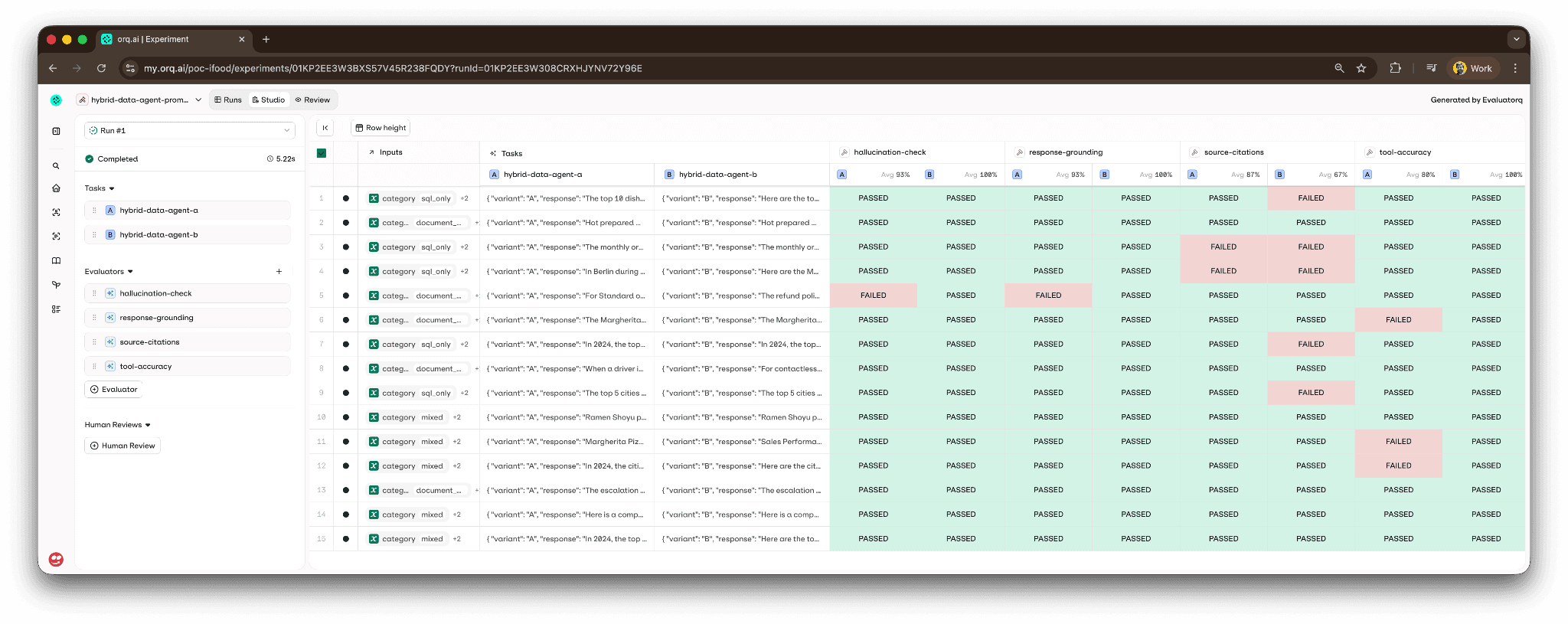
There's a second command, make evals-compare-prompts, that runs the same 15 test cases against both system prompt variants in a single experiment. That's the A/B workflow — edit variant B in the Studio, publish, run the make target, and compare the scorer deltas across variants side by side. No redeploy, no code change.

I've wired the same pipeline into a GitHub Actions workflow (.github/workflows/evals.yml) that runs on pull requests touching src/assistant/ and blocks merges if any scorer regresses. There's a nightly workflow for the A/B comparison so drift in prompt performance shows up as a recurring experiment rather than a surprise.

Two implementations of the same agent

This is the part of the repo that I think is most underrated, and probably the most useful for anyone evaluating how to structure their own agent codebase.

The demo ships two implementations of the same Hybrid Data Agent, side by side:

  • Approach A, code-first LangGraph  the StateGraph with explicit nodes, Python tools, and Python safety guardrail we've been walking through. Run it with make run.

  • Approach B, Studio-first managed Agent : the agent configuration lives in the orq.ai Studio as a managed Agent. Orchestration is handled by the platform. Run it with make run-orq-agent.

Both talk to the same Knowledge Base, the same OpenAI model through the AI Router, and the same orq.ai project. What differs is where the orchestration logic lives.

When does each one win? Approach A when you need explicit and low level control of the agentic loop or want to host the agent yourself. Approach B when you're iterating fast on prompts and want product teams to edit without touching code, when your tools are standard (web search, KB retrieval, MCP), or when you want the built-in Studio workflows for A/B testing agent configs.

We have a full side-by-side comparison table and a decision guide. Seeing the same question answered by both implementations made the tradeoffs concrete for me in a way that reading a blog post never would have.

Running it yourself

The happy path is four commands:

# Clone and install
git clone https://github.com/orq-ai/orq-langgraph-demo
cd orq-langgraph-demo
uv sync

# Configure
cp .env.example .env

# edit .env set OPENAI_API_KEY, ORQ_API_KEY, ORQ_PROJECT_NAME
# Bootstrap the orq.ai workspace (idempotent)
make setup-workspace

# Load data + run
make ingest-data
make run

make setup-workspace is the one I'm proudest of. It's a single idempotent script that creates a project, a Knowledge Base, the default system prompt plus variant B, the four evaluators (safety, source-citations, grounding, hallucination), the managed agent for Approach B, and the evaluation dataset. It's safe to re-run If an entity already exists and matches the key, it's reused; if it exists but has drifted, the script updates it in place. At the end it prints a paste-safe block of env-var IDs you drop into .env.

If something feels off after the first run, make doctor walks nine checks ( env-var parsing, API reachability, KB chunks, prompt fetchability, SQLite content, test search, evaluatorq imports ) and prints a clear remediation for each failure. That command has saved me more debugging time than any other piece of the repo.

Extending it for your own domain

The repo is deliberately brand-neutral and domain-swappable. If food delivery isn't your world, here's what you'd change to point it at your own:

  1. Swap the structured data : replace scripts/generate_demo_orders.py with your own generator (or point at real data), and rewrite the 9 typed tools in src/assistant/sql_tools.py to match your schema.

  2. Swap the unstructured data : drop your own PDFs into docs/, then rerun make ingest-kb. The KB search tools don't care about filenames or content.

  3. Rewrite the system prompt : edit SYSTEM_PROMPT in src/assistant/prompts.py or, better, edit the prompt directly in the orq.ai Studio and republish. No code change needed.

  4. Update the eval dataset : evals/datasets/tool_calling_evals.jsonl has 15 rows. Replace them with your own questions + expected tool calls.

  5. Tune the scorer prompts : edit the three LLM evaluators (source-citations, response-grounding, hallucination-check) in the Studio to match your domain's language.

Everything else stays the same ( the graph topology, the router, the tool loop, the tracing, the evals pipeline). The repo's design separates what the agent knows about (data + prompts + tools) from how the agent runs (graph + tracing + evals) so you can learn how each layer works.

What you get at the end

Concretely, at the end of an hour of setup you have:

  • A running LangGraph agent answering real questions about your domain

  • Every execution traced, with token usage and cost per step, in the orq.ai Studio

  • A managed Knowledge Base with hybrid search over your PDFs

  • A versioned, Studio-managed system prompt you can iterate on without redeploying

  • An LLM-judge safety guardrail as a first line of defense

  • A four-scorer eval pipeline runnable locally or in CI/CD

  • A/B prompt-variant comparison as a one-command experiment

  • A side-by-side managed-agent implementation to compare against

And a git repo you actually own, so every decision is auditable and extensible.

The whole thing is at github.com/orq-ai/orq-langgraph-demo. If you're starting a LangGraph app on orq.ai, I'd genuinely start from this instead of from a blank template, not because every line of it is perfect, but because the integration points are the part that takes the longest to get right, and they're all already wired.

If you want to see it running against a real orq.ai workspace without cloning anything, book a demo or get started.


TL;DR

I shipped a runnable reference implementation of a LangGraph agent on orq.ai. It answers complex questions that trigger both an analytical SQL database and a corpus of operational PDFs. It shows how to use Orq.ai features in combination with LangGraph agent in production: tracing, prompts, knowledge base, AI router, safety guardrail, evals, A/B experiments.

Clone it, run make setup-workspace && make ingest-data && make run, and you have a production-shaped starting point:

git clone https://github.com/orq-ai/orq-langgraph-demo

This post is a walkthrough of the repo. What you get when you clone it, learn how to leverage some features from orq.ai , and how to extend it for your own domain.

The question that drives the whole demo

I want to ground the rest of this post in a single concrete query. Every pattern in the repo exists because this kind of question is surprisingly hard to answer well:

"How is Margherita Pizza performing in sales for 2024, and what allergens does it contain?"

That's a question an operations analyst at a food-delivery company could reasonably ask. It spans two completely different data sources:

  • Structured: monthly sales numbers from an orders database. For instance, dishes × restaurants × cities, aggregated by month

  • Unstructured: the company's internal menu book, where allergen information lives as prose inside a PDF

Neither a plain SQL agent nor a plain RAG agent can answer it alone. You need both, orchestrated by something that knows when to call which tool, how to merge the results, and how to cite the sources so an analyst can audit the answer.

LangGraph is great as a framework and here we demonstrate how to use orq.ai the operational layer. The prompts, the Knowledge Base, the AI Router, the observability, the evaluation pipeline. The repo shows how to wire them together without either side getting in the way of the other.

Once running, here's what it looks like in the demo Chainlit UI:

The agent returns a city-by-city sales table for 2024, the allergen text from the Menu Book, and an inline PDF preview opened to the exact page it cited. Every claim has references and we attribute where in the document or in the database the info was found. That's the baseline.

The agent's shape

The LangGraph flow is intentionally a little more complex than the textbook ReAct example, because production agents aren't just "LLM in a loop calling tools." You want an input safety check, you want routing so off-topic questions don't reach the tool loop, and you want a clean exit path for questions that need clarification. We simulate that scenario. Here's the whole graph:

Every box in the diagram is a node defined in src/assistant/graph.py. The between call_model and tools is the agentic loop. The model keeps calling tools and looking at the results until it has enough context to answer. Which is our example is what makes the Margherita query work. It finds and calls a SQL tool (get_orders_by_dish), looks at the monthly order numbers, calls a KB search (search_documents with query "Margherita allergens"), reads the Menu Book chunk, and only then writes the final answer.

The graph also counts with a safety evaluator nod, the router that classifies the question and off-topic prompts to a polite refusal, and the explicit "need more info" node for vague questions. 

What orq.ai fills in

LangGraph gives you the graph and the state machine. orq.ai adds the operational layer with observability, prompts management, experimentation, guardrails, routing, knowledge base,, and managed agents among other features. Every surface below is wired in the repo as a concrete example you can read and extend.

Knowledge Base managed hybrid search over PDFs

The repo ships six operational PDFs: a menu book, refund and SLA policy, food safety policy, allergen labeling policy, delivery operations handbook, and customer-service playbook. They're ingested into an orq.ai Knowledge Base, which handles chunking, embeddings, and hybrid (vector + keyword) search.

The KB is exposed to LangGraph as three typed tools in src/assistant/kb_tools.py:

  • search_documents(query, limit) : hybrid search across all PDFs

  • search_in_document(filename, query, limit) : scoped search in a single PDF

  • list_available_documents() : useful when the LLM needs to decide which PDF to search

Each tool uses LangChain's response_format="content_and_artifact" pattern so the LLM sees a text-formatted search result as its tool output and the structured SearchResult objects ride along on the ToolMessage.artifact field. That's what lets the Chainlit UI render the PDF preview side panel. It walks the tool messages, pulls the artifacts, and turns them into cl.Pdf elements without the LLM needing to know anything about the UI.

Ingestion is executed using one  make command: make ingest-kb. The script under scripts/unstructured_data_ingestion_pipeline.py reads PDFs from ./docs/, chunks them locally, and uploads the chunks. orq.ai handles the embeddings. If you wanted you could also use orq.ai Knowledge Base API and leave even the chunking for the platform to manage, but we kept the manual chunking logic to showcase how you could customize chunking logic and leave that in your hands for flexibility purposes. 

AI Router

Every LLM call in the repo goes through https://api.orq.ai/v2/router, which is OpenAI-protocol-compatible. That means you can swap providers by changing one line in .env:

DEFAULT_MODEL="openai/gpt-4.1-mini"        # default
DEFAULT_MODEL="anthropic/claude-sonnet-4-5"
DEFAULT_MODEL="groq/llama-3.3-70b-versatile"
DEFAULT_MODEL="google/gemini-2.5-flash"

No code changes. The orq.ai Router handles authentication, protocol translation, cost tracking, and provider fallbacks. The trace for each run shows the exact model that served it, so you can A/B-compare providers side by side in the Studio without changing anything in the graph.

Prompts, manage system prompts in the Studio, not the repo

The agent's system prompt is fetched from orq.ai at startup. That means product managers and prompt engineers can edit it in the Studio — with full version history and a built-in playground — and the next make run picks up the change without a redeploy. There's a local fallback in src/assistant/prompts.py so offline development still works when orq.ai is unreachable.

A second variant of the same prompt is bootstrapped by make setup-workspace as hybrid-data-agent-system-prompt-variant-b. That's there for A/B testing, which I'll come back to in the evals section.

Safety guardrail, an LLM-judge evaluator before the graph runs

The guard_input node classifies every user message as SAFE or UNSAFE using an orq.ai LLM Evaluator. The classification prompt lives in the Studio, so it's tunable without a code change or deploy. You can tighten or loosen the policy and the next run picks it up. Every evaluator invocation is captured in the trace tree under guard_input, so blocked queries are auditable. The guardrail can also  fall back to the OpenAI Moderation API. 

This is simple for the sake of the demo. For more sophisticated guardrails best practices I recommend reading about protecting and Red Teaming AI agents with Orq.ai. 

Tracing, two backends, one env var

Every LangGraph execution, whether it comes from the Chainlit UI, an eval run, or a direct invocation, emits a full span tree into the orq.ai Studio Traces view. The repo ships two tracing backends side by side:

  • Callback handler (default) : orq_ai_sdk.langchain.setup(), one line, auto-attaches to every LangChain Runnable

  • OpenTelemetry exporter : the original integration, kept as reference for teams that already run their own OTEL collector

You pick one with ORQ_TRACING_BACKEND="callback" or "otel" in .env. I wrote a separate post on the tradeoffs, but for a new LangGraph app on orq.ai the callback backend is the happy path and what I'd recommend.

Here's what a trace tree looks like for the Margherita query,  every node, tool call, LLM requests, with token usage and cost per step:

Evaluating quality

Is hard to improve what you can’t measure. The repo ships an eval pipeline that runs 15 test cases (five SQL-only, five document-only, five mixed) through the agent and reports four scorers per row:

  • tool-accuracy (local Python scorer) : did the agent call the expected tools for this question?

  • source-citations (orq.ai LLM judge) : did the response cite a source document, or is it a pure refusal/clarification?

  • response-grounding (orq.ai LLM judge) : is every factual claim in the response supported by the retrieved context (KB chunks and SQL tool outputs)?

  • hallucination-check (orq.ai LLM judge) : does any claim in the response contradict the retrievals?

Three of the four scorers live in orq.ai as LLM Evaluators with tunable prompts. You can edit them in the Studio and re-run the pipeline without touching code. The tool-accuracy scorer stays local because it needs the agent's internal tools_called list, which isn't part of the standard evaluator log surface.

The whole pipeline is one command: make evals-run. Results sync to orq.ai Studio as an experiment with a color-coded grid : easy to spot the one outlier without scrolling the terminal:

There's a second command, make evals-compare-prompts, that runs the same 15 test cases against both system prompt variants in a single experiment. That's the A/B workflow — edit variant B in the Studio, publish, run the make target, and compare the scorer deltas across variants side by side. No redeploy, no code change.

I've wired the same pipeline into a GitHub Actions workflow (.github/workflows/evals.yml) that runs on pull requests touching src/assistant/ and blocks merges if any scorer regresses. There's a nightly workflow for the A/B comparison so drift in prompt performance shows up as a recurring experiment rather than a surprise.

Two implementations of the same agent

This is the part of the repo that I think is most underrated, and probably the most useful for anyone evaluating how to structure their own agent codebase.

The demo ships two implementations of the same Hybrid Data Agent, side by side:

  • Approach A, code-first LangGraph  the StateGraph with explicit nodes, Python tools, and Python safety guardrail we've been walking through. Run it with make run.

  • Approach B, Studio-first managed Agent : the agent configuration lives in the orq.ai Studio as a managed Agent. Orchestration is handled by the platform. Run it with make run-orq-agent.

Both talk to the same Knowledge Base, the same OpenAI model through the AI Router, and the same orq.ai project. What differs is where the orchestration logic lives.

When does each one win? Approach A when you need explicit and low level control of the agentic loop or want to host the agent yourself. Approach B when you're iterating fast on prompts and want product teams to edit without touching code, when your tools are standard (web search, KB retrieval, MCP), or when you want the built-in Studio workflows for A/B testing agent configs.

We have a full side-by-side comparison table and a decision guide. Seeing the same question answered by both implementations made the tradeoffs concrete for me in a way that reading a blog post never would have.

Running it yourself

The happy path is four commands:

# Clone and install
git clone https://github.com/orq-ai/orq-langgraph-demo
cd orq-langgraph-demo
uv sync

# Configure
cp .env.example .env

# edit .env set OPENAI_API_KEY, ORQ_API_KEY, ORQ_PROJECT_NAME
# Bootstrap the orq.ai workspace (idempotent)
make setup-workspace

# Load data + run
make ingest-data
make run

make setup-workspace is the one I'm proudest of. It's a single idempotent script that creates a project, a Knowledge Base, the default system prompt plus variant B, the four evaluators (safety, source-citations, grounding, hallucination), the managed agent for Approach B, and the evaluation dataset. It's safe to re-run If an entity already exists and matches the key, it's reused; if it exists but has drifted, the script updates it in place. At the end it prints a paste-safe block of env-var IDs you drop into .env.

If something feels off after the first run, make doctor walks nine checks ( env-var parsing, API reachability, KB chunks, prompt fetchability, SQLite content, test search, evaluatorq imports ) and prints a clear remediation for each failure. That command has saved me more debugging time than any other piece of the repo.

Extending it for your own domain

The repo is deliberately brand-neutral and domain-swappable. If food delivery isn't your world, here's what you'd change to point it at your own:

  1. Swap the structured data : replace scripts/generate_demo_orders.py with your own generator (or point at real data), and rewrite the 9 typed tools in src/assistant/sql_tools.py to match your schema.

  2. Swap the unstructured data : drop your own PDFs into docs/, then rerun make ingest-kb. The KB search tools don't care about filenames or content.

  3. Rewrite the system prompt : edit SYSTEM_PROMPT in src/assistant/prompts.py or, better, edit the prompt directly in the orq.ai Studio and republish. No code change needed.

  4. Update the eval dataset : evals/datasets/tool_calling_evals.jsonl has 15 rows. Replace them with your own questions + expected tool calls.

  5. Tune the scorer prompts : edit the three LLM evaluators (source-citations, response-grounding, hallucination-check) in the Studio to match your domain's language.

Everything else stays the same ( the graph topology, the router, the tool loop, the tracing, the evals pipeline). The repo's design separates what the agent knows about (data + prompts + tools) from how the agent runs (graph + tracing + evals) so you can learn how each layer works.

What you get at the end

Concretely, at the end of an hour of setup you have:

  • A running LangGraph agent answering real questions about your domain

  • Every execution traced, with token usage and cost per step, in the orq.ai Studio

  • A managed Knowledge Base with hybrid search over your PDFs

  • A versioned, Studio-managed system prompt you can iterate on without redeploying

  • An LLM-judge safety guardrail as a first line of defense

  • A four-scorer eval pipeline runnable locally or in CI/CD

  • A/B prompt-variant comparison as a one-command experiment

  • A side-by-side managed-agent implementation to compare against

And a git repo you actually own, so every decision is auditable and extensible.

The whole thing is at github.com/orq-ai/orq-langgraph-demo. If you're starting a LangGraph app on orq.ai, I'd genuinely start from this instead of from a blank template, not because every line of it is perfect, but because the integration points are the part that takes the longest to get right, and they're all already wired.

If you want to see it running against a real orq.ai workspace without cloning anything, book a demo or get started.

TL;DR

I shipped a runnable reference implementation of a LangGraph agent on orq.ai. It answers complex questions that trigger both an analytical SQL database and a corpus of operational PDFs. It shows how to use Orq.ai features in combination with LangGraph agent in production: tracing, prompts, knowledge base, AI router, safety guardrail, evals, A/B experiments.

Clone it, run make setup-workspace && make ingest-data && make run, and you have a production-shaped starting point:

git clone https://github.com/orq-ai/orq-langgraph-demo

This post is a walkthrough of the repo. What you get when you clone it, learn how to leverage some features from orq.ai , and how to extend it for your own domain.

The question that drives the whole demo

I want to ground the rest of this post in a single concrete query. Every pattern in the repo exists because this kind of question is surprisingly hard to answer well:

"How is Margherita Pizza performing in sales for 2024, and what allergens does it contain?"

That's a question an operations analyst at a food-delivery company could reasonably ask. It spans two completely different data sources:

  • Structured: monthly sales numbers from an orders database. For instance, dishes × restaurants × cities, aggregated by month

  • Unstructured: the company's internal menu book, where allergen information lives as prose inside a PDF

Neither a plain SQL agent nor a plain RAG agent can answer it alone. You need both, orchestrated by something that knows when to call which tool, how to merge the results, and how to cite the sources so an analyst can audit the answer.

LangGraph is great as a framework and here we demonstrate how to use orq.ai the operational layer. The prompts, the Knowledge Base, the AI Router, the observability, the evaluation pipeline. The repo shows how to wire them together without either side getting in the way of the other.

Once running, here's what it looks like in the demo Chainlit UI:

The agent returns a city-by-city sales table for 2024, the allergen text from the Menu Book, and an inline PDF preview opened to the exact page it cited. Every claim has references and we attribute where in the document or in the database the info was found. That's the baseline.

The agent's shape

The LangGraph flow is intentionally a little more complex than the textbook ReAct example, because production agents aren't just "LLM in a loop calling tools." You want an input safety check, you want routing so off-topic questions don't reach the tool loop, and you want a clean exit path for questions that need clarification. We simulate that scenario. Here's the whole graph:

Every box in the diagram is a node defined in src/assistant/graph.py. The between call_model and tools is the agentic loop. The model keeps calling tools and looking at the results until it has enough context to answer. Which is our example is what makes the Margherita query work. It finds and calls a SQL tool (get_orders_by_dish), looks at the monthly order numbers, calls a KB search (search_documents with query "Margherita allergens"), reads the Menu Book chunk, and only then writes the final answer.

The graph also counts with a safety evaluator nod, the router that classifies the question and off-topic prompts to a polite refusal, and the explicit "need more info" node for vague questions. 

What orq.ai fills in

LangGraph gives you the graph and the state machine. orq.ai adds the operational layer with observability, prompts management, experimentation, guardrails, routing, knowledge base,, and managed agents among other features. Every surface below is wired in the repo as a concrete example you can read and extend.

Knowledge Base managed hybrid search over PDFs

The repo ships six operational PDFs: a menu book, refund and SLA policy, food safety policy, allergen labeling policy, delivery operations handbook, and customer-service playbook. They're ingested into an orq.ai Knowledge Base, which handles chunking, embeddings, and hybrid (vector + keyword) search.

The KB is exposed to LangGraph as three typed tools in src/assistant/kb_tools.py:

  • search_documents(query, limit) : hybrid search across all PDFs

  • search_in_document(filename, query, limit) : scoped search in a single PDF

  • list_available_documents() : useful when the LLM needs to decide which PDF to search

Each tool uses LangChain's response_format="content_and_artifact" pattern so the LLM sees a text-formatted search result as its tool output and the structured SearchResult objects ride along on the ToolMessage.artifact field. That's what lets the Chainlit UI render the PDF preview side panel. It walks the tool messages, pulls the artifacts, and turns them into cl.Pdf elements without the LLM needing to know anything about the UI.

Ingestion is executed using one  make command: make ingest-kb. The script under scripts/unstructured_data_ingestion_pipeline.py reads PDFs from ./docs/, chunks them locally, and uploads the chunks. orq.ai handles the embeddings. If you wanted you could also use orq.ai Knowledge Base API and leave even the chunking for the platform to manage, but we kept the manual chunking logic to showcase how you could customize chunking logic and leave that in your hands for flexibility purposes. 

AI Router

Every LLM call in the repo goes through https://api.orq.ai/v2/router, which is OpenAI-protocol-compatible. That means you can swap providers by changing one line in .env:

DEFAULT_MODEL="openai/gpt-4.1-mini"        # default
DEFAULT_MODEL="anthropic/claude-sonnet-4-5"
DEFAULT_MODEL="groq/llama-3.3-70b-versatile"
DEFAULT_MODEL="google/gemini-2.5-flash"

No code changes. The orq.ai Router handles authentication, protocol translation, cost tracking, and provider fallbacks. The trace for each run shows the exact model that served it, so you can A/B-compare providers side by side in the Studio without changing anything in the graph.

Prompts, manage system prompts in the Studio, not the repo

The agent's system prompt is fetched from orq.ai at startup. That means product managers and prompt engineers can edit it in the Studio — with full version history and a built-in playground — and the next make run picks up the change without a redeploy. There's a local fallback in src/assistant/prompts.py so offline development still works when orq.ai is unreachable.

A second variant of the same prompt is bootstrapped by make setup-workspace as hybrid-data-agent-system-prompt-variant-b. That's there for A/B testing, which I'll come back to in the evals section.

Safety guardrail, an LLM-judge evaluator before the graph runs

The guard_input node classifies every user message as SAFE or UNSAFE using an orq.ai LLM Evaluator. The classification prompt lives in the Studio, so it's tunable without a code change or deploy. You can tighten or loosen the policy and the next run picks it up. Every evaluator invocation is captured in the trace tree under guard_input, so blocked queries are auditable. The guardrail can also  fall back to the OpenAI Moderation API. 

This is simple for the sake of the demo. For more sophisticated guardrails best practices I recommend reading about protecting and Red Teaming AI agents with Orq.ai. 

Tracing, two backends, one env var

Every LangGraph execution, whether it comes from the Chainlit UI, an eval run, or a direct invocation, emits a full span tree into the orq.ai Studio Traces view. The repo ships two tracing backends side by side:

  • Callback handler (default) : orq_ai_sdk.langchain.setup(), one line, auto-attaches to every LangChain Runnable

  • OpenTelemetry exporter : the original integration, kept as reference for teams that already run their own OTEL collector

You pick one with ORQ_TRACING_BACKEND="callback" or "otel" in .env. I wrote a separate post on the tradeoffs, but for a new LangGraph app on orq.ai the callback backend is the happy path and what I'd recommend.

Here's what a trace tree looks like for the Margherita query,  every node, tool call, LLM requests, with token usage and cost per step:

Evaluating quality

Is hard to improve what you can’t measure. The repo ships an eval pipeline that runs 15 test cases (five SQL-only, five document-only, five mixed) through the agent and reports four scorers per row:

  • tool-accuracy (local Python scorer) : did the agent call the expected tools for this question?

  • source-citations (orq.ai LLM judge) : did the response cite a source document, or is it a pure refusal/clarification?

  • response-grounding (orq.ai LLM judge) : is every factual claim in the response supported by the retrieved context (KB chunks and SQL tool outputs)?

  • hallucination-check (orq.ai LLM judge) : does any claim in the response contradict the retrievals?

Three of the four scorers live in orq.ai as LLM Evaluators with tunable prompts. You can edit them in the Studio and re-run the pipeline without touching code. The tool-accuracy scorer stays local because it needs the agent's internal tools_called list, which isn't part of the standard evaluator log surface.

The whole pipeline is one command: make evals-run. Results sync to orq.ai Studio as an experiment with a color-coded grid : easy to spot the one outlier without scrolling the terminal:

There's a second command, make evals-compare-prompts, that runs the same 15 test cases against both system prompt variants in a single experiment. That's the A/B workflow — edit variant B in the Studio, publish, run the make target, and compare the scorer deltas across variants side by side. No redeploy, no code change.

I've wired the same pipeline into a GitHub Actions workflow (.github/workflows/evals.yml) that runs on pull requests touching src/assistant/ and blocks merges if any scorer regresses. There's a nightly workflow for the A/B comparison so drift in prompt performance shows up as a recurring experiment rather than a surprise.

Two implementations of the same agent

This is the part of the repo that I think is most underrated, and probably the most useful for anyone evaluating how to structure their own agent codebase.

The demo ships two implementations of the same Hybrid Data Agent, side by side:

  • Approach A, code-first LangGraph  the StateGraph with explicit nodes, Python tools, and Python safety guardrail we've been walking through. Run it with make run.

  • Approach B, Studio-first managed Agent : the agent configuration lives in the orq.ai Studio as a managed Agent. Orchestration is handled by the platform. Run it with make run-orq-agent.

Both talk to the same Knowledge Base, the same OpenAI model through the AI Router, and the same orq.ai project. What differs is where the orchestration logic lives.

When does each one win? Approach A when you need explicit and low level control of the agentic loop or want to host the agent yourself. Approach B when you're iterating fast on prompts and want product teams to edit without touching code, when your tools are standard (web search, KB retrieval, MCP), or when you want the built-in Studio workflows for A/B testing agent configs.

We have a full side-by-side comparison table and a decision guide. Seeing the same question answered by both implementations made the tradeoffs concrete for me in a way that reading a blog post never would have.

Running it yourself

The happy path is four commands:

# Clone and install
git clone https://github.com/orq-ai/orq-langgraph-demo
cd orq-langgraph-demo
uv sync

# Configure
cp .env.example .env

# edit .env set OPENAI_API_KEY, ORQ_API_KEY, ORQ_PROJECT_NAME
# Bootstrap the orq.ai workspace (idempotent)
make setup-workspace

# Load data + run
make ingest-data
make run

make setup-workspace is the one I'm proudest of. It's a single idempotent script that creates a project, a Knowledge Base, the default system prompt plus variant B, the four evaluators (safety, source-citations, grounding, hallucination), the managed agent for Approach B, and the evaluation dataset. It's safe to re-run If an entity already exists and matches the key, it's reused; if it exists but has drifted, the script updates it in place. At the end it prints a paste-safe block of env-var IDs you drop into .env.

If something feels off after the first run, make doctor walks nine checks ( env-var parsing, API reachability, KB chunks, prompt fetchability, SQLite content, test search, evaluatorq imports ) and prints a clear remediation for each failure. That command has saved me more debugging time than any other piece of the repo.

Extending it for your own domain

The repo is deliberately brand-neutral and domain-swappable. If food delivery isn't your world, here's what you'd change to point it at your own:

  1. Swap the structured data : replace scripts/generate_demo_orders.py with your own generator (or point at real data), and rewrite the 9 typed tools in src/assistant/sql_tools.py to match your schema.

  2. Swap the unstructured data : drop your own PDFs into docs/, then rerun make ingest-kb. The KB search tools don't care about filenames or content.

  3. Rewrite the system prompt : edit SYSTEM_PROMPT in src/assistant/prompts.py or, better, edit the prompt directly in the orq.ai Studio and republish. No code change needed.

  4. Update the eval dataset : evals/datasets/tool_calling_evals.jsonl has 15 rows. Replace them with your own questions + expected tool calls.

  5. Tune the scorer prompts : edit the three LLM evaluators (source-citations, response-grounding, hallucination-check) in the Studio to match your domain's language.

Everything else stays the same ( the graph topology, the router, the tool loop, the tracing, the evals pipeline). The repo's design separates what the agent knows about (data + prompts + tools) from how the agent runs (graph + tracing + evals) so you can learn how each layer works.

What you get at the end

Concretely, at the end of an hour of setup you have:

  • A running LangGraph agent answering real questions about your domain

  • Every execution traced, with token usage and cost per step, in the orq.ai Studio

  • A managed Knowledge Base with hybrid search over your PDFs

  • A versioned, Studio-managed system prompt you can iterate on without redeploying

  • An LLM-judge safety guardrail as a first line of defense

  • A four-scorer eval pipeline runnable locally or in CI/CD

  • A/B prompt-variant comparison as a one-command experiment

  • A side-by-side managed-agent implementation to compare against

And a git repo you actually own, so every decision is auditable and extensible.

The whole thing is at github.com/orq-ai/orq-langgraph-demo. If you're starting a LangGraph app on orq.ai, I'd genuinely start from this instead of from a blank template, not because every line of it is perfect, but because the integration points are the part that takes the longest to get right, and they're all already wired.

If you want to see it running against a real orq.ai workspace without cloning anything, book a demo or get started.

TL;DR

I shipped a runnable reference implementation of a LangGraph agent on orq.ai. It answers complex questions that trigger both an analytical SQL database and a corpus of operational PDFs. It shows how to use Orq.ai features in combination with LangGraph agent in production: tracing, prompts, knowledge base, AI router, safety guardrail, evals, A/B experiments.

Clone it, run make setup-workspace && make ingest-data && make run, and you have a production-shaped starting point:

git clone https://github.com/orq-ai/orq-langgraph-demo

This post is a walkthrough of the repo. What you get when you clone it, learn how to leverage some features from orq.ai , and how to extend it for your own domain.

The question that drives the whole demo

I want to ground the rest of this post in a single concrete query. Every pattern in the repo exists because this kind of question is surprisingly hard to answer well:

"How is Margherita Pizza performing in sales for 2024, and what allergens does it contain?"

That's a question an operations analyst at a food-delivery company could reasonably ask. It spans two completely different data sources:

  • Structured: monthly sales numbers from an orders database. For instance, dishes × restaurants × cities, aggregated by month

  • Unstructured: the company's internal menu book, where allergen information lives as prose inside a PDF

Neither a plain SQL agent nor a plain RAG agent can answer it alone. You need both, orchestrated by something that knows when to call which tool, how to merge the results, and how to cite the sources so an analyst can audit the answer.

LangGraph is great as a framework and here we demonstrate how to use orq.ai the operational layer. The prompts, the Knowledge Base, the AI Router, the observability, the evaluation pipeline. The repo shows how to wire them together without either side getting in the way of the other.

Once running, here's what it looks like in the demo Chainlit UI:

The agent returns a city-by-city sales table for 2024, the allergen text from the Menu Book, and an inline PDF preview opened to the exact page it cited. Every claim has references and we attribute where in the document or in the database the info was found. That's the baseline.

The agent's shape

The LangGraph flow is intentionally a little more complex than the textbook ReAct example, because production agents aren't just "LLM in a loop calling tools." You want an input safety check, you want routing so off-topic questions don't reach the tool loop, and you want a clean exit path for questions that need clarification. We simulate that scenario. Here's the whole graph:

Every box in the diagram is a node defined in src/assistant/graph.py. The between call_model and tools is the agentic loop. The model keeps calling tools and looking at the results until it has enough context to answer. Which is our example is what makes the Margherita query work. It finds and calls a SQL tool (get_orders_by_dish), looks at the monthly order numbers, calls a KB search (search_documents with query "Margherita allergens"), reads the Menu Book chunk, and only then writes the final answer.

The graph also counts with a safety evaluator nod, the router that classifies the question and off-topic prompts to a polite refusal, and the explicit "need more info" node for vague questions. 

What orq.ai fills in

LangGraph gives you the graph and the state machine. orq.ai adds the operational layer with observability, prompts management, experimentation, guardrails, routing, knowledge base,, and managed agents among other features. Every surface below is wired in the repo as a concrete example you can read and extend.

Knowledge Base managed hybrid search over PDFs

The repo ships six operational PDFs: a menu book, refund and SLA policy, food safety policy, allergen labeling policy, delivery operations handbook, and customer-service playbook. They're ingested into an orq.ai Knowledge Base, which handles chunking, embeddings, and hybrid (vector + keyword) search.

The KB is exposed to LangGraph as three typed tools in src/assistant/kb_tools.py:

  • search_documents(query, limit) : hybrid search across all PDFs

  • search_in_document(filename, query, limit) : scoped search in a single PDF

  • list_available_documents() : useful when the LLM needs to decide which PDF to search

Each tool uses LangChain's response_format="content_and_artifact" pattern so the LLM sees a text-formatted search result as its tool output and the structured SearchResult objects ride along on the ToolMessage.artifact field. That's what lets the Chainlit UI render the PDF preview side panel. It walks the tool messages, pulls the artifacts, and turns them into cl.Pdf elements without the LLM needing to know anything about the UI.

Ingestion is executed using one  make command: make ingest-kb. The script under scripts/unstructured_data_ingestion_pipeline.py reads PDFs from ./docs/, chunks them locally, and uploads the chunks. orq.ai handles the embeddings. If you wanted you could also use orq.ai Knowledge Base API and leave even the chunking for the platform to manage, but we kept the manual chunking logic to showcase how you could customize chunking logic and leave that in your hands for flexibility purposes. 

AI Router

Every LLM call in the repo goes through https://api.orq.ai/v2/router, which is OpenAI-protocol-compatible. That means you can swap providers by changing one line in .env:

DEFAULT_MODEL="openai/gpt-4.1-mini"        # default
DEFAULT_MODEL="anthropic/claude-sonnet-4-5"
DEFAULT_MODEL="groq/llama-3.3-70b-versatile"
DEFAULT_MODEL="google/gemini-2.5-flash"

No code changes. The orq.ai Router handles authentication, protocol translation, cost tracking, and provider fallbacks. The trace for each run shows the exact model that served it, so you can A/B-compare providers side by side in the Studio without changing anything in the graph.

Prompts, manage system prompts in the Studio, not the repo

The agent's system prompt is fetched from orq.ai at startup. That means product managers and prompt engineers can edit it in the Studio — with full version history and a built-in playground — and the next make run picks up the change without a redeploy. There's a local fallback in src/assistant/prompts.py so offline development still works when orq.ai is unreachable.

A second variant of the same prompt is bootstrapped by make setup-workspace as hybrid-data-agent-system-prompt-variant-b. That's there for A/B testing, which I'll come back to in the evals section.

Safety guardrail, an LLM-judge evaluator before the graph runs

The guard_input node classifies every user message as SAFE or UNSAFE using an orq.ai LLM Evaluator. The classification prompt lives in the Studio, so it's tunable without a code change or deploy. You can tighten or loosen the policy and the next run picks it up. Every evaluator invocation is captured in the trace tree under guard_input, so blocked queries are auditable. The guardrail can also  fall back to the OpenAI Moderation API. 

This is simple for the sake of the demo. For more sophisticated guardrails best practices I recommend reading about protecting and Red Teaming AI agents with Orq.ai. 

Tracing, two backends, one env var

Every LangGraph execution, whether it comes from the Chainlit UI, an eval run, or a direct invocation, emits a full span tree into the orq.ai Studio Traces view. The repo ships two tracing backends side by side:

  • Callback handler (default) : orq_ai_sdk.langchain.setup(), one line, auto-attaches to every LangChain Runnable

  • OpenTelemetry exporter : the original integration, kept as reference for teams that already run their own OTEL collector

You pick one with ORQ_TRACING_BACKEND="callback" or "otel" in .env. I wrote a separate post on the tradeoffs, but for a new LangGraph app on orq.ai the callback backend is the happy path and what I'd recommend.

Here's what a trace tree looks like for the Margherita query,  every node, tool call, LLM requests, with token usage and cost per step:

Evaluating quality

Is hard to improve what you can’t measure. The repo ships an eval pipeline that runs 15 test cases (five SQL-only, five document-only, five mixed) through the agent and reports four scorers per row:

  • tool-accuracy (local Python scorer) : did the agent call the expected tools for this question?

  • source-citations (orq.ai LLM judge) : did the response cite a source document, or is it a pure refusal/clarification?

  • response-grounding (orq.ai LLM judge) : is every factual claim in the response supported by the retrieved context (KB chunks and SQL tool outputs)?

  • hallucination-check (orq.ai LLM judge) : does any claim in the response contradict the retrievals?

Three of the four scorers live in orq.ai as LLM Evaluators with tunable prompts. You can edit them in the Studio and re-run the pipeline without touching code. The tool-accuracy scorer stays local because it needs the agent's internal tools_called list, which isn't part of the standard evaluator log surface.

The whole pipeline is one command: make evals-run. Results sync to orq.ai Studio as an experiment with a color-coded grid : easy to spot the one outlier without scrolling the terminal:

There's a second command, make evals-compare-prompts, that runs the same 15 test cases against both system prompt variants in a single experiment. That's the A/B workflow — edit variant B in the Studio, publish, run the make target, and compare the scorer deltas across variants side by side. No redeploy, no code change.

I've wired the same pipeline into a GitHub Actions workflow (.github/workflows/evals.yml) that runs on pull requests touching src/assistant/ and blocks merges if any scorer regresses. There's a nightly workflow for the A/B comparison so drift in prompt performance shows up as a recurring experiment rather than a surprise.

Two implementations of the same agent

This is the part of the repo that I think is most underrated, and probably the most useful for anyone evaluating how to structure their own agent codebase.

The demo ships two implementations of the same Hybrid Data Agent, side by side:

  • Approach A, code-first LangGraph  the StateGraph with explicit nodes, Python tools, and Python safety guardrail we've been walking through. Run it with make run.

  • Approach B, Studio-first managed Agent : the agent configuration lives in the orq.ai Studio as a managed Agent. Orchestration is handled by the platform. Run it with make run-orq-agent.

Both talk to the same Knowledge Base, the same OpenAI model through the AI Router, and the same orq.ai project. What differs is where the orchestration logic lives.

When does each one win? Approach A when you need explicit and low level control of the agentic loop or want to host the agent yourself. Approach B when you're iterating fast on prompts and want product teams to edit without touching code, when your tools are standard (web search, KB retrieval, MCP), or when you want the built-in Studio workflows for A/B testing agent configs.

We have a full side-by-side comparison table and a decision guide. Seeing the same question answered by both implementations made the tradeoffs concrete for me in a way that reading a blog post never would have.

Running it yourself

The happy path is four commands:

# Clone and install
git clone https://github.com/orq-ai/orq-langgraph-demo
cd orq-langgraph-demo
uv sync

# Configure
cp .env.example .env

# edit .env set OPENAI_API_KEY, ORQ_API_KEY, ORQ_PROJECT_NAME
# Bootstrap the orq.ai workspace (idempotent)
make setup-workspace

# Load data + run
make ingest-data
make run

make setup-workspace is the one I'm proudest of. It's a single idempotent script that creates a project, a Knowledge Base, the default system prompt plus variant B, the four evaluators (safety, source-citations, grounding, hallucination), the managed agent for Approach B, and the evaluation dataset. It's safe to re-run If an entity already exists and matches the key, it's reused; if it exists but has drifted, the script updates it in place. At the end it prints a paste-safe block of env-var IDs you drop into .env.

If something feels off after the first run, make doctor walks nine checks ( env-var parsing, API reachability, KB chunks, prompt fetchability, SQLite content, test search, evaluatorq imports ) and prints a clear remediation for each failure. That command has saved me more debugging time than any other piece of the repo.

Extending it for your own domain

The repo is deliberately brand-neutral and domain-swappable. If food delivery isn't your world, here's what you'd change to point it at your own:

  1. Swap the structured data : replace scripts/generate_demo_orders.py with your own generator (or point at real data), and rewrite the 9 typed tools in src/assistant/sql_tools.py to match your schema.

  2. Swap the unstructured data : drop your own PDFs into docs/, then rerun make ingest-kb. The KB search tools don't care about filenames or content.

  3. Rewrite the system prompt : edit SYSTEM_PROMPT in src/assistant/prompts.py or, better, edit the prompt directly in the orq.ai Studio and republish. No code change needed.

  4. Update the eval dataset : evals/datasets/tool_calling_evals.jsonl has 15 rows. Replace them with your own questions + expected tool calls.

  5. Tune the scorer prompts : edit the three LLM evaluators (source-citations, response-grounding, hallucination-check) in the Studio to match your domain's language.

Everything else stays the same ( the graph topology, the router, the tool loop, the tracing, the evals pipeline). The repo's design separates what the agent knows about (data + prompts + tools) from how the agent runs (graph + tracing + evals) so you can learn how each layer works.

What you get at the end

Concretely, at the end of an hour of setup you have:

  • A running LangGraph agent answering real questions about your domain

  • Every execution traced, with token usage and cost per step, in the orq.ai Studio

  • A managed Knowledge Base with hybrid search over your PDFs

  • A versioned, Studio-managed system prompt you can iterate on without redeploying

  • An LLM-judge safety guardrail as a first line of defense

  • A four-scorer eval pipeline runnable locally or in CI/CD

  • A/B prompt-variant comparison as a one-command experiment

  • A side-by-side managed-agent implementation to compare against

And a git repo you actually own, so every decision is auditable and extensible.

The whole thing is at github.com/orq-ai/orq-langgraph-demo. If you're starting a LangGraph app on orq.ai, I'd genuinely start from this instead of from a blank template, not because every line of it is perfect, but because the integration points are the part that takes the longest to get right, and they're all already wired.

If you want to see it running against a real orq.ai workspace without cloning anything, book a demo or get started.

Image of Reginald Martyr

Research Engineer

About

Arian Pasquali is a Research Engineer at Orq.ai, specializing in AI agents and LLM evaluation. Before joining Orq.ai, he spent years in consulting and academia, building an extensive publication record in natural language processing and information retrieval.

Image of Reginald Martyr

Research Engineer

About

Arian Pasquali is a Research Engineer at Orq.ai, specializing in AI agents and LLM evaluation. Before joining Orq.ai, he spent years in consulting and academia, building an extensive publication record in natural language processing and information retrieval.

Image of Reginald Martyr

Research Engineer

About

Arian Pasquali is a Research Engineer at Orq.ai, specializing in AI agents and LLM evaluation. Before joining Orq.ai, he spent years in consulting and academia, building an extensive publication record in natural language processing and information retrieval.

Image of Reginald Martyr

Research Engineer

About

Arian Pasquali is a Research Engineer at Orq.ai, specializing in AI agents and LLM evaluation. Before joining Orq.ai, he spent years in consulting and academia, building an extensive publication record in natural language processing and information retrieval.

Create an account and start building today.

Create an account and start building today.

Create an account and start building today.

Create an account and start building today.